

Wallet Libre
Hsin-Yao Lin Utilities iPhoneiPadiPod touch
Wallet Libre is a free Utilities app for iPhone and iPad by Hsin-Yao Lin. Rated 5.0/5 from 1 ratings. Requires iOS 17.0. Updated October 15, 2026.
- Rating
- 5.0
- 1 ratings
- Price
- Free
- on the App Store
- Size
- 6 MB
- Age 4+
- Updated
- Oct 15
- 2026 · v2.1
Screenshots



About Wallet Libre
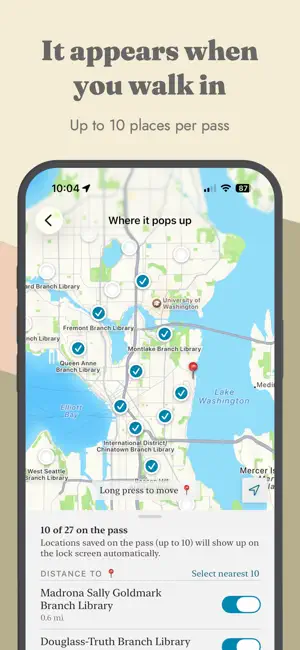
Wallet Libre turns a card you already carry into a pass in Apple Wallet. Photograph the barcode, check the number it read, and add it. That is the whole flow — everything after it is optional. WHY IT EXISTS Most library cards use Codabar, a barcode format Apple Wallet has no support for. Wallet Libre draws the bars itself, at the same width they are printed on the card, so the pass scans where the plastic did. QR, Code 128, PDF417 and Aztec are handled natively when your card carries one. Some formats cannot be rebuilt into a pass at all — EAN, UPC, Code 39, Code 93 and ITF among them — and the app tells you so when it reads one, rather than quietly shipping a barcode that will not scan. LET IT FILL IN THE REST Ask it to, and Wallet Libre reads the photo of your card and suggests a title, colors drawn from the card itself, and the issuer's logo. Nothing is applied without you seeing it first, and you can skip the whole step and type the details yourself. IT SHOWS UP WHERE YOU USE IT Give a pass locations and Apple Wallet offers it on your lock screen when you arrive — no app to open, nothing to search for. Wallet Libre finds the places for you: from a built-in directory of US public libraries that needs no network round trip, or from a map search anywhere else. You choose which ones stay. Apple Wallet carries up to ten per pass, and one tap picks the ten nearest you. MAKE IT LOOK LIKE YOUR CARD Choose the colors, or take them from the photo. Use a letter or an emoji where there is no logo to find. Add the fields printed on your own card — a member number, a join date, an expiry. PRIVACY There is no account and no sign-in, and there is nothing to create. Apple requires every pass to be signed with a registered developer certificate, and a certificate cannot ship inside an app. So the card's details go to the signing server, are signed, and are discarded before the response is sent. They are never stored and never logged. The optional fill is the only other thing that leaves your iPhone: when you ask for it, the photo of your card and the text read from it are sent to be interpreted, and are not kept afterwards. Tap the other button and nothing is ever sent anywhere.
What’s new
Version 2.1 · Updated October 15, 2026
• Share a photo of a card to Wallet Libre from Photos or another app, and it opens straight into adding that card. • Choosing a background photo for a pass now offers your photo album, Files, or a picture you've copied. • The text color you pick now applies to the card's name on poster-style passes too. • Finding a card's logo is more reliable when the issuer's website can't be reached. • Updated for iOS 27.
App privacy
The developer, Hsin-Yao Lin, reported these privacy practices to Apple.
Data Not Collected
The developer does not collect any data from this app.
Alternatives to Wallet Libre
Looking for apps like Wallet Libre? Here are 6 similar apps on the App Store. The highest rated is Search Filter Web Extension (5.0/5), and 5 of the 6 are free to download.
-
 Search Filter Web Extension
5.0
Search Filter Web Extension
5.0
-
 PickPics: Swipe Photo Cleaner
3.5
PickPics: Swipe Photo Cleaner
3.5
-
 SatChannels
3.8
SatChannels
3.8
-
 Cleaner: Clean Up iPhone
4.4
Cleaner: Clean Up iPhone
4.4
-
 Le Cat Walks
-
 Countdown: Day Counter Widget
5.0
Countdown: Day Counter Widget
5.0
| App | Rating | Price | Last updated | Compare |
|---|---|---|---|---|
| Wallet Libre | 5.0 / 5 (1 rating) | Free | October 15, 2026 | |
| Search Filter Web Extension | 5.0 / 5 (1) | 2.99 USD | Oct 1, 2026 | Compare |
| PickPics: Swipe Photo Cleaner | 3.5 / 5 (6) | Free | Oct 23, 2026 | Compare |
| SatChannels | 3.8 / 5 (12) | Free | Aug 18, 2026 | Compare |
| Cleaner: Clean Up iPhone | 4.4 / 5 (49) | Free | Nov 25, 2025 | Compare |
| Le Cat Walks | – | Free | Aug 30, 2026 | Compare |
| Countdown: Day Counter Widget | 5.0 / 5 (4) | Free | Nov 5, 2024 | Compare |
Compare Wallet Libre with the top alternatives: ratings, updates, ASO score and keyword gaps →