

Briven: Budget & Expenses
Jaehoon Lee Finance iPhoneiPadiPod touch
Briven: Budget & Expenses is a free Finance app for iPhone and iPad by Jaehoon Lee. Requires iOS 18.6. Updated October 17, 2026.
- Price
- Free
- on the App Store
- Size
- 6 MB
- Age 4+
- Updated
- Oct 17
- 2026 · v2.3.0
Screenshots


About Briven: Budget & Expenses
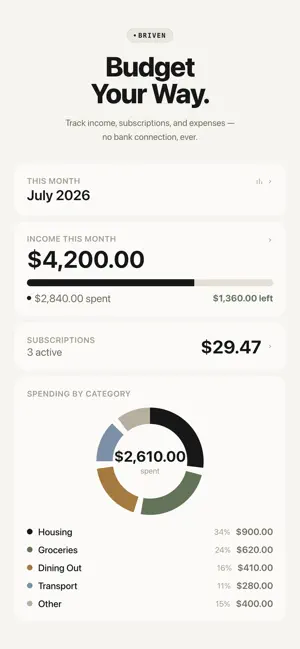
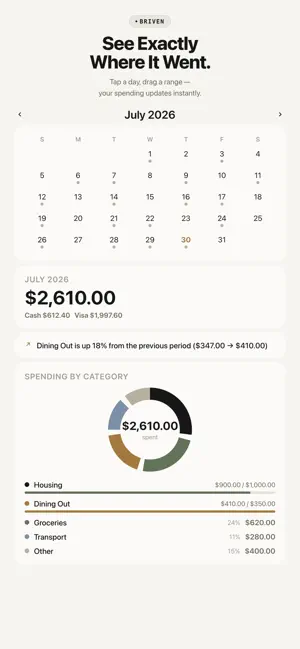
Briven is a manual budgeting app for people who want structure, not surveillance. There's no bank connection. No CSV or OFX import. No account to sign up for. You enter your income, subscriptions, and expenses yourself — and Briven turns that into a clear, honest picture of where your money goes every month. WHY MANUAL? Every "smart" finance app promises to auto-categorize your spending by reading your bank transactions. That convenience comes at a cost: your bank credentials and full transaction history now live on someone else's server. Briven skips that trade entirely. Nothing you enter ever leaves your device unless you choose to sync it — and even then, it only goes to your own private iCloud, never to us. WHAT YOU CAN DO • Track multiple income sources — a full-time job, freelance work, anything else — each with its own schedule (weekly, monthly, yearly, or irregular) and an optional payday reminder • Log every subscription with its billing date and get a reminder the day before it renews; when a price goes up, Briven keeps the old one, flags the increase, and shows what you pay per year • Record expenses in seconds, organized into categories and subcategories (or your own custom ones) — your recent categories are one tap away, and Briven suggests the one you used last time for the same note • Tag expenses by payment method — cash, or any card you add • See your month at a glance: income vs. spending, category breakdowns, and a calendar you can tap or drag to inspect any day or range — plus a weekly review of your last 7 days • Set a monthly budget per category, watch the progress bar fill, and get an alert the moment an expense takes you over PRIVATE BY DESIGN • No account, no login, no bank linking — ever • Your data lives on your device • Free iCloud sync keeps your own devices in sync with each other — never shared with anyone else • Optional Face ID / Touch ID app lock, processed entirely on-device FREE TO USE Unlimited expense logging, income tracking, subscription tracking (up to 3), categories, payment methods, iCloud sync, and monthly reports — all free, no ads. BRIVEN LIFETIME (OPTIONAL) A single one-time purchase — not a subscription, ever — unlocks: • Unlimited savings goals — log deposits, set a deadline, and see how much to save each month • Unlimited subscription tracking (free plan includes up to 3) • Week and year views in Reports, plus a 12-month spending trend chart • A full category-by-category comparison against the previous period • Export your expenses to CSV or PDF — for spreadsheets, your accountant, or your own records Briven doesn't guess what you spent money on from a bank feed. You tell it — and that's exactly the point.
What’s new
Version 2.3.0 · Updated October 17, 2026
Savings goals, upgraded. With Briven Lifetime, your savings goals now: • Track real progress — log each deposit and watch the bar fill up • Take an optional deadline, with how much to save each month to get there • Get their own color and icon New for everyone, free: • Add an expense right from the Dashboard • Your recent categories are one tap away when adding an expense • The weekly review now opens your last 7 days at a glance • Transactions show totals for the month and for each day Also includes accessibility improvements and minor fixes.
App privacy
The developer, Jaehoon Lee, reported these privacy practices to Apple.
Data Not Linked to You
The following data, which may be collected but is not linked to your identity, may be used for the following purposes:
- Identifiers: User ID
- Usage Data: Product Interaction
- Diagnostics: Crash Data
Used for: Analytics, App Functionality