

Grublist: Recipes & Meal Plan
Lhovon Ventures Corp. Food & Drink iPhoneiPadiPod touch
Grublist: Recipes & Meal Plan is a free Food & Drink app for iPhone and iPad by Lhovon Ventures Corp. Requires iOS 16.4. Updated October 20, 2026.
- Price
- Free
- on the App Store
- Size
- 79 MB
- Age 4+
- Updated
- Oct 20
- 2026 · v1.0.3
Screenshots


About Grublist: Recipes & Meal Plan
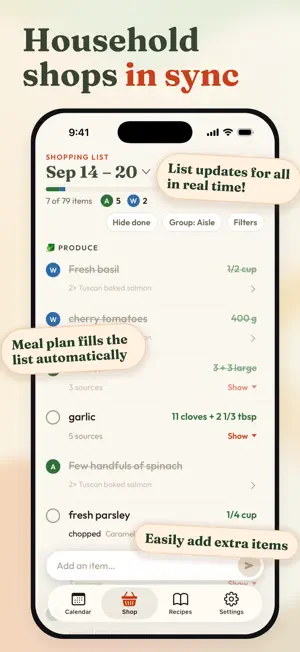
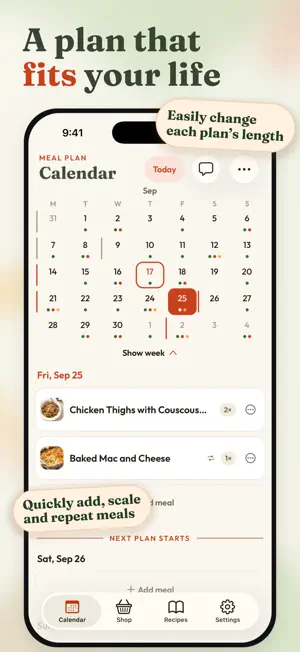
Built around your household, Grublist brings recipes, meal plans, and groceries into one shared place. Whether you cook for yourself, live with a partner or roommates, or feed a family, plan around the way your home works. SAVE RECIPES FROM ANYWHERE Share TikTok, Instagram, YouTube or Web recipes to Grublist to automatically import them. Grublist reads the caption and, when needed, the video, so you get the recipe even when it is only in the video. A video with several recipes becomes several recipes. The recipe imports in the background, so you can keep scrolling without interruption, and it waits in To review until you save it. You can also paste recipe links, import PDF files, or add your own recipe. Grublist parses the ingredients automatically and categorizes them, ready for your shopping list. Grublist embeds the ingredients in the steps, for convenient cooking. Recipes in other languages are automatically translated to English. KEEP YOUR COOKBOOK ORGANIZED Sort your recipes into folders, like weeknight dinners or breakfasts. Every recipe shows its servings and total time. Edit ingredients right in place, group them into sections, and drag them into order. COOK WITH THE AMOUNTS RIGHT IN THE STEPS With ingredient amounts right in the recipe steps, you can keep cooking without scrolling back up to the ingredient list. Scale recipes for one, a family dinner, or a bigger batch, even from Cook mode. The amounts in the ingredient list and steps adjust together. Tap a time in a step to start a timer. PLAN AROUND YOUR LIFE Grublist does not force you into set plans. Choose your own start date and the number of days you want to plan. Set dates for a one-off plan or use a repeating rhythm. Plan around shift work, a trip, or when you actually shop, and adjust the dates as life changes. Set your favorite meals to repeat on the days you choose, so regular dinners take less planning. Keep Friday pizza or a favorite breakfast on the calendar without adding it each time. ONE SYNCED LIST FOR THE HOUSEHOLD Grublist builds a grocery list from your meal plan. Everyone in your household sees the same list, updated live as items are added or checked off, with a much faster sync than Notes (milliseconds vs seconds!). No more double-bought milk or "did you get the eggs?" texts. Matching ingredients from separate recipes are merged into one total, with a line for each recipe that asks for it. Quickly add everyday extras. Grublist puts most new ingredients in the right aisle for you, and you can organize items by store and filter your list for each shopping stop. PLAN FROM YOUR COMPUTER TOO Use the full app at app.getgrublist.com to plan on a big screen, then take your grocery list and recipes with you on iPhone. The webapp is convenient for copy pasting recipes for import. Your household shares the same recipes, calendar, and list across devices. ONE SUBSCRIPTION FOR YOUR HOUSEHOLD A single subscription covers up to 6 people in your household, each with their own account. Invite the people you live with using a link or code. Grublist works just as well for a household of one. TRY IT FREE FOR 14 DAYS, NO CARD NEEDED Your household's free trial includes 20 imports from TikTok, Instagram, and YouTube. Imports from recipe websites and PDFs have no limit. After the trial, your household can still view its recipes, meal plans, and lists. To add and change things again, subscribe for less than a coffee per month! Subscriptions renew automatically unless cancelled at least 24 hours before the current period ends. Payment is charged to your Apple Account. Manage or cancel in Settings > Apple Account > Subscriptions. Terms of Use (EULA): https://www.apple.com/legal/internet-services/itunes/dev/stdeula/ Grublist Terms: https://getgrublist.com/terms Privacy: https://getgrublist.com/privacy
What’s new
Version 1.0.3 · Updated October 20, 2026
Lots of goodies: Recipes: • Recipe folders: put your recipes in folders, and set a recipe's folders from its page. • YouTube imports, and from videos with more than one recipe. • Imports from TikTok and Instagram now read the video itself. You get the recipe even when the caption does not have it. • Import recipes from Mealime links and from PDF files, for example recipes that you printed from Mealime. • New imports wait in "To review" on the Recipes page until you save them. A recipe that you type can wait there as a draft. • Edit ingredients in place, put them in sections, and drag them into a new order. • Recipes show their servings and total time. Imports keep them. • Change the batch size in Cook mode. Shopping list: • Each item shows its total for all your recipes, with a line for each recipe. • Each person's avatar shows how many items they checked. • "Select items" in the list menu lets you select many items at a time. • With Hide done on, checked items stay for a moment, then fold away. • New ingredients go into the correct aisle automatically. Calendar: • Add meals to a day with the new Add button. • Drag a meal to the edge of the screen to go to other days. • When you move a past meal to a new day, Grublist copies it, so your meal history stays. Look and feel: • Dark theme: select Light, Dark or System in Settings. • Liquid Glass buttons on iOS 26. • Tap the Shop or Recipes tab again to go back to the top. • Send us feedback from the button at the top of each page. • Bug fixes, more reliable imports.
App privacy
The developer, Lhovon Ventures Corp., reported these privacy practices to Apple.
Data Linked to You
The following data, which may be collected and linked to your identity, may be used for the following purposes:
- Purchases: Purchase History
- Identifiers: User ID, Device ID
- Contact Info: Email Address, Name
- User Content: Photos or Videos
Used for: Analytics, App Functionality
Data Not Linked to You
The following data, which may be collected but is not linked to your identity, may be used for the following purposes:
- Usage Data: Product Interaction
- Diagnostics: Crash Data, Performance Data, Other Diagnostic Data
Used for: Analytics
Alternatives to Grublist: Recipes & Meal Plan
Looking for apps like Grublist: Recipes & Meal Plan? Here are 6 similar apps on the App Store. The highest rated is Salus Fresh Foods Official (5.0/5), and all 6 are free to download.
-
 Stockpot: Recipe Manager
-
 illstyl3 Sammies
-
 Salus Fresh Foods Official
5.0
Salus Fresh Foods Official
5.0
-
 Tut's Egyptian Street Food
-
 Menu Maker - Food & Restaurant
5.0
Menu Maker - Food & Restaurant
5.0
-
 Brasa Peruvian Kitchen Canada
5.0
Brasa Peruvian Kitchen Canada
5.0
| App | Rating | Price | Last updated | Compare |
|---|---|---|---|---|
| Grublist: Recipes & Meal Plan | – | Free | October 20, 2026 | |
| Stockpot: Recipe Manager | – | Free | May 5, 2026 | Compare |
| illstyl3 Sammies | – | Free | Sep 8, 2026 | Compare |
| Salus Fresh Foods Official | 5.0 / 5 (1) | Free | May 27, 2026 | Compare |
| Tut's Egyptian Street Food | – | Free | Oct 17, 2026 | Compare |
| Menu Maker - Food & Restaurant | 5.0 / 5 (19) | Free | Oct 21, 2026 | Compare |
| Brasa Peruvian Kitchen Canada | 5.0 / 5 (1) | Free | Sep 28, 2026 | Compare |