

Tavi: AI Chat Reply Assistant
Muhammet Melik Ozbay Lifestyle iPhoneiPadiPod touch
Tavi: AI Chat Reply Assistant is a free Lifestyle app for iPhone and iPad by Muhammet Melik Ozbay. Requires iOS 15.0. Updated August 17, 2026.
- Price
- Free
- on the App Store
- Size
- 67 MB
- Age 12+
- Updated
- Aug 17
- 2026 · v1.0
Screenshots


About Tavi: AI Chat Reply Assistant
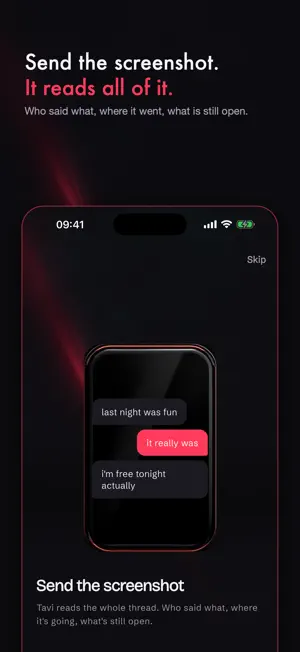
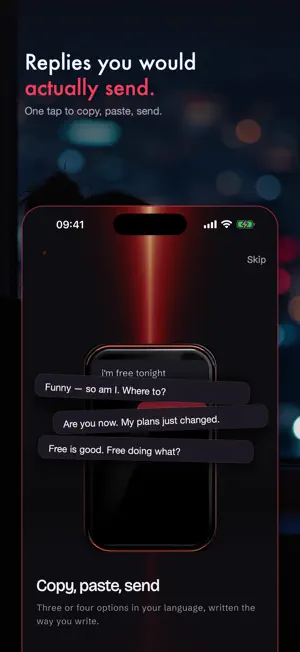
You've typed and deleted the same message four times. Tavi is for that moment. Screenshot the conversation, pick a tone, and get three or four replies you'd actually send — then copy one in a tap. HOW IT WORKS 1. Screenshot a chat, or a profile bio 2. Pick a tone — Funny, Flirty, Bold, Calm or Formal 3. Tap to copy, paste, send IT READS THE WHOLE THREAD Not just the last line. Tavi follows who said what, where the conversation went, and what is actually being asked of you — so the reply fits the conversation instead of floating above it. FIVE TONES, ONE SCREENSHOT Switch tone and get a new set without uploading again. Funny for the group chat, Calm for the difficult one, Formal for the work follow-up you keep postponing. NOT ONLY FOR DATING A friend you left on read three days ago. An awkward family message. A work reply you have already rewritten twice. Formal is a tone for a reason. IT LEARNS HOW YOU WRITE Tavi notices the words and the humour you keep choosing and leans the suggestions your way — so they stop sounding like a chatbot and start sounding like you. WRITTEN IN YOUR LANGUAGE Replies are written in your language, not translated into it. Translated flirting reads wrong, and everyone can tell. PRIVACY YOU CAN CHECK · No sign-up. No name, no email, no phone number. · Your screenshot is sent only after you say yes, and it is never stored. · Nothing that identifies you is attached to it. · Withdraw consent, or delete everything, in one tap in Settings. TAVI PREMIUM A few analyses are free. Premium unlocks unlimited replies. · Weekly, monthly or annual · 3-day free trial on the annual plan · Cancel anytime in your Apple ID settings Payment is charged to your Apple ID at confirmation of purchase. Subscriptions renew automatically unless cancelled at least 24 hours before the end of the current period. Manage your subscription in Settings after purchase. Terms of Use: https://oztechapps.net/tavi/terms.html Privacy Policy: https://oztechapps.net/tavi/privacy.html
App privacy
The developer, Muhammet Melik Ozbay, reported these privacy practices to Apple.
Data Not Linked to You
The following data, which may be collected but is not linked to your identity, may be used for the following purposes:
- Purchases: Purchase History
- User Content: Photos or Videos, Other User Content
- Identifiers: User ID
Used for: App Functionality
Alternatives to Tavi: AI Chat Reply Assistant
Looking for apps like Tavi: AI Chat Reply Assistant? Here are 6 similar apps on the App Store.
-
 PetPal Studio
-
 RizzCraft: Texting Assistant
-
 Linvo: Rizz, Openers & Reply
-
 Replyora: AI Reply Assistant
-
 DateWise: AI Rizz & Wingman
-
 AI Dating Reply Assistant
| App | Rating | Price | Last updated | Compare |
|---|---|---|---|---|
| Tavi: AI Chat Reply Assistant | – | Free | August 17, 2026 | |
| PetPal Studio | – | Free | Sep 5, 2026 | Compare |
| RizzCraft: Texting Assistant | – | Free | Mar 10, 2026 | Compare |
| Linvo: Rizz, Openers & Reply | – | Free | Aug 14, 2026 | Compare |
| Replyora: AI Reply Assistant | – | Free | Oct 20, 2026 | Compare |
| DateWise: AI Rizz & Wingman | – | Free | Jun 29, 2026 | Compare |
| AI Dating Reply Assistant | – | Free | Jul 14, 2026 | Compare |