

Netgleam • Network Check
OmarKnows LLC Utilities iPhoneiPadiPod touch
Netgleam • Network Check is a paid Utilities app for iPhone and iPad by OmarKnows LLC. Rated 5.0/5 from 2 ratings. Requires iOS 26.0.
- Rating
- 5.0
- 2 ratings
- Price
- 0.99 USD
- on the App Store
- Size
- 9 MB
- Age 4+
- Updated
- Oct 19
- 2026 · v1.0.3
Screenshots


About Netgleam • Network Check
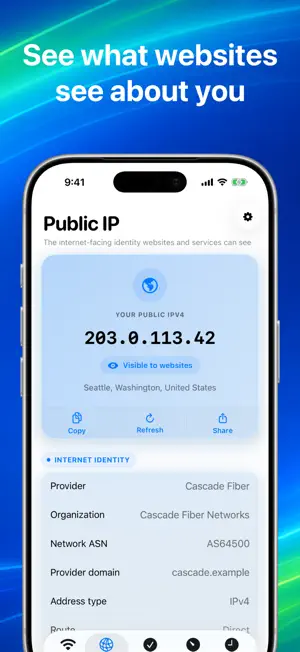
Netgleam gives you a clear answer when your connection feels wrong. Built for iOS 26 from the ground up, Netgleam brings Apple's latest Network and Wireless Insights APIs into one diagnostic toolkit. See live link quality and Wi-Fi security, inspect every cellular service iOS reports, receive on-device cellular service predictions, measure each stage of a secure connection, and test real-world speed against Cloudflare's global edge network. NO ADS. NO TRACKING. Open the app to see whether you are online, which interface is active, the internet's response time, and the network details iOS makes available. Run Diagnostics for a plain-language explanation, or use the adaptive speed test to measure real-world performance. CONNECTION STATUS • See Wi-Fi, cellular, VPN, and offline states at a glance • Check link quality, Wi-Fi security, BSSID, gateway, IPv4 and IPv6 support, and data mode • View local and public IP details • See the public address, provider, organization, ASN, provider domain, and approximate network location visible to websites • Understand whether traffic is using a direct route or a VPN exit CELLULAR • See a separate card for every cellular service reported by iOS • Check each line's radio technology and registration state • See Apple's on-device outlook for anticipated cellular service changes on supported devices, carriers, and regions • Add familiar line and carrier labels that stay on your device • See route-level carrier details when the current public IP is using cellular without a VPN DIAGNOSTICS • Check the active link, local address, and gateway • Verify DNS, IPv4, IPv6, TLS, and wider internet access • Measure DNS lookup, connection, TLS, first-byte, and transfer timing • Detect captive portals and VPN routing • Get useful next steps instead of a wall of technical output CONNECTION TIMELINE • Record Wi-Fi and cellular handoffs • Notice public-IP changes, link-quality drops, and latency spikes • Keep the timeline private on your device SPEED TEST • Measure download and upload throughput against Cloudflare's global edge network • Follow live phase progress, throughput, data moved, elapsed time, and adaptive sample size • Compare idle and loaded latency • Track jitter and save each result • Share a polished visual result card when you need help PRIVATE BY DESIGN Netgleam has no account, ads, or tracking SDKs. Diagnostic, speed-test, and connection history stays on your device. Location permission is optional. Netgleam uses it when you ask iOS to reveal the current Wi-Fi network name. iOS does not provide third-party apps with custom cellular labels, phone numbers, SIM type, signal strength, or a dependable carrier identity. Netgleam shows the live information iOS provides and lets you add labels that stay on your device. Speed tests transfer data and can use several hundred megabytes on a fast connection. Requires iOS 26. Questions or feedback? Email [email protected].
What’s new
Version 1.0.3 · Updated October 19, 2026
Netgleam is ready for iPhone Duo. Unfold your phone for spacious two-column dashboards, side navigation, and a History view that keeps your results beside the selected report. Your place stays the same when you fold or unfold. Ping on the Status screen now uses live latency measurements, with Cloudflare or your own host. This update also improves captive-portal detection and scrolling.
App privacy
The developer, OmarKnows LLC, reported these privacy practices to Apple.
Data Not Linked to You
The following data, which may be collected but is not linked to your identity, may be used for the following purposes:
- Diagnostics: Performance Data, Other Diagnostic Data
- Location: Coarse Location
Used for: Analytics, App Functionality
Alternatives to Netgleam • Network Check
Looking for apps like Netgleam • Network Check? Here are 6 similar apps on the App Store. The highest rated is Mantle—Home maintenance (5.0/5), and 5 of the 6 are free to download.
-
 Lock Status: Laptop & Desktop
-
 Tools for HomeKit
-
 SignalScout Cell Tower Locator
-
 Mantle—Home maintenance
5.0
Mantle—Home maintenance
5.0
-
 Nawmi
Nawmi
-
 Kasetti: Retro Voice Recorder
| App | Rating | Price | Last updated | Compare |
|---|---|---|---|---|
| Netgleam • Network Check | 5.0 / 5 (2 ratings) | 0.99 USD | October 19, 2026 | |
| Lock Status: Laptop & Desktop | – | Free | Sep 19, 2026 | Compare |
| Tools for HomeKit | – | 2.99 USD | Oct 15, 2026 | Compare |
| SignalScout Cell Tower Locator | – | Free | Aug 5, 2026 | Compare |
| Mantle—Home maintenance | 5.0 / 5 (5) | Free | Sep 13, 2026 | Compare |
| Nawmi | – | Free | May 15, 2026 | Compare |
| Kasetti: Retro Voice Recorder | – | Free | May 27, 2026 | Compare |