

EVA Clock Nixie
Futoshi Ebata Utilities iPhoneiPadiPod touchMac
EVA Clock Nixie is a free Utilities app for iPhone and iPad by Futoshi Ebata. Requires iOS 17.0. Updated October 5, 2026.
- Price
- Free
- on the App Store
- Size
- 5 MB
- Age 4+
- Updated
- Oct 5
- 2026 · v1.1.2
Screenshots
About EVA Clock Nixie
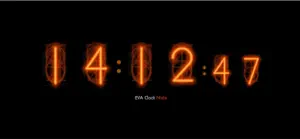
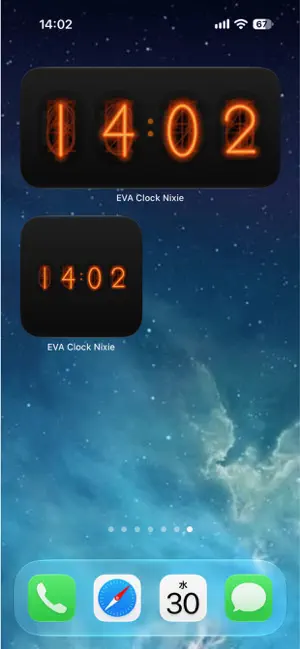
A nixie tube clock for your iPhone or iPad. The glowing orange digits are not photographs. Every bend of every numeral, and every wire stacked behind it, is drawn from scratch. Each digit is built as a single bent wire, and three layers - bloom, midtone, and glowing core - stack up to make that particular orange light. The digits that are not lit are still there, as a faint stack of ten numeral-shaped cathodes behind the glowing one. As the time changes, lit and unlit tubes quietly trade places. Turn the device sideways and the tubes fill the screen. It is meant to sit on your nightstand or desk as the clock itself. WHAT IT DOES - Home Screen widgets showing hours and minutes, in a small square or a wide rectangle - they work in StandBy too - Switch between 12-hour and 24-hour display - Hourly chime, with a three-second countdown tone and adjustable volume (it respects the silent switch) - Keep the screen awake while the clock is showing - Dim the display for night use - Protect OLED displays by shifting the clock a few points every few minutes ABOUT THE WIDGET It sits on your Home Screen or in StandBy. It shows hours and minutes; seconds do not move. iOS decides when widgets refresh, so the displayed time may lag slightly behind. Lock Screen widgets are not supported - the Lock Screen renders widgets without color, and nixie tubes do not survive that. USING IT Tap the screen to open the settings. There are no other buttons - you get the clock and nothing else. PRIVACY This app collects nothing. No analytics, no crash reporting, no advertising. It performs no network communication at all. Your settings are stored only on your device. REQUIREMENTS iOS 17.0 or later / iPadOS 17.0 or later Also available for Mac under the same name.
What’s new
Version 1.1.2 · Updated October 5, 2026
Fixed the widget keeping the old time after a time zone change. After you changed the time zone in Settings, the Home Screen widget could keep showing the time in the previous time zone. Opening the app now updates the widget to the new time zone. If you don't open the app, the widget still corrects itself on its next automatic update. As always, this app collects nothing.
App privacy
The developer, Futoshi Ebata, reported these privacy practices to Apple.
Data Not Collected
The developer does not collect any data from this app.
Alternatives to EVA Clock Nixie
Looking for apps like EVA Clock Nixie? Here are 6 similar apps on the App Store. The highest rated is 30minTimer: Hourly Chime (3.0/5), and 5 of the 6 are free to download.
-
 Horalume
-
 Simple Clock JP
-
 30minTimer: Hourly Chime
3.0
30minTimer: Hourly Chime
3.0
-
 IP Calc(ipv4/ipv6)
-
 猫耳ビューアー
-
 Contrigraph: Habit Tracker
| App | Rating | Price | Last updated | Compare |
|---|---|---|---|---|
| EVA Clock Nixie | – | Free | October 5, 2026 | |
| Horalume | – | Free | Aug 20, 2026 | Compare |
| Simple Clock JP | – | Free | Sep 26, 2026 | Compare |
| 30minTimer: Hourly Chime | 3.0 / 5 (1) | Free | Sep 28, 2026 | Compare |
| IP Calc(ipv4/ipv6) | – | 0.49 USD | Apr 25, 2026 | Compare |
| 猫耳ビューアー | – | Free | Aug 22, 2026 | Compare |
| Contrigraph: Habit Tracker | – | Free | Oct 13, 2026 | Compare |
Compare EVA Clock Nixie with the top alternatives: ratings, updates, ASO score and keyword gaps →