

Auto Study Planner
Ryota Yoshimatsu Education iPhoneiPadiPod touch
Auto Study Planner is a free Education app for iPhone and iPad by Ryota Yoshimatsu. Requires iOS 15.0. Updated October 7, 2026.
- Price
- Free
- on the App Store
- Size
- 35 MB
- Age 4+
- Updated
- Oct 7
- 2026 · v1.0.3
Screenshots


About Auto Study Planner
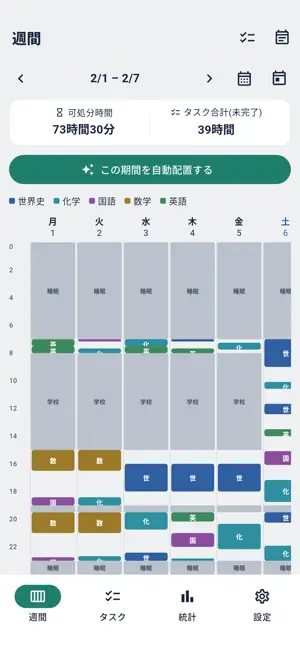
Stop spending your study time planning your study time. Add your fixed commitments - classes, club activities, cram school, part-time shifts - and the tasks you want to get done. The app works out the time you have left and places your study tasks into the gaps. WHO IT IS FOR - You lose time to planning every single week - Your plans fall apart after three days - You find it hard to work backwards from a deadline - Short gaps between commitments go to waste WHAT IT DOES Build a timetable just by adding your schedule Add recurring commitments once and reuse them every week. Whatever is left over is counted automatically as time you can study in. Place tasks automatically Add a task like "Vocabulary, 30 min" or "Maths problems, 2 hours" and the app fits it into your free slots. Long tasks are split up, with breaks in between. Work backwards from deadlines Tasks with deadlines are placed in order of urgency. If something will not fit before its deadline, you find out while there is still time to act. Avoid overloading yourself Your available time and your total task time are shown side by side, with a warning when you have taken on more than fits. See the whole week at a glance Your commitments and study tasks laid out as a timetable. Drag anything to adjust it by hand. Get told what you did not finish An end-of-day notification lists the tasks you did not complete, so they can be rescheduled. Track your study (Premium) Charts for study time over time, a breakdown by subject, and your current streak. PRICING Everything central to the app is free. Premium removes ads and unlocks study statistics and longer automatic scheduling. - Premium (Monthly) - Premium (Yearly) Subscriptions renew automatically. Unless cancelled at least 24 hours before the end of the current period, they renew for the same period at the same price. You can cancel any time from your App Store account settings. YOUR DATA Your schedule, tasks and records are stored only on your device. No account is required. Terms of Use: https://www.apple.com/legal/internet-services/itunes/dev/stdeula/ Privacy Policy: https://tanupi0821.github.io/katteni-gakushu/privacy-policy.html
What’s new
Version 1.0.3 · Updated October 7, 2026
You can now start with sample subjects, tasks and a sample schedule already filled in, so you can see the auto-scheduling work right away instead of facing an empty app. - Added "Start with a sample" to the first-run screen - The walkthrough now opens on the right screen - Notification permission is requested when it is actually needed
App privacy
The developer, Ryota Yoshimatsu, reported these privacy practices to Apple.
Data Used to Track You
The following data may be used to track you across apps and websites owned by other companies:
- Identifiers: Device ID
- Usage Data: Advertising Data
Data Not Linked to You
The following data, which may be collected but is not linked to your identity, may be used for the following purposes:
- Identifiers: Device ID
- Usage Data: Advertising Data, Product Interaction
- Purchases: Purchase History
- Diagnostics: Crash Data, Performance Data
Used for: Third-Party Advertising, Analytics, App Functionality
Alternatives to Auto Study Planner
Looking for apps like Auto Study Planner? Here are 6 similar apps on the App Store.



| App | Rating | Price | Last updated | Compare |
|---|---|---|---|---|
| Auto Study Planner | – | Free | October 7, 2026 | |
| PIECE - 学習手帳 - | – | Free | Sep 28, 2026 | Compare |
| Stuudy | – | Free | Jun 29, 2026 | Compare |
| 自動で勉強スケジュールを作成 べんすけ2 | – | Free | May 29, 2026 | Compare |
| 自習室カフェ | – | Free | Aug 4, 2026 | Compare |
| 高校1年生毎日のミニテスト | – | Free | Sep 1, 2026 | Compare |
| 勉強カレンダー、簡単登録!進捗が分かる、やる気継続 | – | Free | Oct 19, 2026 | Compare |
Compare Auto Study Planner with the top alternatives: ratings, updates, ASO score and keyword gaps →