

Visual Schedule: PictoCue
Smart Automation SRL Education iPhoneiPadiPod touch
Visual Schedule: PictoCue is a free Education app for iPhone and iPad by Smart Automation SRL. Requires iOS 17.0. Updated September 29, 2026.
- Price
- Free
- on the App Store
- Size
- 7 MB
- Age 4+
- Updated
- Sep 29
- 2026 · v1.4
Screenshots



About Visual Schedule: PictoCue
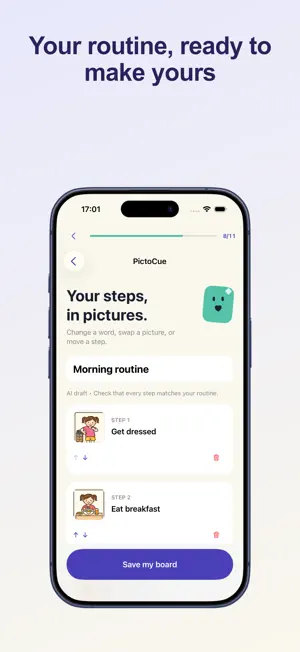
Turn one sentence into picture steps you can review and change. A child like yours? Would you like your board pictures to show a child with similar features? No photo needed. Optional. Choose only details you want shown. PictoCue helps families, caregivers, teachers, and neurodivergent people create clear visual boards. Enter a short routine, choose friendly illustrations, simple pictograms, or realistic pictures, and PictoCue creates an editable draft after you choose to share it for AI processing. Change every word, picture, and step before saving, or build the complete board yourself without AI. Main features: - Optional sentence-to-board suggestions with three picture styles and explicit sharing consent - Editable words, built-in pictures, order, and one-step mode - Photo cards with your own pictures and short labels - First/then boards, flexible routines, choice boards, and calm cards - Quiet full-screen Use Mode with optional on-device voice labels - PDF, print, Share Sheet, AirDrop, and portable backup - Local storage and no account required For the optional AI feature, the sentence you enter, selected language, selected picture style, and generated step labels are sent through the secure gateway to Replicate and OpenAI or Google after you confirm. Photos, existing boards, and profile names are not sent. The manual board builder remains available. PictoCue is an organizational aid. It does not provide medical advice, diagnosis, or treatment. Terms of use: https://smartaitomation.com/termspictocueapp.html
What’s new
Version 1.4 · Updated September 29, 2026
Improved review request timing and made it easier to send feedback.
App privacy
The developer, Smart Automation SRL, reported these privacy practices to Apple.
Data Linked to You
The following data, which may be collected and linked to your identity, may be used for the following purposes:
- Location: Coarse Location
- User Content: Other User Content
- Diagnostics: Other Diagnostic Data
- Other Data: Other Data Types
Used for: Analytics, App Functionality
Data Not Linked to You
The following data, which may be collected but is not linked to your identity, may be used for the following purposes:
- Purchases: Purchase History
- Identifiers: Device ID
- Usage Data: Product Interaction
Used for: Analytics
Alternatives to Visual Schedule: PictoCue
Looking for apps like Visual Schedule: PictoCue? Here are 6 similar apps on the App Store. The highest rated is Step & Star (5.0/5), and all 6 are free to download.
-
 Visual Schedule: Daily Planner
-
 Token Board: Reward Chart
-
 BrightPath: IEP Organizer
-
 OFM Firefighter I Exam Prep
-
 Step & Star
5.0
Step & Star
5.0
-
 A2Z Speech Therapy
| App | Rating | Price | Last updated | Compare |
|---|---|---|---|---|
| Visual Schedule: PictoCue | – | Free | September 29, 2026 | |
| Visual Schedule: Daily Planner | – | Free | Aug 21, 2026 | Compare |
| Token Board: Reward Chart | – | Free | Aug 20, 2026 | Compare |
| BrightPath: IEP Organizer | – | Free | Aug 4, 2026 | Compare |
| OFM Firefighter I Exam Prep | – | Free | Aug 5, 2026 | Compare |
| Step & Star | 5.0 / 5 (1) | Free | Aug 8, 2026 | Compare |
| A2Z Speech Therapy | – | Free | Mar 18, 2026 | Compare |