

ClassPort: Schedule & AI Quiz
SAYEDUL ISLAM Productivity iPhoneiPadiPod touch
ClassPort: Schedule & AI Quiz is a free Productivity app for iPhone and iPad by SAYEDUL ISLAM. Rated 5.0/5 from 2 ratings. Requires iOS 17.0.
- Rating
- 5.0
- 2 ratings
- Price
- Free
- on the App Store
- Size
- 5 MB
- Age 12+
- Updated
- Aug 11
- 2026 · v1.1.0
Screenshots



About ClassPort: Schedule & AI Quiz
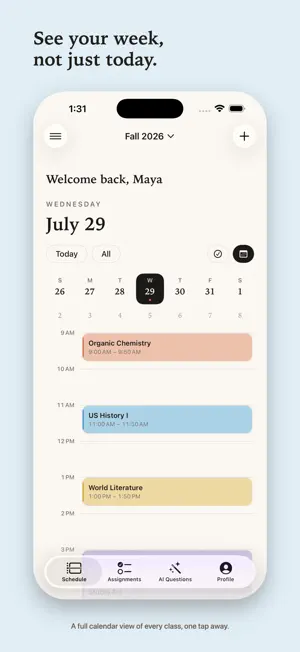
Your classes, assignments, and grades. One calm place. ClassPort always knows where you're supposed to be. Open it and today is right there: every class, its building, floor, and room, all at a glance. TODAY AT A GLANCE • See your day as a simple timeline, or switch to the calendar to see your whole week • Classes that overlap sit side by side, so nothing gets hidden ASSIGNMENTS THAT ADD UP • Track what's due and how much it's worth • Enter your grades as they come in, and ClassPort keeps a running grade for every class automatically • No spreadsheet, no math ATTENDANCE, ONE TAP • Mark yourself present, absent, or note that class didn't meet, all with a single tap • Watch your attendance rate for each class build over the semester SEE YOUR SEMESTER • Grade trends, category breakdowns, on-time rates, and attendance, all in one place • A clear, honest picture of exactly how your semester is going REMINDERS THAT RESPECT YOU • A heads-up before big assignments are due • A nudge the morning of class • A gentle catch-up if something slips through the cracks • No spam, just the right reminder at the right time WALLET, WIDGETS & MORE • Add a ClassPort card to Apple Wallet and your next class is always one swipe away, even when the app is closed if you turn on auto-updates • Add widgets to your Home Screen or Lock Screen for your next class and what's due • Export your whole schedule to Apple Calendar in one tap AI QUESTIONS • Turn your own notes, slides, or a photo of your textbook into a real practice quiz in seconds • Multiple choice and short answer, with a full explanation for every question • Free to try, and unlocked further with ClassPort Plus PRIVATE BY DESIGN • No account. No ads. No tracking. Your planner data stays on your phone • Only two features ever leave your device: Wallet auto-updates and AI Questions • Both are optional and off until you turn them on • Full details are in the Privacy Policy Terms of Use: https://sayedu.github.io/ClassPort-website/terms.html
What’s new
Version 1.1.0 · Updated August 11, 2026
New: get a reminder right before your next class starts, with the room and building. Reminders are simpler now, just one clear setting for how far ahead to notify you. Fixed: setting up your class schedule now walks you through creating your semester properly. Fixed: tapping your semester now lets you edit it. Fixed: grade weights can no longer accidentally add up to more than 100%. Small visual fixes on smaller iPhones.
App privacy
The developer, SAYEDUL ISLAM, reported these privacy practices to Apple.
Data Not Linked to You
The following data, which may be collected but is not linked to your identity, may be used for the following purposes:
- Purchases: Purchase History
- User Content: Photos or Videos, Other User Content
- Identifiers: User ID
Used for: App Functionality
Alternatives to ClassPort: Schedule & AI Quiz
Looking for apps like ClassPort: Schedule & AI Quiz? Here are 6 similar apps on the App Store. The highest rated is TopicFlow: AI Notes (5.0/5), and all 6 are free to download.
-
 RemindMeWhy - Because You Care
-
 WorkNest AI
-
 DeadlineNest: Class Planner
-
 TopicFlow: AI Notes
5.0
TopicFlow: AI Notes
5.0
-
 Pandimo Planner
-
 Crit: AI Design Advisor
5.0
Crit: AI Design Advisor
5.0
| App | Rating | Price | Last updated | Compare |
|---|---|---|---|---|
| ClassPort: Schedule & AI Quiz | 5.0 / 5 (2 ratings) | Free | August 11, 2026 | |
| RemindMeWhy - Because You Care | – | Free | Mar 9, 2026 | Compare |
| WorkNest AI | – | Free | Sep 14, 2026 | Compare |
| DeadlineNest: Class Planner | – | Free | Jul 24, 2026 | Compare |
| TopicFlow: AI Notes | 5.0 / 5 (1) | Free | Jun 29, 2026 | Compare |
| Pandimo Planner | – | Free | Jan 6, 2026 | Compare |
| Crit: AI Design Advisor | 5.0 / 5 (3) | Free | Sep 22, 2026 | Compare |