

Inkword: Vocabulary Flashcards
Huu Phuc Nguyen Education iPhoneiPadiPod touch
Inkword: Vocabulary Flashcards is a free Education app for iPhone and iPad by Huu Phuc Nguyen. Requires iOS 15.6. Updated October 12, 2026.
- Price
- Free
- on the App Store
- Size
- 32 MB
- Age 4+
- Updated
- Oct 12
- 2026 · v1.2.1
Screenshots


About Inkword: Vocabulary Flashcards
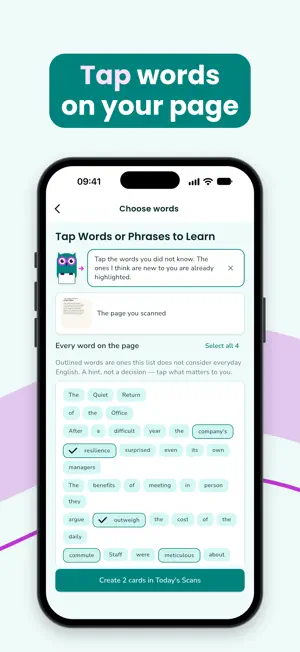
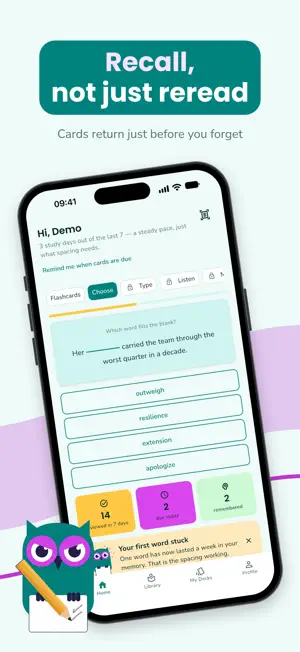
Inkword turns the English you already read into flashcards you actually remember. Photograph a page — an article, an email, a book — tap the words and phrases you did not know, and Inkword writes each one a card: what it means in your language, the sentence you met it in, and how it is used. WHY IT IS BUILT THIS WAY Two things decide whether a word sticks, and both are structural rather than decorative. • Retrieval, not rereading. Every review shows the sentence with the word taken out, and you bring the word back: pick it, type it, or recall it on your own. Rereading a list feels productive and is not: in a 2006 study by Roediger and Karpicke, recall practice left 61% remembered after a week against 40% for rereading — and the gap only opens at a delay. • Spacing. Cards come back at widening intervals — one day, three, a week, three weeks — because the same study time spread across sessions is worth two to three times more (Cepeda et al., 2006, a review of 317 experiments). Most days there is nothing due. That is the method working, not the app being empty. FOUR WAYS TO STUDY • Flashcards — recall the missing word, then check • Choose — pick the word that fills the blank • Type — write the word from memory; one slip still counts • Listen — hear the word and pick it • Mix — new words start easy, and get harder as they stick WHAT IT DOES • Scan any printed or on-screen English text with the camera or from your photos • Choose exactly which words and phrases become cards — nothing is decided for you • Meanings explained in your own language, in the sentence you actually met • Tap to hear any word spoken aloud — works even with your phone on silent • Reviews scheduled for you; one reminder, only when something is due • See your progress: words remembered, every deck, and a calendar of the days you studied — no streaks to break • Your cards sync to your account on every device and keep working offline WORD SETS IN THE LIBRARY Ready-made decks, explained in your language, every deck marked Basic, Intermediate or Advanced. The first deck of each set is free; one purchase unlocks the rest for good, and Pro includes them all. • Essential Words — the 1,800 words that come right after the basics, in 18 decks • Words for TOEIC® — about 2,400 words of the test and of working English, in 61 decks by the settings the test uses: offices, finance, travel, dining and more • Exam Topic Words — about 2,000 words of the themes IELTS-style essays and reading return to, in 50 decks by topic; our own list, not an official list of any exam • B1 Words and B2 Words — the CEFR-J lists for levels B1 and B2 (about 2,350 and 2,700 words), in 62 and 70 decks by the topics of the Cambridge B1 Preliminary exam • Academic Words — 957 words of lectures, papers and textbooks, in 23 decks by field FREE AND PRO Free: unlimited scanning and reviewing, up to 100 scanned cards, Flashcards and Choose, the first deck of each Library set, progress and sync. Pro: no cap on cards, Type, Listen and Mix, and every Library deck (Words for TOEIC®, Exam Topic Words, B1 Words, B2 Words, Academic Words, Essential Words) — $3.99/month or $23.99/year, with a 7-day free trial for new subscribers. Each word set can also be bought once, without Pro, and its cards never count toward the cap. Camera and photo access are used only to read text you choose to scan. Notifications are optional, and Inkword asks after you have made your first cards — never at launch. Terms of Use: https://www.apple.com/legal/internet-services/itunes/dev/stdeula/ TOEIC and TOEFL are registered trademarks of ETS. IELTS is a registered trade mark of the IELTS Partners (British Council, IDP IELTS and Cambridge University Press & Assessment). B1 Preliminary, B2 First and Cambridge English are trademarks of Cambridge University Press & Assessment. This app and its word lists are not affiliated with, endorsed or approved by any of them; the Exam Topic Words list is our own.
What’s new
Version 1.2.1 · Updated October 12, 2026
Inkword now speaks Vietnamese. • The whole app in Vietnamese. It follows your iPhone's language; change it any time in Settings → App language. • Restore purchases now brings your word sets to the Inkword account you are signed in to, even if you bought them while signed in to another one.
App privacy
The developer, Huu Phuc Nguyen, reported these privacy practices to Apple.
Data Not Collected
The developer does not collect any data from this app.
Alternatives to Inkword: Vocabulary Flashcards
Looking for apps like Inkword: Vocabulary Flashcards? Here are 6 similar apps on the App Store. The highest rated is Vocago: English Vocabulary AI (5.0/5), and all 6 are free to download.
-
 ScorePlus - IELTS Reading
-
 Lexidotori: English Vocab OCR
-
 Loop Note: Listening Practice
-
 Vocago: English Vocabulary AI
5.0
-
 English Grammar - AI Powered
-
 Wordwise: Personal Dictionary
5.0
| App | Rating | Price | Last updated | Compare |
|---|---|---|---|---|
| Inkword: Vocabulary Flashcards | – | Free | October 12, 2026 | |
| ScorePlus - IELTS Reading | – | Free | Apr 26, 2026 | Compare |
| Lexidotori: English Vocab OCR | – | Free | Oct 12, 2026 | Compare |
| Loop Note: Listening Practice | – | Free | Oct 7, 2026 | Compare |
| Vocago: English Vocabulary AI | 5.0 / 5 (1) | Free | Aug 18, 2026 | Compare |
| English Grammar - AI Powered | – | Free | Jun 12, 2025 | Compare |
| Wordwise: Personal Dictionary | 5.0 / 5 (2) | Free | Feb 22, 2026 | Compare |