

Surface Camera
Carlos Tarrats Photo & Video iPhoneiPadiPod touch
Surface Camera is a free Photo & Video app for iPhone and iPad by Carlos Tarrats. Rated 5.0/5 from 1 ratings. Requires iOS 18.0. Updated October 7, 2026.
- Rating
- 5.0
- 1 ratings
- Price
- Free
- on the App Store
- Size
- 80 MB
- Age 4+
- Updated
- Oct 7
- 2026 · v1.0.4
Screenshots


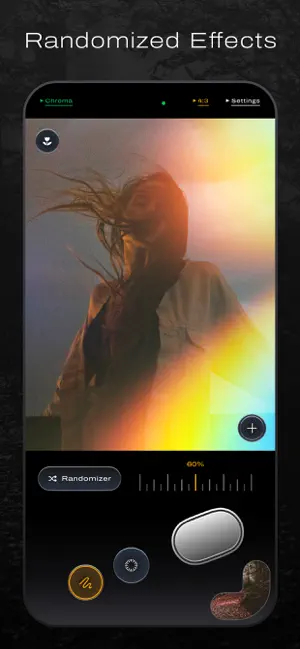

About Surface Camera
A film camera for iPhone. Choose your film. Compose the frame. Make the photograph. Surface brings eight distinct film profiles to your iPhone, with the look visible in the viewfinder before you shoot. Add blur or light leaks, take control of focus and exposure, and save directly to Apple Photos. FIND YOUR FILM Four black-and-white profiles: Selenium 400, Bromide 125, Metol 125, and Palladium 3200. Four color profiles: Chroma 100, Tonal 400, Radian 400, and Prism 100. Your chosen profile becomes part of the photograph at capture. Editing refines that photograph while keeping its film. SHAPE THE FRAME Position blur and adjust its strength. Add a light leak, then randomize it to explore a different color and pattern. Tap to focus, adjust exposure, and use focus peaking. Flash, a timer, and slow shutter are close at hand. EDIT IN SURFACE Adjust Exposure, Contrast, Blacks, Whites, Saturation, Warmth, Tint, Grain, Halation, and Vignette. Crop and straighten, undo and redo, and save your edits back to Photos. ONE PHOTO LIBRARY Captures and edits live in Apple Photos. Browse your Surface photographs, import photos for editing, share favorites, and manage your collection without maintaining a second library. CAPTURE YOUR WAY Choose HEIC, JPEG, or Apple ProRAW on supported iPhones. Capture at 12, 24, or 48 MP depending on your hardware and settings. ProRAW supports 12 or 48 MP. Open the viewfinder from Siri, Shortcuts, the Lock Screen, or Control Center. MADE FOR YOUR IPHONE Film rendering and editing happen on your device. No Surface account, ads, or tracking. Apple services handle purchases, optional iCloud Photos sync, and location-name lookup. Available in English, French, German, Spanish, Italian, Japanese, Simplified Chinese, and Korean. Requires iOS 18 or later. Camera features vary by iPhone model. MEMBERSHIP Choose a monthly or yearly auto-renewing subscription, or a one-time lifetime purchase. Purchases are handled by Apple. Subscriptions renew unless canceled through your Apple Account settings. Local prices are shown before purchase. Privacy Policy: https://surfacecamera.app/privacy/ Terms of Use (EULA): https://www.apple.com/legal/internet-services/itunes/dev/stdeula/
What’s new
Version 1.0.4 · Updated October 7, 2026
Added five alternate app icons: Splatter, Thread, Sunset, Sunrise and Sol. Improved photo deletion and Apple Photos synchronization, Settings navigation and code-redemption presentation. Fixed a brief locked-access indicator during startup and made tap-to-focus feedback slightly faster.
App privacy
The developer, Carlos Tarrats, reported these privacy practices to Apple.
Data Not Collected
The developer does not collect any data from this app.
Alternatives to Surface Camera
Looking for apps like Surface Camera? Here are 6 similar apps on the App Store. The highest rated is Black & White No Bullshit (5.0/5), and 5 of the 6 are free to download.


| App | Rating | Price | Last updated | Compare |
|---|---|---|---|---|
| Surface Camera | 5.0 / 5 (1 rating) | Free | October 7, 2026 | |
| second.lux | – | Free | Oct 2, 2026 | Compare |
| Cupidon Cam | – | Free | Sep 1, 2026 | Compare |
| Black & White No Bullshit | 5.0 / 5 (1) | 2.99 USD | Feb 20, 2026 | Compare |
| Kiek | – | Free | Sep 26, 2026 | Compare |
| CyberCamera | – | Free | Aug 10, 2026 | Compare |
| Paper Cam - Toy Camera | – | Free | Aug 4, 2026 | Compare |
Compare Surface Camera with the top alternatives: ratings, updates, ASO score and keyword gaps →