

LessonSpark: AI Teacher Tools
ASIYE GUNEY Education iPhoneiPadiPod touch
LessonSpark: AI Teacher Tools is a free Education app for iPhone and iPad by ASIYE GUNEY. Requires iOS 17.0. Updated October 12, 2026.
- Price
- Free
- on the App Store
- Size
- 51 MB
- Age 4+
- Updated
- Oct 12
- 2026 · v1.0.1
Screenshots

About LessonSpark: AI Teacher Tools
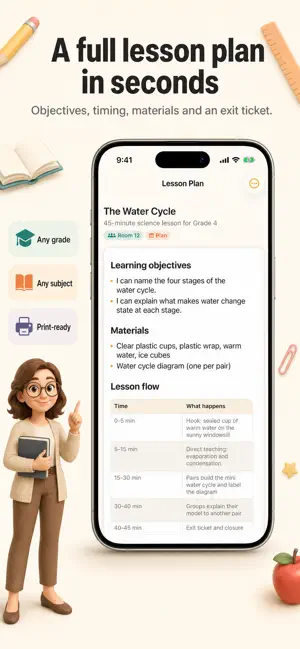
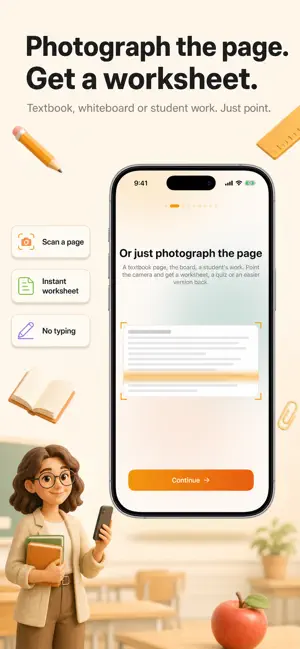
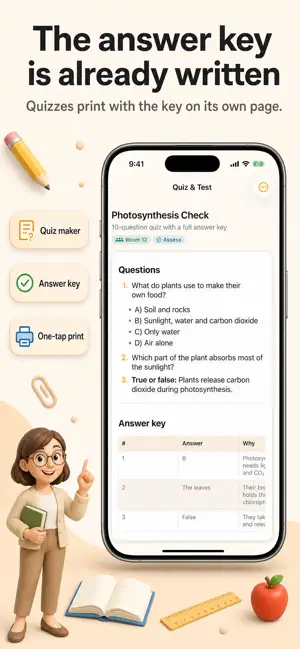
It's Sunday night and there's still a worksheet to make, a quiz to write and three parent emails waiting. LessonSpark turns that pile into minutes — on the phone already in your pocket. POINT THE CAMERA AT THE WORK • Photograph a textbook page and get a worksheet, a leveled reading passage or a question set • Photograph a student's paper and get item-by-item feedback plus a suggested grade • Photograph the whiteboard and get a slide outline 42 TOOLS IN SIX GROUPS • Plan — lessons, units, substitute plans, warm-ups, exit tickets, stations, projects • Create — worksheets, reading passages, vocabulary sets, puzzles, flashcards, visuals • Adapt — one text at three reading levels, scaffolds, ESL support, accommodation ideas • Assess — quizzes with answer keys, rubrics, writing feedback, report card comments • Communicate — parent emails, newsletters, positive notes, conference prep • At Home — for parents: homework help that teaches instead of answering MADE TO BE PRINTED Every result renders as a clean PDF you can AirPrint from your phone. Answer keys always land on a separate page, so the copy you hand out never shows them. IT KNOWS YOUR CLASS Save a class once — grade, subject, students — and every tool opens pre-filled. Everything you make is kept in your library: searchable, editable, reprintable. ASK INSTEAD OF SEARCHING Not sure which tool you need? Describe the situation and the assistant picks one and fills it in. IMPORTANT LessonSpark is a professional aid, not a decision-maker. AI-generated material can contain errors — review everything before using it with students and verify facts, standards and answer keys. Suggested grades and feedback are inputs to your judgment, never a replacement for it. Share as little student information as possible: first names or initials only. Your school or district rules take precedence. Classes and materials are stored on your device. Export or delete everything in Settings. In-App Purchases & Subscriptions LessonSpark offers optional weekly and monthly subscription plans to unlock premium features. Subscriptions are processed through your App Store account and renew automatically unless canceled by the user. You can manage or cancel your subscription anytime via your App Store account settings. Privacy: https://github.com/asiyegy/rework-privacy/blob/main/lessonlab/privacy.md Terms: https://github.com/asiyegy/rework-privacy/blob/main/lessonlab/terms.md
What’s new
Version 1.0.1 · Updated October 12, 2026
Now optimized for iPhone Duo. Includes minor improvements and bug fixes.
App privacy
The developer, ASIYE GUNEY, reported these privacy practices to Apple.
Data Linked to You
The following data, which may be collected and linked to your identity, may be used for the following purposes:
- Identifiers: User ID, Device ID
- Diagnostics: Crash Data, Performance Data, Other Diagnostic Data
- User Content: Photos or Videos
Used for: Analytics, App Functionality
Alternatives to LessonSpark: AI Teacher Tools
Looking for apps like LessonSpark: AI Teacher Tools? Here are 6 similar apps on the App Store. The highest rated is Class Planner for teachers (4.7/5), and all 6 are free to download.
-
 TeachFlow - AI for Teachers
-
 Class Wizard - AI for Teachers
4.0
Class Wizard - AI for Teachers
4.0
-
 Make My Lesson: One Tap Done
-
 Class Planner (cloud)
4.6
Class Planner (cloud)
4.6
-
 Wayground for Teachers
1.0
Wayground for Teachers
1.0
-
 Class Planner for teachers
4.7
Class Planner for teachers
4.7
| App | Rating | Price | Last updated | Compare |
|---|---|---|---|---|
| LessonSpark: AI Teacher Tools | – | Free | October 12, 2026 | |
| TeachFlow - AI for Teachers | – | Free | Jun 11, 2026 | Compare |
| Class Wizard - AI for Teachers | 4.0 / 5 (1) | Free | Aug 17, 2026 | Compare |
| Make My Lesson: One Tap Done | – | Free | Oct 5, 2026 | Compare |
| Class Planner (cloud) | 4.6 / 5 (55) | Free | Sep 15, 2026 | Compare |
| Wayground for Teachers | 1.0 / 5 (1) | Free | Oct 21, 2026 | Compare |
| Class Planner for teachers | 4.7 / 5 (66) | Free | Aug 14, 2026 | Compare |