

Leftover: Budget Calendar
Pavle Pejic Finance iPhoneiPadiPod touch
Leftover: Budget Calendar is a free Finance app for iPhone and iPad by Pavle Pejic. Rated 5.0/5 from 1 ratings. Requires iOS 18.0. Updated October 25, 2026.
- Rating
- 5.0
- 1 ratings
- Price
- Free
- on the App Store
- Size
- 11 MB
- Age 4+
- Updated
- Oct 25
- 2026 · v2.0.3
Screenshots



About Leftover: Budget Calendar
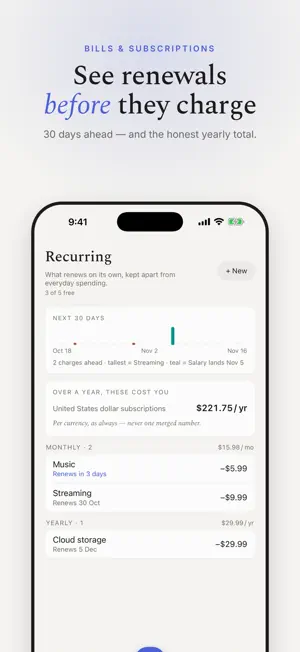
Leftover shows what's left to spend after your bills, subscriptions and upcoming expenses — laid out on one budget calendar. No bank connection, no account, no ads. SAFE TO SPEND, AT A GLANCE One number on the home screen: what you can still spend this cycle after everything that's already committed. It updates the moment you add an expense. A BUDGET CALENDAR See each day of your pay cycle: what you spent, what came in, and which bills and renewals are coming. Plan from payday to payday, not just by calendar month. BILLS & SUBSCRIPTIONS Track rent, utilities, streaming, gym and every other recurring charge. See renewals 30 days ahead and the honest yearly total of what your subscriptions cost. ADD AN EXPENSE IN SECONDS A built-in keypad with math, one-tap categories, recent payees and templates. Dictate or describe a purchase and confirm the draft — on-device. Snap a receipt to fill it in. PRIVATE BY DESIGN No bank credentials, no sign-up, no tracking. Your data stays on your iPhone; turn on iCloud sync and it goes only to your own iCloud. MULTI-CURRENCY, DONE RIGHT Keep accounts in different currencies. Every total stays per currency — never silently converted. LEFTOVER PLUS Unlimited recurring bills and subscriptions, iCloud sync across devices, the full statistics set with PDF export, savings goals, receipt photos, and Home Screen widgets. Eligible users can start with a 7-day free trial on the yearly plan. Subscriptions renew automatically unless cancelled at least 24 hours before the end of the current period. Manage or cancel in your Apple Account settings. Terms of Use: https://www.apple.com/legal/internet-services/itunes/dev/stdeula/ Privacy Policy: https://moneyfold-support.pavlepejic.chatgpt.site/privacy
What’s new
Version 2.0.3 · Updated October 25, 2026
Moneyfold is now Leftover — same private budget, new name. - Redesigned Add screen: amount, account, date and payee all fit above the keypad; the keyboard never covers what you type. - A Done button on every number keyboard. - Amounts follow your region's format. - Tighter layouts on every iPhone size, from SE to Pro Max. - Eligible users can start the yearly plan with a 7-day free trial.
App privacy
The developer, Pavle Pejic, reported these privacy practices to Apple.
Data Not Collected
The developer does not collect any data from this app.
Alternatives to Leftover: Budget Calendar
Looking for apps like Leftover: Budget Calendar? Here are 6 similar apps on the App Store.
-
 ClevrCash
-
 Finfolio
-
 Your Finances: Money Manager
-
 Spendo: Expense & GST Tracker
-
 SubTrack: Track your expenses
-
 Expenso AI
| App | Rating | Price | Last updated | Compare |
|---|---|---|---|---|
| Leftover: Budget Calendar | 5.0 / 5 (1 rating) | Free | October 25, 2026 | |
| ClevrCash | – | Free | May 24, 2026 | Compare |
| Finfolio | – | Free | May 22, 2026 | Compare |
| Your Finances: Money Manager | – | Free | Oct 28, 2026 | Compare |
| Spendo: Expense & GST Tracker | – | Free | Oct 20, 2026 | Compare |
| SubTrack: Track your expenses | – | Free | Oct 19, 2026 | Compare |
| Expenso AI | – | Free | Oct 11, 2026 | Compare |