

TripDays: Trip Planner
Chunhou Li Travel iPhoneiPadiPod touchMac
TripDays: Trip Planner is a free Travel app for iPhone and iPad by Chunhou Li. Requires iOS 18.0. Updated October 7, 2026.
- Price
- Free
- on the App Store
- Size
- 12 MB
- Age 4+
- Updated
- Oct 7
- 2026 · v1.6
Screenshots
About TripDays: Trip Planner
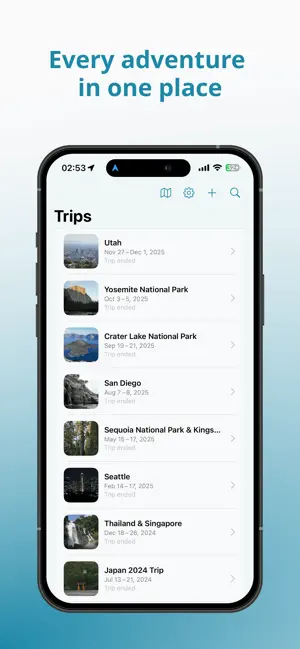
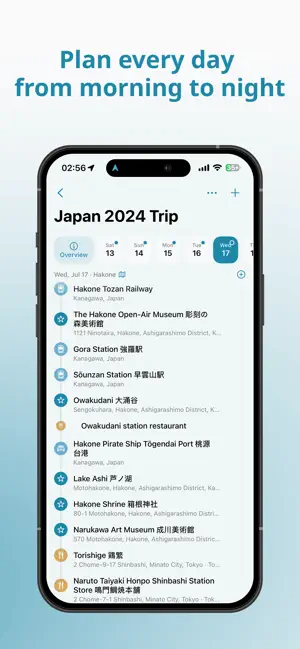
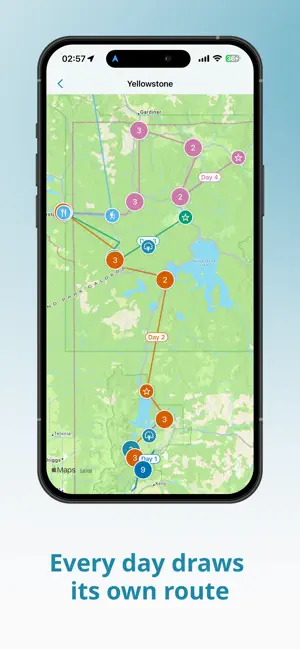
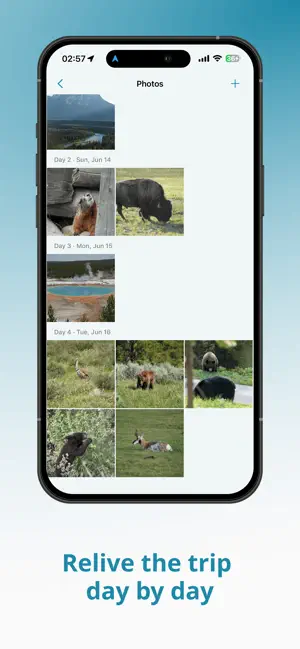
TripDays keeps the whole trip in one shared plan: a day-by-day itinerary, maps, shared photos, a packing checklist, and split expenses, in sync with the people you travel with. —— PLAN DAY BY DAY —— Build each day on a timeline: flights, trains, lodging, food, hikes, and activities, each with its own details, booking status, and reminders. Plans without a date wait on the Ideas board. Drag to reorder or move plans between days, and add several in a row without leaving the keyboard. A city you live in can be a home base: it keeps move-in and move-out dates instead of a trip range, with everyday plans on a month calendar. —— PASTE A LINK OR A NOTE —— Paste a booking, map, trail, tour, or rental link and TripDays fills in the plan: name, type, exact location, and details. The optional AI import turns a pasted travel note into complete trips for your review, or folds it into an existing trip without duplicates. It runs only when you ask, using your own Google Gemini key. —— TRAVEL TOGETHER —— Invite companions to plan with you and friends to follow along. Everyone sees the same trip, and every change reaches the group. Travelers without the app can be added by name, so their share of costs still counts. —— SPLIT EXPENSES —— Record expenses in any currency and split them equally, exactly, or by percentage. Personal spending stays separate from shared costs. Attach receipts, see who paid and who owes, then settle up and share the summary. —— SEE THE WHOLE TRIP —— Maps show every trip, each day's route, and national park boundaries. Photos are grouped by day. A widget counts down to the next trip and lists today's plans, reminders fire before each one, and the itinerary exports to your calendar. —— PRIVATE —— No accounts, no tracking. Trips are stored on your device, sync through your own iCloud when you turn sync on, and back up to a file you keep. TripDays works offline.
What’s new
Version 1.6 · Updated October 7, 2026
TripDays 1.6 shows plan times in each place's local time and fixes a range of date and sync issues. • Plan times follow the time zone of the place you're visiting, and show the zone when it differs from your device's • A trip's "today" is the date where the trip is • A menu bar on iPad, plus ⌘E to edit and ⌘⌫ to delete • Only the owner can archive a shared trip • Newer Gemini model by default for pasted notes • Fixed a freeze when opening the app offline with iCloud sync on • Fixes for trip dates and times, merging trips, backups, and expense splits
App privacy
The developer, Chunhou Li, reported these privacy practices to Apple.
Data Not Collected
The developer does not collect any data from this app.
Alternatives to TripDays: Trip Planner
Looking for apps like TripDays: Trip Planner? Here are 6 similar apps on the App Store. The highest rated is planethub - Currency and Trip (5.0/5), and all 6 are free to download.
-
 TripOdyssey: Trip Planner
-
 heere - Stories Underfoot
-
 planethub - Currency and Trip
5.0
planethub - Currency and Trip
5.0
-
 GoFlow Travel
5.0
GoFlow Travel
5.0
-
 Trip Pocket: Travel Planner
-
 Dream Trip: Save Travel Places
5.0
Dream Trip: Save Travel Places
5.0
| App | Rating | Price | Last updated | Compare |
|---|---|---|---|---|
| TripDays: Trip Planner | – | Free | October 7, 2026 | |
| TripOdyssey: Trip Planner | – | Free | May 21, 2026 | Compare |
| heere - Stories Underfoot | – | Free | Sep 21, 2026 | Compare |
| planethub - Currency and Trip | 5.0 / 5 (1) | Free | Sep 29, 2026 | Compare |
| GoFlow Travel | 5.0 / 5 (1) | Free | May 18, 2026 | Compare |
| Trip Pocket: Travel Planner | – | Free | Oct 7, 2026 | Compare |
| Dream Trip: Save Travel Places | 5.0 / 5 (2) | Free | Oct 7, 2026 | Compare |