

Afoot: Auto Tracker
Hyunjin Shin Health & Fitness iPhoneiPadiPod touch
Afoot: Auto Tracker is a free Health & Fitness app for iPhone and iPad by Hyunjin Shin. Requires iOS 17.0. Updated September 26, 2026.
- Price
- Free
- on the App Store
- Size
- 4 MB
- Age 4+
- Updated
- Sep 26
- 2026 · v1.4.0
Screenshots
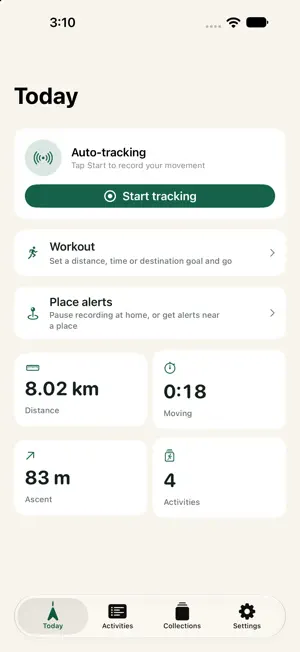
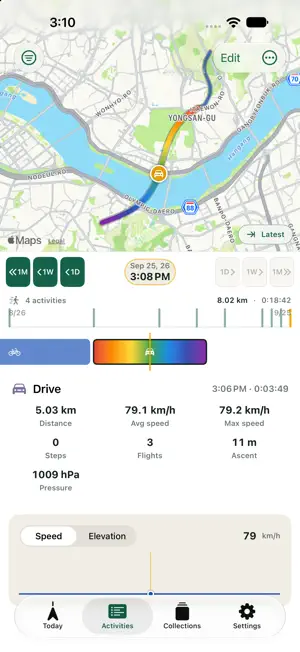
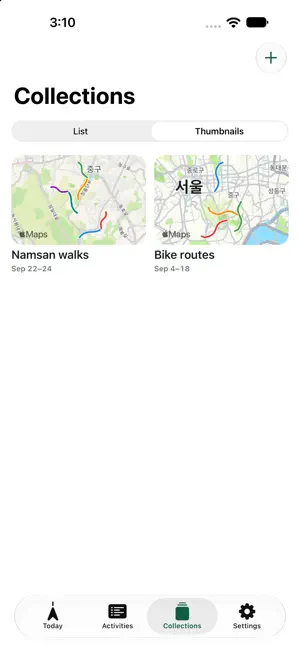

About Afoot: Auto Tracker
Tap Start tracking once and Afoot records your day on its own. It can tell whether you’re walking, running, cycling, or driving. You don’t need an account. Your history stays on your iPhone. ■ Automatic recording You don’t have to keep the app open. If Afoot gets an activity wrong, you can fix it on the timeline. ■ Workouts Choose cycling, walk/run, or hiking and set a goal by distance, time, or destination. Afoot reads out your progress as you go. When you finish, you’ll see your pace (speed for cycling) and estimated calories. ■ Place alerts Save home or work to pause recording while you’re there. Save a place you’re heading to, and Afoot notifies you how far you have left as you get close. ■ Collections Put the activities from a trip, or a route you take often, on one map. Photos and videos you took along the way show up where you took them. You can export a collection as an image or a video. ■ Maps and history Every route has speed and elevation graphs. You can jump to any past day from the calendar. You can also import and export GPX files. ■ Privacy There are no ads, and no tracking or analytics code. Afoot looks through your photos on your iPhone and uploads nothing. You can lock the app with Face ID. ■ Battery Using GPS in the background can drain your battery faster.
What’s new
Version 1.4.0 · Updated September 26, 2026
v1.4.0 ■ Workouts You can now record workouts. Choose cycling, walk/run, or hiking and set a goal by distance, time, or destination. Afoot reads out your progress as you go. When you finish, the workout is saved as a collection with your pace (speed for cycling) and estimated calories. ■ Place alerts Save home or work as a Pause recording place, and Afoot stops recording while you’re there. As you get close to a Distance alerts place, you get notifications with the distance left. Tap one to follow the countdown on the Lock Screen. ■ Collections Photos and videos you took during a collection’s activities now show up on its map, where you took them. You can also export a collection as an image or a video. ■ Other changes Afoot no longer sends an “Activity recorded” notification after each activity, and the Activity notifications switch is gone. If recording stops without you tapping Stop, you now always get a notification.
App privacy
The developer, Hyunjin Shin, reported these privacy practices to Apple.
Data Not Collected
The developer does not collect any data from this app.
Alternatives to Afoot: Auto Tracker
Looking for apps like Afoot: Auto Tracker? Here are 6 similar apps on the App Store. The highest rated is Rowing Machine Workouts (4.7/5), and all 6 are free to download.
-
 Sthira: Yoga Interval Timer
-
 Ergometer Space
-
 이지앤안고라
-
 Swelldone - Virtual Row+Paddle
4.3
Swelldone - Virtual Row+Paddle
4.3
-
 HUME Private Health Club
4.5
HUME Private Health Club
4.5
-
 Rowing Machine Workouts
4.7
Rowing Machine Workouts
4.7
| App | Rating | Price | Last updated | Compare |
|---|---|---|---|---|
| Afoot: Auto Tracker | – | Free | September 26, 2026 | |
| Sthira: Yoga Interval Timer | – | Free | Aug 16, 2026 | Compare |
| Ergometer Space | – | Free | May 20, 2024 | Compare |
| 이지앤안고라 | – | Free | Jun 18, 2026 | Compare |
| Swelldone - Virtual Row+Paddle | 4.3 / 5 (103) | Free | May 22, 2026 | Compare |
| HUME Private Health Club | 4.5 / 5 (8) | Free | Sep 12, 2026 | Compare |
| Rowing Machine Workouts | 4.7 / 5 (349) | Free | Oct 9, 2026 | Compare |