

GPS Map Camera Lite : Timemark
Dhruvik Khakhriya Photo & Video iPhoneiPadiPod touch
GPS Map Camera Lite : Timemark is a free Photo & Video app for iPhone and iPad by Dhruvik Khakhriya. Requires iOS 15.0. Updated August 26, 2026.
- Price
- Free
- on the App Store
- Size
- 89 MB
- Age 4+
- Updated
- Aug 26
- 2026 · v1.0
Screenshots

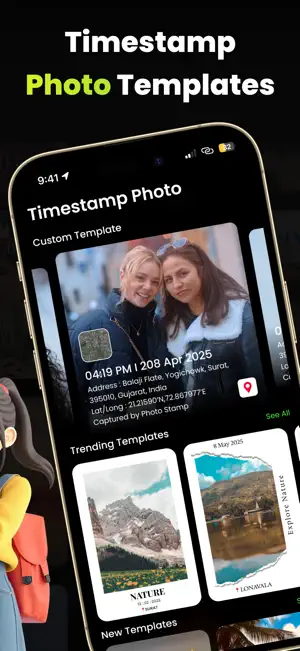

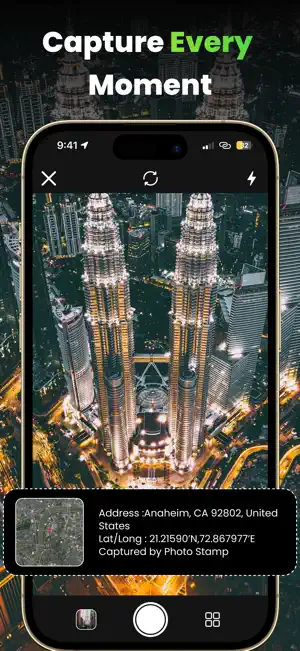
About GPS Map Camera Lite : Timemark
Timestamp Camera: Timemark is a powerful GPS Map Camera that lets you capture GPS stamps, geotagged photos, timestamp overlays, latitude longitude coordinates, address, map, date, and time automatically. Add professional GPS stamps and customizable timestamp layouts to every photo for work, travel, inspections, deliveries, and everyday memories. Why Choose Timemark? Timemark makes it easy to capture photos with your current location, address, map, date, and time in just one tap. Choose from beautifully designed stamp templates and instantly create professional-looking photos for travel, work, business, and daily life. Key Features: • Live Location - Automatically display your real-time position on every photo. • Current Address - Display the complete street address where the photo was captured. • Latitude & Longitude - Show accurate coordinates for location verification. • Place Name - Automatically add the city, landmark, or nearby place name. • Date Stamp - Stamp every image with the exact capture date. • Time Stamp - Record the precise capture time with second-level accuracy. • Multiple Date Formats - Choose from various regional and international date formats. • Custom Stamp Position - Move the stamp anywhere on the photo for the perfect layout. 25+ Professional Stamp Templates Choose from a growing collection of beautiful and professional stamp designs for every situation. • GPS Map Stamps – Add live GPS coordinates and map location details to every photo for accurate location tracking. • Date & Time Stamps – Automatically display the exact date and time on your photos to capture every moment with context. • Address Stamps – Stamp complete address information on photos, making it easy to document where they were taken. • Travel Stamps – Highlight your journeys with travel-friendly stamps including city, country, and trip location details. Create Stamped Photos in Seconds • Choose your favorite stamp template. • Open the built-in camera. • Capture your photo. • Your timestamped image is automatically generated. View, save, share, or manage your photos anytime. Keep all your stamped photos organized in one place. • View all stamped images • Share instantly with friends or clients • Save important records • Delete unwanted photos • Organize travel and work documentation Perfect For: • Travelers - Capture every destination with location, address, map, and timestamp information. • Road Trips - Document every stop with beautiful travel stamps and accurate map details. • Family Vacations - Preserve unforgettable memories with stylish timestamp overlays. • Hiking & Camping - Track your outdoor adventures with coordinates and location stamps. • Photography - Organize your photo collection with professional location information. • Field Employees - Create reliable work records with accurate coordinates and timestamps. • Engineers - Document project progress with location-verified photos. • Construction Teams - Maintain inspection records with address, map, and capture details. • Surveyors - Record survey points with latitude and longitude for easy verification. • Delivery Services - Capture proof of delivery with visible address, map, and timestamp. • Sales Professionals - Keep organized records of customer meetings and business visits. • Real Estate - Document property visits and inspections with accurate location information. • Insurance Inspections - Capture claim evidence with trusted capture details and map information. • Event Memories - Remember every special occasion with beautifully stamped photos. Download Timemark today and add GPS stamps, geotags, latitude longitude, address, map, date, and time to every photo. Whether for work, travel, inspections, or daily life, create professional timestamped photos with confidence, precision, and style. privacy policy : https://sites.google.com/view/gps-stamp/home terms of use : https://sites.google.com/view/gps-stamp/terms
App privacy
The developer, Dhruvik Khakhriya, reported these privacy practices to Apple.
Data Used to Track You
The following data may be used to track you across apps and websites owned by other companies:
- Usage Data: Advertising Data
Data Linked to You
The following data, which may be collected and linked to your identity, may be used for the following purposes:
- Usage Data: Advertising Data
Used for: Third-Party Advertising, Analytics
Alternatives to GPS Map Camera Lite : Timemark
Looking for apps like GPS Map Camera Lite : Timemark? Here are 6 similar apps on the App Store. The highest rated is Photo to Video - Pic Motion (2.3/5), and all 6 are free to download.
-
 LocaStamp - GPS Camera Stamp
-
 Tattoo AI Design & Generate
-
 Bullet Time: Camera Control AI
1.0
Bullet Time: Camera Control AI
1.0
-
 Time-Camera
-
 Photo to Video - Pic Motion
2.3
Photo to Video - Pic Motion
2.3
-
 Timestamp GPS Camera: InfoCam
| App | Rating | Price | Last updated | Compare |
|---|---|---|---|---|
| GPS Map Camera Lite : Timemark | – | Free | August 26, 2026 | |
| LocaStamp - GPS Camera Stamp | – | Free | Sep 25, 2026 | Compare |
| Tattoo AI Design & Generate | – | Free | Jan 13, 2025 | Compare |
| Bullet Time: Camera Control AI | 1.0 / 5 (1) | Free | Nov 24, 2025 | Compare |
| Time-Camera | – | Free | Sep 24, 2026 | Compare |
| Photo to Video - Pic Motion | 2.3 / 5 (3) | Free | Mar 23, 2026 | Compare |
| Timestamp GPS Camera: InfoCam | – | Free | May 23, 2025 | Compare |