

Lixing Wubi Keyboard
海洋 杨 Utilities iPhoneiPadiPod touch
Lixing Wubi Keyboard is a free Utilities app for iPhone and iPad by 海洋 杨. Requires iOS 15.0. Updated October 22, 2026.
- Price
- Free
- on the App Store
- Size
- 27 MB
- Age 4+
- Updated
- Oct 22
- 2026 · v3.1.1
Screenshots

About Lixing Wubi Keyboard
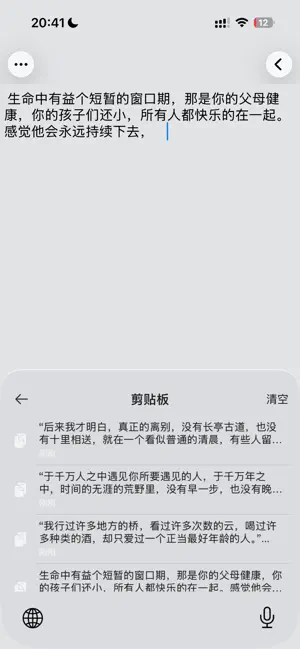
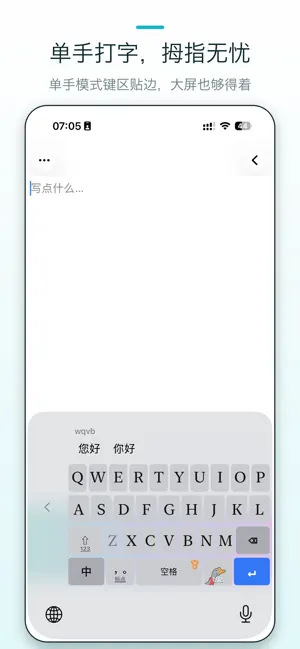
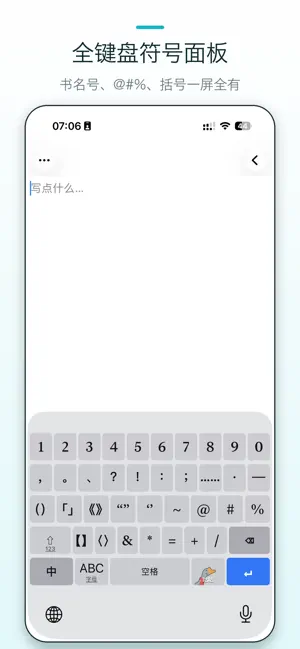
Lixing Wubi Keyboard is a fully offline Wubi (五笔字型) input method powered by a self-developed on-device engine. It supports three Wubi schemes—86, 98, and New Century. It requires no network permission and tracks, collects, or uploads no data at all. Three Wubi Schemes, Switch Anytime 86, 98, and New Century each ship with their own dictionary. Switch in Settings and your candidate ranking follows immediately—no need to adopt someone else's coding habits. 26-Key and 9-Key Layouts Beyond the full keyboard there is a 9-key Wubi layout: a 3×3 grid that makes one-handed typing on a phone far steadier. Each layout keeps its own key positions, candidate bar, and haptics. Smart Sentence Input A built-in language model assembles whole sentences as you type—more accurate, fewer duplicate codes, smoother input. No more disassembling long chat messages character by character. Picked the wrong segment inside a long sentence? Fix that segment directly instead of retyping the whole thing. Smart Wubi Guidance Valid next keystrokes are highlighted while invalid ones fade out, so you can always find the next key at a glance. Great for beginners. Dedicated Number Pad A separate number and symbol panel with the same key-by-key layout as mainstream Pinyin keyboards, so you never have to switch apps to do the books. Type an expression or a unit and it hands you the result. Semantic Candidates Type "tomorrow" and get the date, "3pm" and get the time, "12000" and get 12K, "12+34" and get 46. Domain Lexicons 16 vertical packs—emoji, chat, campus, legal, and more—switchable on demand. Professional and emerging vocabulary becomes typeable the moment you enable it, without disturbing your everyday candidates. Million-Word Dictionary Everyday chat, work, and life vocabulary is fully covered: common words, idioms, names and places, internet slang—whole-sentence candidates form in one pass. Keyboard Themes 6 built-in themes—Dark and Classic Gray (free), plus Liquid Glass, Rainbow, Sexy, and Peach. Every key recolors live when you switch, WYSIWYG. Slide Input & Swipe-Up Popups Full QWERTY layout with continuous slide input and dual-label number/letter keys. Long-press a letter and swipe up to open a punctuation or emoji panel in a grid. Font Size & Learned Lexicon Key label size, candidate text size, and candidate bar height are all adjustable to fit any screen and reading habit. The keyboard learns the characters and words you actually use—and Settings shows you exactly what it learned. Absolute Privacy Unlike other keyboards that demand "Full Access", Lixing Wubi needs no such permission—the keyboard extension has zero network access and is system-isolated, eliminating data leakage at the root. One-Time Purchase A single purchase unlocks every feature and all Pro themes forever. No ads, no tracking, no data collection. An optional yearly subscription is offered purely as a voluntary support plan—it never locks any feature. Terms of Use: https://www.apple.com/legal/internet-services/itunes/dev/stdeula/ Privacy Policy: https://lanceryoung.github.io/policy/daewubi/privacy.html
What’s new
Version 3.1.1 · Updated October 22, 2026
- New 98 and New Century Wubi schemes: switch between 86/98/New Century in Settings, each with its own dictionary and coding rules - New 9-key Wubi layout: a 3×3 grid for steadier one-handed typing, with its own key positions and haptics, switchable with the 26-key layout anytime - New dedicated number pad: same key-by-key layout as mainstream Pinyin keyboards, evaluates expressions and units right in the candidate bar - New 16 domain lexicons: emoji, chat, campus, legal and more—enable on demand, typeable the moment you switch them on - New semantic candidates: "tomorrow" gives the date, "3pm" gives the time, "12000" gives 12K, "12+34" gives 46 - New Learned Lexicon page: see exactly which characters and words the keyboard picked up from your typing - In-sentence segment correction: fix the one wrong segment in a long sentence instead of retyping all of it - New switches for keyboard hints, hiding all popups, and allowing segmented commit - Settings reorganized: layout, appearance, clipboard, feedback, and smart input each grouped in place - Version 3.1.0
App privacy
The developer, 海洋 杨, reported these privacy practices to Apple.
Data Not Collected
The developer does not collect any data from this app.
Alternatives to Lixing Wubi Keyboard
Looking for apps like Lixing Wubi Keyboard? Here are 6 similar apps on the App Store. The highest rated is RiceKey Wubi Keyboard (5.0/5), and 5 of the 6 are free to download.


| App | Rating | Price | Last updated | Compare |
|---|---|---|---|---|
| Lixing Wubi Keyboard | – | Free | October 22, 2026 | |
| RiceKey Wubi Keyboard | 5.0 / 5 (1) | Free | Oct 16, 2026 | Compare |
| 晗戈五笔 | – | Free | Jul 13, 2026 | Compare |
| Langboard | 5.0 / 5 (1) | Free | Oct 21, 2026 | Compare |
| NOMO - 打造只专属你的阅读空间 | – | Free | Aug 19, 2026 | Compare |
| 清歌输入法-五笔老炮儿必备 | 3.4 / 5 (5) | 2.99 USD | Apr 1, 2025 | Compare |
| 智花输入法 | – | Free | Sep 29, 2026 | Compare |