

Mapling: Location History Map
Materialchain Lifestyle iPhoneiPadiPod touchApple Watch
Mapling: Location History Map is a free Lifestyle app for iPhone and iPad by Materialchain. Requires iOS 17.0. Updated November 26, 2026.
- Price
- Free
- on the App Store
- Size
- 50 MB
- Age 4+
- Updated
- Nov 26
- 2026 · v2.0.0
Screenshots
Save to Pinterest


About Mapling: Location History Map
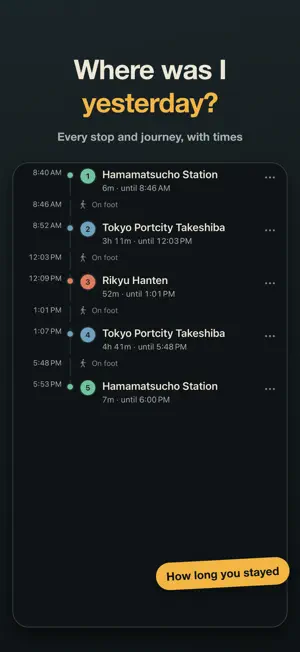
Never wonder "where was I yesterday?" again. Mapling quietly records the places you visit and the journeys between them, turning everyday life into a private map and timeline. It is free to start. Coming from Google Maps Timeline? Import your exported file and keep years of history. AUTOMATIC, NO BUTTONS Cafés, stations, the office, a day trip. Mapling records each stop and the walk or train ride between them in the background. There is nothing to start or stop. A MAP THAT GROWS WITH YOU The places you return to grow on your map, shaped by how often you go and how long you stay. RELIVE ANY DAY See where you were, when, and how you got there, with the path you actually walked drawn on the map. Scroll from one day into the next on a single timeline. FIND ANY PLACE BY GENRE The Places tab lists everywhere you've been. Filter by food, culture, sports and more, and sort by recent, frequent, visited once or longest stay. SHARE A DAY WITH FRIENDS ONLY Invite friends who use Mapling and show them a day, and no one else. Choose who sees each share, and find the shares you receive in the app whenever you like. TRAVEL JOURNAL, WRITTEN FOR YOU Every stop on a trip is kept in order, without typing a thing. MOVE OVER FROM GOOGLE MAPS TIMELINE Works with exports from your phone and from Google Takeout, old format or new. ALSO • Open a day's history from a photo taken there • Personal rankings saved with your own conditions • Commute alerts with the train you can still catch and how fast to walk • Place search using names, categories and official website information • Correct, add or delete a recorded visit • Confirm uncertain visits from Apple Watch • The weather where you spent each day (in Japan, from Japan Meteorological Agency AMeDAS observations) • Support for iPhone Duo HEALTH INTEGRATION When you turn it on in Settings, step counts recorded in the Health app, by Apple Watch above all, are read to tell stays and travel apart more accurately. Only step records are read; nothing is written to Health, and no other data such as heart rate is read. OPTIONAL AI ASSIST Only if you turn it on in Settings, an external AI service helps judge where you stayed and how you travelled. It receives clues such as times and travel speed, never coordinates, place names or anything that identifies your account. PRIVACY AND CONTROL Your history is private by default. When sharing, you choose who sees it (friends only, or anyone with the link) and the day, places and photos. Location data is never used for advertising or tracking across other companies' apps or websites. Settings let you delete individual records, choose a retention period, erase all recorded data or delete the account. Only if you turn on usage sharing, app openings, which tabs are used, and technical information about the device, app and OS are sent to TelemetryDeck. It is off unless you turn it on, and can be changed in Settings at any time. No location, place names, history or account information is sent. Automatic recording requires Always and Precise Location access. To determine travel mode and draw the route you took, movement locations are kept on the device for up to seven days and route coordinates are synced to your account.
What’s new
Version 2.0.0 · Updated November 26, 2026
• Visit the same spot often? Answer once and its other stays are settled too • A look-back notification now opens its week or month • The day map moves the way your fingers do, and opens full screen • Stay notifications ask about that stay, in the app's language • Answers show on the timeline as soon as you return to it • Every screen shows when it is loading • "Import without reviewing" in Google Timeline import now finishes • Other small fixes
App privacy
The developer, Materialchain, reported these privacy practices to Apple.
Data Linked to You
The following data, which may be collected and linked to your identity, may be used for the following purposes:
- Usage Data: Product Interaction
- Diagnostics: Other Diagnostic Data
- Health & Fitness: Fitness
- Location: Precise Location
- Contact Info: Email Address, Name
- Contacts: Contacts
- User Content: Photos or Videos, Other User Content
- Identifiers: User ID
Used for: Analytics, App Functionality
Data Not Linked to You
The following data, which may be collected but is not linked to your identity, may be used for the following purposes:
- Identifiers: Device ID
Used for: Analytics
Alternatives to Mapling: Location History Map
Looking for apps like Mapling: Location History Map? Here are 6 similar apps on the App Store.
-
 Lifeline – Your Daily Timeline
-
 Edo Ukiyo Map
-
 Japanaye Api
-
 エンディングノート:デジタル遺品整理 - 家族へ終活の記録
-
 サンライズモータース公式アプリ
-
 Retro Walk
| App | Rating | Price | Last updated | Compare |
|---|---|---|---|---|
| Mapling: Location History Map | – | Free | November 26, 2026 | |
| Lifeline – Your Daily Timeline | – | Free | Nov 18, 2026 | Compare |
| Edo Ukiyo Map | – | Free | Jul 30, 2024 | Compare |
| Japanaye Api | – | Free | Sep 22, 2026 | Compare |
| エンディングノート:デジタル遺品整理 - 家族へ終活の記録 | – | Free | Apr 13, 2024 | Compare |
| サンライズモータース公式アプリ | – | Free | Oct 14, 2025 | Compare |
| Retro Walk | – | Free | Jun 27, 2026 | Compare |