

Leopold - Sheet Music & Midi
COLIN WILLIAM MACRIS Music iPhoneiPadiPod touch
Leopold - Sheet Music & Midi is a paid Music app for iPhone and iPad by COLIN WILLIAM MACRIS. Rated 1.0/5 from 1 ratings. Requires iOS 15.0.
- Rating
- 1.0
- 1 ratings
- Price
- 5.99 USD
- on the App Store
- Size
- 18 MB
- Age 4+
- Updated
- Aug 15
- 2026 · v1.1
Screenshots


About Leopold - Sheet Music & Midi
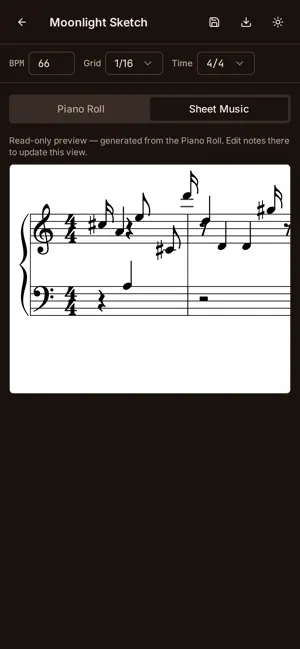
Leopold listens to you play piano and turns it into real sheet music and MIDI — entirely on your device, entirely offline. Sit down at any piano or keyboard, tap record, and play. Leopold's on-device transcription model listens through your phone's microphone and converts your performance into notes as you play. When you're done, you get a full piano-roll transcription that you can edit, clean up, and export as sheet music, MIDI, or MusicXML. HOW IT WORKS • Tap New Recording, set your time signature and tempo (with an optional built-in metronome and click track), and play. • Leopold's on-device model transcribes pitch and timing directly from the audio — no internet connection required, no account, no upload. • Review the transcription in a piano-roll editor: select, move, quantize, or delete notes to clean up the result. • Flip to Sheet Music view to see your performance rendered as standard notation. • Export to MIDI (.mid) for use in your DAW or notation software, MusicXML (.musicxml) for Sibelius/MuseScore/Finale, or a PNG image of the rendered sheet music. • Save projects to your library and come back to edit them anytime. BUILT FOR PRIVACY Leopold does all of its transcription work on your device. Your playing is never uploaded, streamed, or sent anywhere — there are no accounts, no cloud processing, and no network requests involving your audio or your music. Everything — recordings, transcriptions, and saved projects — is stored locally on your phone. DESIGNED FOR REAL PRACTICE • Adjustable metronome and tempo, with classical tempo markings (Andante, Allegro, Presto, and more) shown as you dial in your BPM. • A tuning calibration option for pianos that are slightly out of tune, so transcription stays accurate even on an imperfect instrument. • A clean piano-roll editor built for quick fixes, not deep production work — select a note, nudge it, quantize a phrase, and move on. • Light and dark modes throughout the app, so it looks right whether you're practicing under stage lights or in a dim practice room. WHO IT'S FOR Leopold is for pianists who want a fast way to capture an idea, a lesson, or a piece they're learning — without stopping to write it out by hand. It's for teachers who want to hand a student sheet music from what they just played. It's for composers sketching at the keyboard who want a MIDI file to build on later. Leopold doesn't try to replace a full notation program — it's the fastest way to get from "I just played that" to a sheet music page or a MIDI file you can take somewhere else. No account. No subscription. No ads. No data collection. Just you, your piano, and your phone.
App privacy
The developer, COLIN WILLIAM MACRIS, reported these privacy practices to Apple.
Data Not Collected
The developer does not collect any data from this app.
Alternatives to Leopold - Sheet Music & Midi
Looking for apps like Leopold - Sheet Music & Midi? Here are 6 similar apps on the App Store. The highest rated is Vesper MultiEffect (5.0/5), and 3 of the 6 are free to download.
-
 PianoScore: Sheet Music
-
 MuseMemo
1.0
MuseMemo
1.0
-
 Vesper MultiEffect
5.0
Vesper MultiEffect
5.0
-
 AllGoRhythmics
-
 Jamgram: Make Songs with Video
3.0
Jamgram: Make Songs with Video
3.0
-
 Jamtracks - Guitar, Bass, Keys
1.0
Jamtracks - Guitar, Bass, Keys
1.0
| App | Rating | Price | Last updated | Compare |
|---|---|---|---|---|
| Leopold - Sheet Music & Midi | 1.0 / 5 (1 rating) | 5.99 USD | August 15, 2026 | |
| PianoScore: Sheet Music | – | 4.99 USD | Oct 22, 2026 | Compare |
| MuseMemo | 1.0 / 5 (1) | 9.99 USD | Jul 22, 2026 | Compare |
| Vesper MultiEffect | 5.0 / 5 (1) | 19.99 USD | Oct 8, 2026 | Compare |
| AllGoRhythmics | – | Free | Jun 18, 2026 | Compare |
| Jamgram: Make Songs with Video | 3.0 / 5 (5) | Free | Nov 13, 2024 | Compare |
| Jamtracks - Guitar, Bass, Keys | 1.0 / 5 (2) | Free | Jul 29, 2026 | Compare |