

LandMeter: Field Area GPS
Muhammet Ozturk Navigation iPhoneiPadiPod touch
LandMeter: Field Area GPS is a free Navigation app for iPhone and iPad by Muhammet Ozturk. Requires iOS 18.0. Updated August 6, 2026.
- Price
- Free
- on the App Store
- Size
- 9 MB
- Age 4+
- Updated
- Aug 6
- 2026 · v1.0
Screenshots



About LandMeter: Field Area GPS
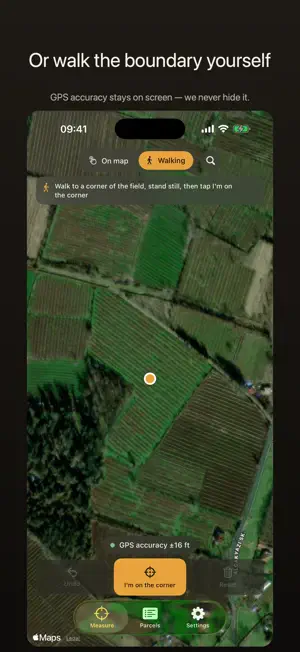
LandMeter measures land area from the satellite map. Find your field, line the crosshair up with each corner, and the area and perimeter appear as you go — in acres, hectares, square meters, square feet or dönüm. No survey equipment, no paperwork, no account. Mark the corners, read the number, save the parcel. HOW IT WORKS • Open the satellite map and find your field — search a place or paste coordinates • Line the crosshair up with a corner of the boundary and tap Add corner • From the third corner on, area and perimeter update with every tap • Tap any corner to move it or delete it • Save the parcel with a name and a note TWO WAYS TO MEASURE • On map — line each corner up on the satellite view. This is the accurate one. • Walking — stand on each corner in the field and let the phone average a few seconds of GPS. Use it when the boundary cannot be seen from above. ABOUT ACCURACY — PLEASE READ Phone GPS is accurate to a few meters in the open. On a small field that is a real difference, so LandMeter always shows you the GPS accuracy figure instead of hiding it, and warns you when the signal is weak or the map is zoomed too far out. Measuring on the satellite map is usually more accurate than walking. LandMeter gives approximate areas — it is not a cadastral or legal survey. UNITS Square meters • Hectares • Dönüm / decare • Acres • Square feet Parcels are stored as corner coordinates, not as a number, so switching units re-reads every saved parcel correctly. PDF PARCEL REPORT Turn any saved parcel into a printable A4 report: the satellite view with the boundary drawn on it, the area in every unit, the perimeter, the method used, the GPS accuracy, and a table of corner coordinates in WGS84. It is produced on your device and works with no signal — if satellite imagery cannot be fetched, the outline is drawn from the same corners. PERFECT FOR • Farmers checking field size, seed, fertilizer or yield per area • Landscapers and contractors quoting by area • Real estate agents and land buyers • Anyone who needs the size of a plot, garden, pasture or woodland PRIVACY No account, no sign-up, no cloud. Your parcels stay on your device. Location is used only while you measure in Walking mode, never in the background. FREE AND PRO Measuring, area, perimeter and unit switching are free and always will be. LandMeter Pro removes the saved-parcel limit and unlocks PDF parcel reports. SUBSCRIPTION Payment is charged to your Apple Account. A subscription renews automatically unless it is canceled at least 24 hours before the end of the current period. Manage or cancel anytime in your App Store account settings. Any unused portion of a free trial is forfeited when you buy a subscription. Terms of Use: https://moz6.com/app-term • Privacy Policy: https://moz6.com/app-privacy • [email protected]
App privacy
The developer, Muhammet Ozturk, reported these privacy practices to Apple.
Data Not Collected
The developer does not collect any data from this app.
Alternatives to LandMeter: Field Area GPS
Looking for apps like LandMeter: Field Area GPS? Here are 6 similar apps on the App Store. The highest rated is Land Lens: Field Area Measure (5.0/5), and all 6 are free to download.
-
 Field Maps Measure - Landmetr
4.6
Field Maps Measure - Landmetr
4.6
-
 Land Area Measure – TerraTrace
-
 Land Lens: Field Area Measure
5.0
Land Lens: Field Area Measure
5.0
-
 Area Measure - GPS Field Maps
5.0
Area Measure - GPS Field Maps
5.0
-
 Grundschau
-
 北斗导航-北斗卫星地图街景导航
5.0
北斗导航-北斗卫星地图街景导航
5.0
| App | Rating | Price | Last updated | Compare |
|---|---|---|---|---|
| LandMeter: Field Area GPS | – | Free | August 6, 2026 | |
| Field Maps Measure - Landmetr | 4.6 / 5 (7) | Free | Apr 13, 2026 | Compare |
| Land Area Measure – TerraTrace | – | Free | Sep 20, 2026 | Compare |
| Land Lens: Field Area Measure | 5.0 / 5 (2) | Free | Sep 26, 2026 | Compare |
| Area Measure - GPS Field Maps | 5.0 / 5 (1) | Free | Aug 24, 2026 | Compare |
| Grundschau | – | Free | Sep 24, 2026 | Compare |
| 北斗导航-北斗卫星地图街景导航 | 5.0 / 5 (1) | Free | Sep 18, 2026 | Compare |