

Notes: Aesthetic Notes
Sofia Schuster Productivity iPhoneiPadiPod touchMac
Notes: Aesthetic Notes is a free Productivity app for iPhone and iPad by Sofia Schuster. Requires iOS 17.0. Updated October 27, 2026.
- Price
- Free
- on the App Store
- Size
- 88 MB
- Age 4+
- Updated
- Oct 27
- 2026 · v1.3
Screenshots


About Notes: Aesthetic Notes
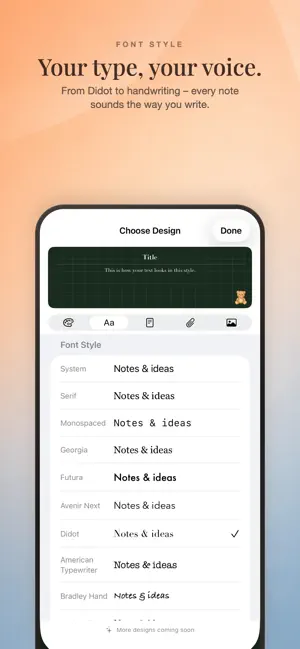
Your notes. Your aesthetic. Aesthetic Notes is not an ordinary notes app. Here every note gets its own paper, its own type and its own colour – and, if you like, a strip of tape, a wax seal or punch holes along the edge. What comes out doesn't look like a form. It looks like something off your desk. THE SAME NOTES EVERYWHERE – AND THE SAME DESIGN iCloud keeps your notes on iPhone, iPad and Mac at once. Not just the text: paper, type, colour, trimmings and image crop travel with them. A note you design in the evening looks exactly the same on your other device in the morning. Nothing gets reformatted, nothing goes missing. Everything stays private in your own iCloud. FOUR KINDS OF NOTES • Text note with weight, alignment and bullets • To-do list to tick off, with a reminder for each item • Table for plans, weeks and overviews • Picture note with a clean crop DESIGN IT UNTIL IT FEELS RIGHT Ten paper colours from cream to sage. Blank, lined or grid. Seventeen typefaces from plain to handwriting. Plus around thirty trimmings: tape, wax seals, pins, paper clips, punch holes, torn edges, decorative frames and bows. Found a combination you love? Save it in the Style Studio as your own style and apply it to any other note with a single tap. ON YOUR HOME SCREEN Any note can go on your Home Screen as a widget – in three sizes and in its own design. Your shopping list ends up where you're already looking. FOR YOUR EYES ONLY Individual notes can be locked with Face ID, Touch ID or your passcode. A locked note stays milky – lovely to look at, impossible to read. DRAWING Pen, marker, pencil and eraser. On iPad with Apple Pencil too. ON MAC AS WELL Aesthetic Notes is also available for macOS. There your notes sit right on the desktop, free to place anywhere, and they can turn transparent. FREE AND PRO Aesthetic Notes is free. Pro unlocks custom colours with an eyedropper, your own images as note backgrounds, the Design Collection and more typefaces. Try it free for seven days. Privacy Policy: https://notes-privacy-museandmethod.sofia-schuster02.chatgpt.site/ Terms of Use: https://www.apple.com/legal/internet-services/itunes/dev/stdeula/
What’s new
Version 1.3 · Updated October 27, 2026
More room for your own style. • Combine a frame with up to two stickers on each note. • Place stickers in any corner or at the middle of an edge, and mirror them horizontally. • Find your favourites in the new sticker library with categories, search and a Pro filter. • Frames and Mac shapes now have their own tab. • Save frames and stickers together in your own styles. • Your stickers also appear in iPhone and iPad widgets. For the full sticker experience across iCloud, update Aesthetic Notes on all your devices.
App privacy
The developer, Sofia Schuster, reported these privacy practices to Apple.
Data Not Collected
The developer does not collect any data from this app.
Alternatives to Notes: Aesthetic Notes
Looking for apps like Notes: Aesthetic Notes? Here are 6 similar apps on the App Store. The highest rated is Quick Note: Sticky Notes Menu (5.0/5), and all 6 are free to download.
-
 All Notes App
-
 Quick Note: Sticky Notes Menu
5.0
Quick Note: Sticky Notes Menu
5.0
-
 Glass Notes: Private Notepad
5.0
Glass Notes: Private Notepad
5.0
-
 Sticky Notes - Posty
4.6
Sticky Notes - Posty
4.6
-
 NoeHub Notes
5.0
NoeHub Notes
5.0
-
 Desktop Note - Notes & Photos
4.6
Desktop Note - Notes & Photos
4.6
| App | Rating | Price | Last updated | Compare |
|---|---|---|---|---|
| Notes: Aesthetic Notes | – | Free | October 27, 2026 | |
| All Notes App | – | Free | Oct 20, 2026 | Compare |
| Quick Note: Sticky Notes Menu | 5.0 / 5 (6) | Free | Oct 19, 2026 | Compare |
| Glass Notes: Private Notepad | 5.0 / 5 (3) | Free | Oct 16, 2026 | Compare |
| Sticky Notes - Posty | 4.6 / 5 (33) | Free | Sep 18, 2026 | Compare |
| NoeHub Notes | 5.0 / 5 (1) | Free | Apr 20, 2026 | Compare |
| Desktop Note - Notes & Photos | 4.6 / 5 (23) | Free | Oct 30, 2026 | Compare |