

ClassNotes: My smart notebook
Tony Aboud Education iPhoneiPadiPod touch
ClassNotes: My smart notebook is a free Education app for iPhone and iPad by Tony Aboud. Requires iOS 26.0. Updated October 21, 2026.
- Price
- Free
- on the App Store
- Size
- 19 MB
- Age 4+
- Updated
- Oct 21
- 2026 · v1.6.4
Screenshots
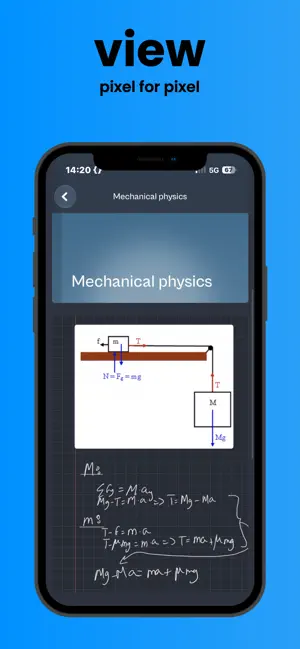
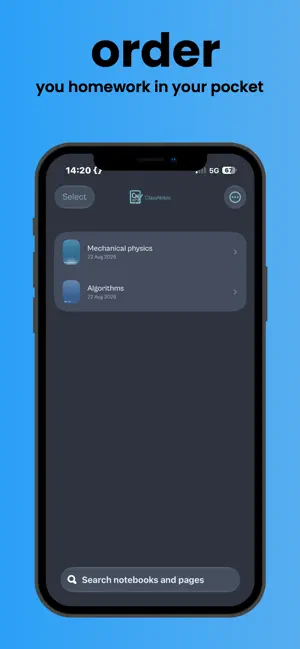

About ClassNotes: My smart notebook
ClassNotes is a handwriting-first notebook for iPad, built so what you write is exactly what stays on the page. WRITE, DON'T FIGHT YOUR APP Your Apple Pencil ink is recorded exactly as you draw it — no smoothing, no reshaping, nothing "cleaned up" behind your back. Turn on live beautification only if you want your handwriting typeset as you go. SMART TOOLS, ON YOUR TERMS • Hold a shape steady and watch it snap into a clean line, circle, rectangle, or triangle — still adjustable until you lift the pencil • A real two-finger ruler for straight edges • Paint bucket fill that flows under your ink, not over it • Scribble to erase • Sticky tape, text boxes, and photo/file drops • Full undo/redo history, per page NOVA, YOUR AI STUDY PARTNER Circle anything — a diagram, an equation, a paragraph — and ask NOVA about it. It sees exactly what you circled, not just the text, so it can actually explain a graph or work through the diagram you drew. MADE FOR NOTEBOOKS 28 cover designs, 14 paper templates, custom paper and line colors, multiple page sizes and orientations, and a dedicated whiteboard page for freeform sketching. FIND ANYTHING Search across typed text and your own handwriting — even pages you never touched with a keyboard. STAYS IN SYNC Sign in with a free ClassNotes account (optional) and your notebooks, pages, and attachments sync automatically, or keep everything on your device without one. READ ANYWHERE The iPhone companion app is a fast, read-only viewer for your whole library — perfect for a quick look between classes. NOVA PLUS AND NOVA PRO (OPTIONAL) NOVA is free. NOVA Plus ($3.99 a month or $34.99 a year) gives you 30 answers a day from Anthropic's Claude, and NOVA Pro ($5.99 a month or $54.99 a year) gives you 50. After the day's Claude answers, NOVA carries on with the free model. Subscriptions renew automatically unless cancelled at least 24 hours before the end of the period, and you can manage or cancel them in your App Store account settings. Free to use. No paywall on the notebook: every tool is free. Terms of Use: https://www.apple.com/legal/internet-services/itunes/dev/stdeula/ Privacy Policy: https://tony11-dot.github.io/classmate-legal/privacy.html
What’s new
Version 1.6.4 · Updated October 21, 2026
Zoom that stays put. - Pinching in or out now stays exactly on the spot you pinched, from the moment you let go. Before, the page could slip somewhere else for a moment and then come back, especially after a big zoom or when zooming back out.
App privacy
The developer, Tony Aboud, reported these privacy practices to Apple.
Data Linked to You
The following data, which may be collected and linked to your identity, may be used for the following purposes:
- Purchases: Purchase History
- Contact Info: Email Address, Name
- User Content: Photos or Videos, Audio Data, Other User Content
- Identifiers: User ID
Used for: App Functionality
Alternatives to ClassNotes: My smart notebook
Looking for apps like ClassNotes: My smart notebook? Here are 6 similar apps on the App Store. The highest rated is Weakspot (5.0/5), and all 6 are free to download.
-
 Weakspot
5.0
Weakspot
5.0
-
 StuDeep : Feynman AI Study
4.0
StuDeep : Feynman AI Study
4.0
-
 Notepad – Daily Planner post
3.3
Notepad – Daily Planner post
3.3
-
 Science Simulations
4.8
Science Simulations
4.8
-
 AI Flashcards - Study & Learn
4.5
AI Flashcards - Study & Learn
4.5
-
 Study Circle - The Focus App
4.7
Study Circle - The Focus App
4.7
| App | Rating | Price | Last updated | Compare |
|---|---|---|---|---|
| ClassNotes: My smart notebook | – | Free | October 21, 2026 | |
| Weakspot | 5.0 / 5 (2) | Free | Oct 13, 2026 | Compare |
| StuDeep : Feynman AI Study | 4.0 / 5 (4) | Free | Jan 29, 2026 | Compare |
| Notepad – Daily Planner post | 3.3 / 5 (3) | Free | Jun 6, 2024 | Compare |
| Science Simulations | 4.8 / 5 (4) | Free | Oct 3, 2026 | Compare |
| AI Flashcards - Study & Learn | 4.5 / 5 (116) | Free | Oct 16, 2025 | Compare |
| Study Circle - The Focus App | 4.7 / 5 (50) | Free | Oct 14, 2026 | Compare |