

Textify: Image to Text
Jigneshbhai Kevadiya Utilities iPhoneiPadiPod touch
Textify: Image to Text is a free Utilities app for iPhone and iPad by Jigneshbhai Kevadiya. Requires iOS 15.6. Updated September 17, 2026.
- Price
- Free
- on the App Store
- Size
- 142 MB
- Age 4+
- Updated
- Sep 17
- 2026 · v2.0
Screenshots



About Textify: Image to Text
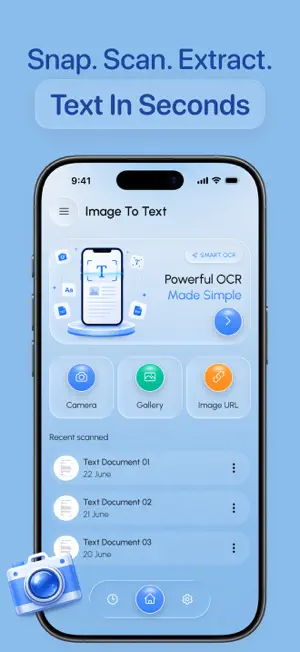
Turn images, photos, documents, and PDFs into editable text with Textify: Image to Text. Quickly scan, recognize, extract, and copy text from almost any document or image using a simple text scanner experience. Whether you’re digitizing handwritten notes, capturing information from a photo, scanning documents, or extracting text from a PDF, Textify helps you get the content you need without typing everything manually. Features • Extract text from images and photos • Scan documents and recognize text with OCR • Convert scanned content into editable text • Extract text from PDFs and documents • Copy extracted text quickly for use in other apps • Scan notes, receipts, books, papers, and more • Capture text directly using your camera • Recognize multiple sections of text from an image • Save and organize extracted text for later use • Simple and fast text scanning experience Scan and Extract Text Easily Use Textify whenever you need to turn printed or photographed content into usable digital text. Capture a page with your camera or select an existing image and let Textify extract the readable content. From image to text, photo to text, document scanning, OCR text recognition, and PDF text extraction, Textify gives you a convenient way to digitize information and make it easier to copy, edit, and reuse. Perfect for students, professionals, researchers, travelers, and anyone who regularly works with printed or scanned information. Scan it. Extract it. Turn it into text with Textify. A Premium subscription is required to unlock unlimited access to all features. Privacy : https://jigneshk4586.blogspot.com/2026/05/privacy-policy.html Terms of Use : https://jigneshk4586.blogspot.com/2026/05/terms-conditions.html
What’s new
Version 2.0 · Updated September 17, 2026
- Fixed minor bugs and improved performance.
App privacy
The developer, Jigneshbhai Kevadiya, reported these privacy practices to Apple.
Data Used to Track You
The following data may be used to track you across apps and websites owned by other companies:
- Identifiers: Device ID
- Usage Data: Advertising Data
Data Not Linked to You
The following data, which may be collected but is not linked to your identity, may be used for the following purposes:
- Identifiers: Device ID
- Usage Data: Advertising Data
- Diagnostics: Performance Data
Used for: Third-Party Advertising, Analytics
Alternatives to Textify: Image to Text
Looking for apps like Textify: Image to Text? Here are 6 similar apps on the App Store. The highest rated is Shuffly (5.0/5), and all 6 are free to download.
-
 Shuffly
5.0
-
 QR Code Reader : Barcode Scan+
-
 Anti Theft Alarm & Tracker
5.0
-
 Cleaner Aid: Cleanup Storage
5.0
-
 QR Scanner: Docs & Barcode
-
 Metal Detector: Stud Finder
5.0
| App | Rating | Price | Last updated | Compare |
|---|---|---|---|---|
| Textify: Image to Text | – | Free | September 17, 2026 | |
| Shuffly | 5.0 / 5 (2) | Free | Aug 25, 2026 | Compare |
| QR Code Reader : Barcode Scan+ | – | Free | Jun 6, 2024 | Compare |
| Anti Theft Alarm & Tracker | 5.0 / 5 (1) | Free | Jun 24, 2026 | Compare |
| Cleaner Aid: Cleanup Storage | 5.0 / 5 (1) | Free | Jun 9, 2026 | Compare |
| QR Scanner: Docs & Barcode | – | Free | Mar 11, 2026 | Compare |
| Metal Detector: Stud Finder | 5.0 / 5 (8) | Free | Oct 12, 2026 | Compare |