

SubCaptions: AI Auto Subtitles
ENES SAKUT Photo & Video iPhoneiPadiPod touch
SubCaptions: AI Auto Subtitles is a free Photo & Video app for iPhone and iPad by ENES SAKUT. Requires iOS 18.0. Updated September 18, 2026.
- Price
- Free
- on the App Store
- Size
- 85 MB
- Age 4+
- Updated
- Sep 18
- 2026 · v1.0.4
Screenshots


About SubCaptions: AI Auto Subtitles
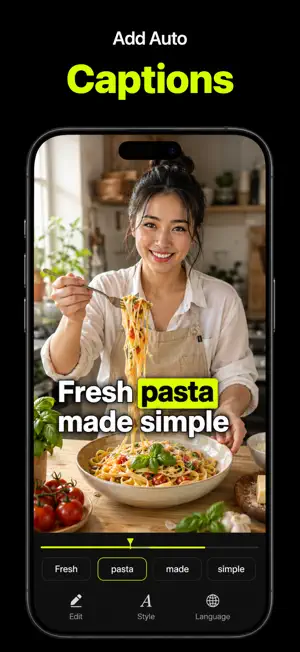
Your story deserves to be understood. SubCaptions brings automatic subtitles, AI dubbing, voiceovers, and a teleprompter together to help you create videos people can follow, with or without sound. ADD AUTOMATIC CAPTIONS Turn speech into timed captions without typing out your video. Review the transcript, edit the wording, and translate your subtitles into supported languages to reach more viewers. CHANGE YOUR VIDEO LANGUAGE Use AI Dubs to give your video a voice in another supported language. Review the translated text and choose a voice that suits your content before generating the dub. CUSTOMIZE YOUR CAPTIONS Make your message stand out with caption templates, fonts, colors, word highlights, backgrounds, and animations. Adjust size and position to complement your video. CREATE AI VOICEOVERS Write or paste your text, explore 30 AI voice characters, and choose the sound of your story. Adjust delivery, intensity, and speed for voiceovers, explainers, and narration. REDUCE BACKGROUND NOISE Reduce distracting background noise with Denoise. Make spoken content easier to hear in interviews, tutorials, and everyday recordings. RECORD WITH A TELEPROMPTER Read your script while recording with the built-in teleprompter. Set the scrolling speed and text position to suit your pace. Need a starting point? Use AI Script to turn an idea into a draft you can edit and make your own. READY FOR YOUR NEXT POST Export captioned videos up to 4K. Choose a vertical, square, or landscape format for your next social post, lesson, or presentation. From short social videos to lessons, interviews, and product demos, bring your words, voice, and style together with SubCaptions. Some features require SubCaptions Pro and are subject to usage limits. Cloud AI features require an internet connection. Language availability varies by feature. Privacy Policy: https://enes-sakut.github.io/SubCaptions/privacy/ Terms of Use: https://enes-sakut.github.io/SubCaptions/terms/
What’s new
Version 1.0.4 · Updated September 18, 2026
This update includes performance improvements and bug fixes.
App privacy
The developer, ENES SAKUT, reported these privacy practices to Apple.
Data Not Linked to You
The following data, which may be collected but is not linked to your identity, may be used for the following purposes:
- Purchases: Purchase History
- User Content: Audio Data
- Identifiers: Device ID
- Diagnostics: Crash Data, Performance Data
Used for: App Functionality
Alternatives to SubCaptions: AI Auto Subtitles
Looking for apps like SubCaptions: AI Auto Subtitles? Here are 6 similar apps on the App Store. The highest rated is StillzCut-Subtitle Translator (4.0/5), and all 6 are free to download.
-
 TypeCut-Auto Caption Generator
-
 DayCut: Video Journal & Diary
-
 CatInCup: Silence Cut Editor
-
 ReelMint - AI Short Video
-
 StillzCut-Subtitle Translator
4.0
StillzCut-Subtitle Translator
4.0
-
 Only Captions - AI Captions
| App | Rating | Price | Last updated | Compare |
|---|---|---|---|---|
| SubCaptions: AI Auto Subtitles | – | Free | September 18, 2026 | |
| TypeCut-Auto Caption Generator | – | Free | Sep 24, 2026 | Compare |
| DayCut: Video Journal & Diary | – | Free | Jul 31, 2026 | Compare |
| CatInCup: Silence Cut Editor | – | Free | Sep 25, 2026 | Compare |
| ReelMint - AI Short Video | – | Free | Jun 23, 2026 | Compare |
| StillzCut-Subtitle Translator | 4.0 / 5 (1) | Free | Jun 6, 2026 | Compare |
| Only Captions - AI Captions | – | Free | Aug 25, 2026 | Compare |