

HotMix Listen
SetSync Central Music iPhoneiPadiPod touch
HotMix Listen is a free Music app for iPhone and iPad by SetSync Central. Requires iOS 17.0. Updated October 28, 2026.
- Price
- Free
- on the App Store
- Size
- 19 MB
- Age 4+
- Updated
- Oct 28
- 2026 · v1.4.5
Screenshots


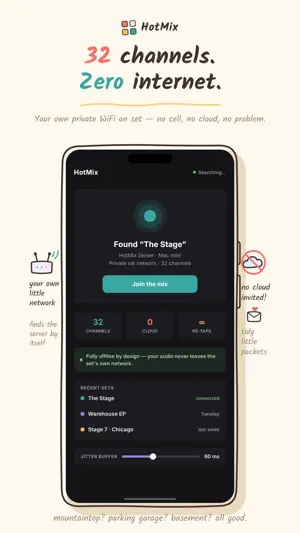
About HotMix Listen
HotMix turns an iPhone or iPad into a personal monitor mixer for production sound — no belt pack required. It connects to the HotMix Server on your Mac and streams up to 32 live channels over local Wi-Fi. Everyone on the crew mixes their own blend on their own device, so the producer's mix and the boom op's mix can look nothing alike. WHAT YOU CAN DO • Tap a tile to drop a channel into your mix. Long-press for a fader. Taps respond right away — every channel is already streaming, so nothing waits on the network. • Read live captions of what each mic is saying, transcribed on the server. Because each channel is one mic, the speaker labels are exact — no guessing who said what. • Save a mix as a Scene and bring it back with one tap. Handy when you jump between an interview setup and a wide. • Star the channels you care about to pin them to the top, and sort the grid the way you work. • On iPad, Auto tile size goes compact for big casts, so 32 channels still fit on one screen. • On iPhone, captions keep running on the Lock Screen and Dynamic Island while the app is in the background. You decide whether a locked screen shows full dialogue or just the speaker's name. • A jitter buffer, adjustable from 40 to 200 ms, rides out Wi-Fi hiccups, and the app reconnects on its own if the signal drops. There's no login, no account, and nothing leaves your network. HotMix finds the server automatically once you're on the same Wi-Fi. HotMix needs the HotMix Server companion app for macOS and a local Wi-Fi network. Use wired headphones or in-ear monitors for the lowest latency — Bluetooth adds too much delay for monitoring.
What’s new
Version 1.4.5 · Updated October 28, 2026
NEW - Show timecode - when the show has a timecode, open Settings and turn on Show timecode. The clock sits at the top of the mixer and stays up in fullscreen captions. Caption marks follow that clock instead of your phone - Log a scene - long-press a caption line and tap Start logging. Tap the initials on a tile to choose who is in the scene. Long-press the closing line, name the scene, and add notes if you want. Double-tap a line to highlight it, and again to take the highlight off. Sign in to Hotsheetz under Settings and pick the show first CHANGES - Minor bug fixes - stability and polish
App privacy
The developer, SetSync Central, reported these privacy practices to Apple.
Data Not Collected
The developer does not collect any data from this app.
Alternatives to HotMix Listen
Looking for apps like HotMix Listen? Here are 6 similar apps on the App Store. The highest rated is Plug Music (5.0/5), and 5 of the 6 are free to download.
-
 Lofi Cat
-
 Unison: Multitrack Recorder
-
 Plug Music
5.0
Plug Music
5.0
-
 WAVETOOL 4 Mobile Remote
-
 Sensaphonics 3DME BT
3.0
Sensaphonics 3DME BT
3.0
-
 MuseLead Synthesizer
5.0
MuseLead Synthesizer
5.0
| App | Rating | Price | Last updated | Compare |
|---|---|---|---|---|
| HotMix Listen | – | Free | October 28, 2026 | |
| Lofi Cat | – | Free | Apr 9, 2026 | Compare |
| Unison: Multitrack Recorder | – | Free | Oct 21, 2026 | Compare |
| Plug Music | 5.0 / 5 (17) | Free | Sep 13, 2026 | Compare |
| WAVETOOL 4 Mobile Remote | – | Free | Sep 8, 2026 | Compare |
| Sensaphonics 3DME BT | 3.0 / 5 (3) | Free | May 12, 2026 | Compare |
| MuseLead Synthesizer | 5.0 / 5 (3) | 12.99 USD | Oct 10, 2026 | Compare |
Compare HotMix Listen with the top alternatives: ratings, updates, ASO score and keyword gaps →