

Reseller Profit & Inventory
CHIKARA SHIMOMURA Finance iPhoneiPadiPod touch
Reseller Profit & Inventory is a free Finance app for iPhone and iPad by CHIKARA SHIMOMURA. Requires iOS 16.4. Updated October 27, 2026.
- Price
- Free
- on the App Store
- Size
- 65 MB
- Age 4+
- Updated
- Oct 27
- 2026 · v2.8.0
Screenshots



About Reseller Profit & Inventory
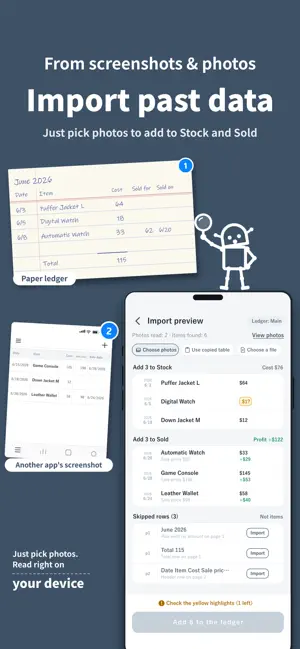
Know what you actually made on every item you resell. This is a simple ledger for resellers: log what you paid, what it sold for, and the fees and shipping that came out of it, and see the real profit on each sale, the cash tied up in your stock, and how each month is going. Made for thrift flippers, side hustlers and small resale businesses. No account needed to start. TRACK REAL PROFIT, ITEM BY ITEM • Log a purchase with the item name, cost, quantity, supplier, notes, model number and purchase date • When it sells, enter the sale price, fees and shipping, and the profit is worked out for you • Bought 10 of something? Sell 3 today and the other 7 stay in stock • Set a fee rate once for each marketplace you sell on, and the fee is subtracted for you when you record a sale (the free plan includes a limited number of automatic calculations each month) KNOW WHAT'S STILL ON YOUR SHELF • Every unsold item in one stock list • See how much cash is tied up in inventory • Days to sell on every item, so you learn what moves and what sits SEE WHAT'S WORKING • Month-by-month results • Profit by supplier, so you know which sources pay off • Profit by category and ROI trends on the paid plan • Color flags to mark items your way (2 colors free, or all 4 with custom names on the paid plan) BRING YOUR RECORDS WITH YOU Import in bulk: paste a table copied from a spreadsheet, pick a CSV file, or take a photo or screenshot of your existing list. Reading happens right on your device. Check everything in a preview, then add your stock and past sales in one go. The free plan imports up to 20 rows at a time. PHOTOS AND RECEIPTS Attach an item photo and a receipt to each item. Images are saved on your device. RECORDS YOU CAN HAND TO AN ACCOUNTANT • Log expenses by category, such as packing supplies and travel (paid plan) • Export your purchases and sales as CSV on the paid plan SHARE A LEDGER WITH A PARTNER OR TEAM • Invite people with an invite code • Choose what each member can do: add purchases, record sales, edit, or change color flags • Free for 2 people; groups of 3 or more need the paid plan • The owner can choose to share item photos and receipts with members • New: bought something together? Choose who you bought it with, and the profit is split equally, or set a percentage for each person. Your share shows in the Sold list, and Stats shows each member's share. YOUR DATA, YOUR WAY • Start without signing up. Your data stays on your device unless you share a ledger • Pick the currency you work in (amounts aren't converted; only the symbol and decimal places change) • Available in 9 languages FREE AND PAID The free version covers the basics and shows ads. One monthly plan unlocks everything: • No ads • Expense tracking by category • CSV export • Unlimited automatic fee calculation • All 4 color flags, with custom names • Deeper stats, including ROI trends • Categories • Multiple ledgers • Importing 21 or more rows at once • Group sharing with 3 or more people New subscribers can try it free for 7 days. The price is shown in your local currency on the plan screen. Payment is charged to your Apple Account when you confirm your purchase. The subscription renews automatically unless it is canceled at least 24 hours before the end of the current period. You can manage or cancel it anytime in Settings > [your name] > Subscriptions. Terms of Use: https://chikarashimomura.github.io/terms/ Privacy Policy: https://chikarashimomura.github.io/privacy/
What’s new
Version 2.8.0 · Updated October 27, 2026
• Stock now shows the estimated sale price, and Sold shows the cost and supplier • Sort by item name to browse with letter headers and an index on the right edge • Record sale shows the estimated sale price, and one tap fills it in • In groups, you can now change who bought an item
App privacy
The developer, CHIKARA SHIMOMURA, reported these privacy practices to Apple.
Data Linked to You
The following data, which may be collected and linked to your identity, may be used for the following purposes:
- Purchases: Purchase History
- Contact Info: Email Address, Name
- User Content: Photos or Videos, Customer Support, Other User Content
- Identifiers: User ID
- Other Data: Other Data Types
Used for: App Functionality
Data Not Linked to You
The following data, which may be collected but is not linked to your identity, may be used for the following purposes:
- Identifiers: Device ID
- Usage Data: Advertising Data, Product Interaction
- Purchases: Purchase History
- Diagnostics: Crash Data, Performance Data
Used for: Third-Party Advertising, Analytics
Alternatives to Reseller Profit & Inventory
Looking for apps like Reseller Profit & Inventory? Here are 6 similar apps on the App Store.
-
 カード台帳 - ポケカ相場・PSA鑑定の収支管理
-
 フリマ台帳
フリマ台帳
-
 フリマ利益ノート - 手数料・送料計算と在庫管理
-
 Store Ledger: Break-Even
-
 ResellCalc
-
 CryptoHeat: Crypto Alerts
| App | Rating | Price | Last updated | Compare |
|---|---|---|---|---|
| Reseller Profit & Inventory | – | Free | October 27, 2026 | |
| カード台帳 - ポケカ相場・PSA鑑定の収支管理 | – | Free | Sep 22, 2026 | Compare |
| フリマ台帳 | – | Free | Sep 29, 2026 | Compare |
| フリマ利益ノート - 手数料・送料計算と在庫管理 | – | Free | Oct 8, 2026 | Compare |
| Store Ledger: Break-Even | – | Free | Oct 23, 2026 | Compare |
| ResellCalc | – | Free | Sep 22, 2026 | Compare |
| CryptoHeat: Crypto Alerts | – | Free | Jun 30, 2026 | Compare |