

sharepot: Split Expenses
Rupert Andreas Maier Finance iPhoneiPadiPod touchApple Watch
sharepot: Split Expenses is a free Finance app for iPhone and iPad by Rupert Andreas Maier. Rated 5.0/5 from 2 ratings. Requires iOS 18.0.
- Rating
- 5.0
- 2 ratings
- Price
- Free
- on the App Store
- Size
- 7 MB
- Age 4+
- Updated
- Oct 20
- 2026 · v1.3
Screenshots



About sharepot: Split Expenses
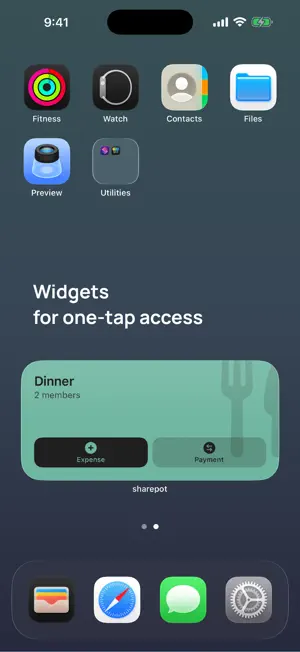
sharepot is the easiest way to split shared expenses – with roommates, on trips, or at dinner. No account, no sign-up: open the app, create a pot, go. HOW IT WORKS • Create a "pot" for your flat, trip, or occasion • Log who paid what • sharepot works out who owes whom how much • Settle up with a few smart transfers LIVE TOGETHER – FREE • Share a pot via link, QR code, or join code • Changes appear instantly for every member • Nobody has to register • "Mark as paid" keeps balances up to date • Write protection: lock the whole pot as its creator, or single expenses as their author • Home Screen widget: add an expense, a payment or a receipt with one tap — it deliberately shows no amounts • Apple Watch: add an expense right from your wrist – pick a pot, the amount, a title PAYING MADE EASY • Balances always show who owes whom • Pay directly via shared payment methods: PayPal, Revolut, Wise, Cash App, Monzo, or IBAN with banking QR • Reminders for open debts go straight to your Reminders app SHAREPOT PRO – yearly subscription or one-time purchase • Unlimited pots • Uneven splits: by percent or exact amounts • Statistics per pot and budget with traffic light • Recurring expenses (rent, streaming …) • Receipt scanner: capture amount and date from a photo • Export as PDF, CSV (Excel), or text • Custom categories and sharing your own payment methods PRIVATE BY DESIGN • No registration, no tracking, no ads • Local pots never leave your device – only what you share is shared • Payment methods are end-to-end encrypted – readable only by the person you share them with • Foreign currencies with a locked-in rate Simple mode for a quick start, advanced mode with every feature – your choice. SHAREPOT PRO AT A GLANCE • Yearly subscription with automatic renewal (1 year) or a one-time "Lifetime" purchase • The subscription renews unless it is cancelled at least 24 hours before the end of the period in your App Store settings • Terms of Use (EULA): https://www.apple.com/legal/internet-services/itunes/dev/stdeula/ • Privacy Policy: https://sharepot.axeptdesign.com/privacy/
What’s new
Version 1.3 · Updated October 20, 2026
• More precise: expenses split equally now add up to the cent – a pot can always be settled completely. • New members see the payment details you share straight away, not only after your next change. • Recurring expenses that are already due appear as soon as you save the template. • Fixed: after sharing a pot online for the first time, your older entries could no longer be locked, and templates lost their selected participants. • Faster and leaner: only pots that changed are synced.
App privacy
The developer, Rupert Andreas Maier, reported these privacy practices to Apple.
Data Not Linked to You
The following data, which may be collected but is not linked to your identity, may be used for the following purposes:
- Financial Info: Payment Info, Other Financial Info
- Contact Info: Name
- Usage Data: Other Usage Data
Used for: App Functionality
Alternatives to sharepot: Split Expenses
Looking for apps like sharepot: Split Expenses? Here are 6 similar apps on the App Store. The highest rated is FIRE Path: FI Planner (5.0/5), and all 6 are free to download.
-
 Hisabi: Subs-Tracker
-
 SubVisual: Track Subscriptions
-
 FIRE Path: FI Planner
5.0
FIRE Path: FI Planner
5.0
-
 Expense Tracker - TrackDad
5.0
Expense Tracker - TrackDad
5.0
-
 DaySum: Daily Spending Limit
4.0
DaySum: Daily Spending Limit
4.0
-
 RateRadar: Fed Rate Tracker
5.0
RateRadar: Fed Rate Tracker
5.0
| App | Rating | Price | Last updated | Compare |
|---|---|---|---|---|
| sharepot: Split Expenses | 5.0 / 5 (2 ratings) | Free | October 20, 2026 | |
| Hisabi: Subs-Tracker | – | Free | Sep 19, 2026 | Compare |
| SubVisual: Track Subscriptions | – | Free | Oct 20, 2026 | Compare |
| FIRE Path: FI Planner | 5.0 / 5 (3) | Free | Aug 19, 2026 | Compare |
| Expense Tracker - TrackDad | 5.0 / 5 (1) | Free | Aug 20, 2026 | Compare |
| DaySum: Daily Spending Limit | 4.0 / 5 (1) | Free | Sep 22, 2026 | Compare |
| RateRadar: Fed Rate Tracker | 5.0 / 5 (1) | Free | Oct 12, 2026 | Compare |