

MoGotcha
建峰 纪 Lifestyle iPhoneiPadiPod touch
MoGotcha is a free Lifestyle app for iPhone and iPad by 建峰 纪. Requires iOS 26.0. Updated October 1, 2026.
- Price
- Free
- on the App Store
- Size
- 32 MB
- Age 4+
- Updated
- Oct 1
- 2026 · v1.6.1
Screenshots



About MoGotcha
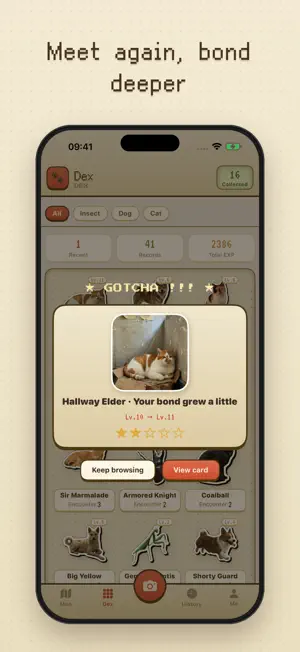
MoGotcha — turn every encounter into a collectible. The orange tabby who always turns up outside your building, a shiba sunbathing in the park, a red dragonfly resting on the railing, an oddly shaped cloud on the horizon — have you ever wanted to just reach out and keep them? Snap a photo, pick a category, jot down a few details, and a fragment of time and space is yours to keep. What this app hopes to give you is first the surprise of meeting by chance, then the joy of meeting again, and finally the warmth of scattered encounters settling into a bond. COLLECT ANYTHING Cat, dog, bird, insect, person, cloud — six categories ship with the app, and they are only six starting points. Categories, fields and options can all be created, renamed or deleted: succulents, an old chair by the road, every bridge you cross. Your collection, your rules. BONDS FOR INDIVIDUALS, COLLECT BOXES FOR EVERYTHING ELSE Every cat is a friend with their own bond card, levelling up the more you meet. Milestones like "first feeding" or "tenth meeting" are configured per category, and the moment you unlock one is recorded on the card forever. Clouds, seashells, street signs — things with no individuals to tell apart — go into a collect box instead, one entry at a time until the set is complete. MAP AND TIMELINE Where an encounter happened and when it happened each get their own screen. Repeat visits to the same spot merge into a single pin you can page through one by one. CUT-OUT STICKERS AND SIX SHARE TEMPLATES Photos can be cut out into white-bordered stickers. When you want to share one, pick from six layouts: Polaroid, LCD, Stamp, Receipt, Minimal and Gacha SSR. EVEN THE CONSOLE IS YOURS TO TUNE Shell, top bar, buttons, highlights — twenty custom colour slots on each of the two tracks, with hue / lightness / chroma sliders and a contrast check. Pick one and the whole interface follows. PRIVACY FIRST — LOCATIONS NEVER LEAVE Photos and data stay on your own device; nothing is uploaded to our servers. Exact coordinates of your encounters are never made public, and shared images automatically strip location and photo metadata, showing only a city district. BILINGUAL The interface and your custom categories support both English and Chinese, switchable anytime. No accounts. No subscriptions. No ads. Just you and the ones you meet.
What’s new
Version 1.6.1 · Updated October 1, 2026
· New Darkroom: partway through logging, tap the floating film-roll button to save the shot as a negative and finish it later. You can also use "Import Film Roll" to bring in photos from your library, then "Quick Develop" to finish several at once · Move a sighting to another profile: in the sighting editor, tap "Belongs to" to pick a different profile, or split it off as a new one · The location field in the entry form is now a card with a small map, where you can rename the place or adjust the point · More accurate places: auto-filled names sit closer to where the photo was taken, and photos without location are no longer tagged with where you imported them. Me > Privacy & location has a new "Location Access" row, and the map explains why when "locate me" is blocked by permission · Location and Photos: photos saved to Photos use the location on the record, and precise locations still never appear in shared images or cards. Added Apple's privacy manifest, declaring no tracking and no data collection · Overlapping map markers stack newest on top, and trail lines are curved · Profiles can use the latest photo as cover (after upgrading it follows the latest photo by default; turn it off in the profile settings), and can be deleted from the settings page · Me > About MoGotcha has new "Share MoGotcha" and "Leave a Review" rows; QR codes on share cards now point to the App Store · Automatic cutout waits at most 10 seconds per photo; if it times out the photo is still saved, and "Cut out again" retries in the editor · Backups now include Darkroom negatives, and "Erase all data" clears the Darkroom too · Other fixes and improvements: a missing photo no longer fails the whole backup export, older backups restore with milestones, and English plural fixes Things to Try · Save a half-logged shot to the Darkroom and pick it up again · Create a record and look at the new location card
App privacy
The developer, 建峰 纪, reported these privacy practices to Apple.
Data Not Collected
The developer does not collect any data from this app.
Alternatives to MoGotcha
Looking for apps like MoGotcha? Here are 6 similar apps on the App Store. The highest rated is 梁柱之间 (5.0/5), and all 6 are free to download.
-
 Machi - 你的日本生活
-
 AAAny - Ask Anyone Anything
-
 Weekit: Weekly Planner
4.5
-
 Talking 3 Headed Dragon
3.0
-
 Readmate - Book Highlights
4.8
-
 梁柱之间
5.0
| App | Rating | Price | Last updated | Compare |
|---|---|---|---|---|
| MoGotcha | – | Free | October 1, 2026 | |
| Machi - 你的日本生活 | – | Free | Sep 21, 2026 | Compare |
| AAAny - Ask Anyone Anything | – | Free | Jun 20, 2024 | Compare |
| Weekit: Weekly Planner | 4.5 / 5 (4) | Free | Oct 7, 2026 | Compare |
| Talking 3 Headed Dragon | 3.0 / 5 (114) | Free | Jan 8, 2026 | Compare |
| Readmate - Book Highlights | 4.8 / 5 (36) | Free | Oct 13, 2026 | Compare |
| 梁柱之间 | 5.0 / 5 (5) | Free | Oct 17, 2026 | Compare |
Compare MoGotcha with the top alternatives: ratings, updates, ASO score and keyword gaps →