

Node Pocket
Zihua Huang Utilities iPhoneiPadiPod touch
Node Pocket is a free Utilities app for iPhone and iPad by Zihua Huang. Requires iOS 17.0. Updated September 21, 2026.
- Price
- Free
- on the App Store
- Size
- 26 MB
- Age 17+
- Updated
- Sep 21
- 2026 · v1.0.1
Screenshots



About Node Pocket
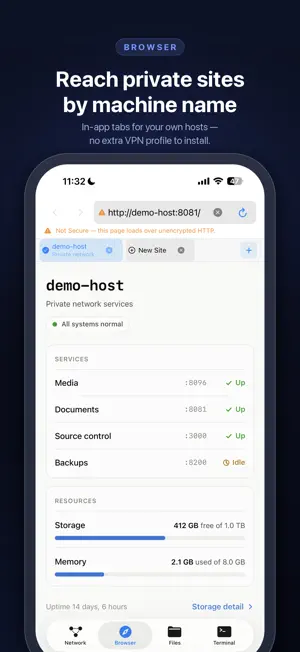
Node Pocket keeps private-network tools inside the app without installing an additional VPN profile. Connect your own Tailscale account to reach your private hosts over SSH, SFTP, and the built-in browser, all from one focused workspace. The browser, terminal, and file client also reach ordinary internet servers without a private network, and the app picks the right route for each address on its own. Start free with one browser tab, one SSH terminal tab, and read-only remote file browsing. An optional one-time Pocket Pro in-app purchase unlocks SFTP uploads and downloads, up to eight browser tabs, and up to four SSH terminal tabs. It is not a subscription. Built for focused private-network work • Browse HTTP and HTTPS web interfaces in multiple in-app tabs. • Open independent SSH terminal tabs with terminal controls for common keys. • Fly through tabs, terminals, and navigation with hardware-keyboard shortcuts. • Browse, download, upload, share, save, and ZIP SFTP files. • Reach ordinary SSH and SFTP servers too, with no private network needed. • Review SSH and SFTP host fingerprints before authenticating. • Read the privacy policy and open-source acknowledgements in the app. Node Pocket does not install an iOS VPN profile or use Network Extension entitlements. It uses an embedded userspace node, so its network access stays scoped to this app. Reaching private hosts requires your own Tailscale account. Ordinary SSH, SFTP, and web servers need only their address and your credentials. Node Pocket is an independent app and is not affiliated with, endorsed by, or sponsored by Tailscale Inc. Tailscale is a trademark of Tailscale Inc.
What’s new
Version 1.0.1 · Updated September 21, 2026
This update makes Node Pocket work great with a hardware keyboard. • Switch tabs with ⌘1–⌘8, open a tab with ⌘T, and close the current tab with ⌘W — in both the browser and the terminal. • Terminal shortcuts: clear the screen with ⌘K, duplicate a terminal with ⌘D, and move between terminals with ⌘⇧[ and ⌘⇧]. • Selected text in the terminal is now clearly highlighted and easy to read. • Reliability improvements to keyboard handling throughout the app.
App privacy
The developer, Zihua Huang, reported these privacy practices to Apple.
Data Linked to You
The following data, which may be collected and linked to your identity, may be used for the following purposes:
- Purchases: Purchase History
Used for: App Functionality
Alternatives to Node Pocket
Looking for apps like Node Pocket? Here are 6 similar apps on the App Store. The highest rated is Pretty Calculator: Themes (5.0/5), and all 6 are free to download.
-
 Pretty Calculator: Themes
5.0
Pretty Calculator: Themes
5.0
-
 Vector Flow - Animator
-
 Grapheme — Unicode Catalog
-
 QAM Connect
-
 TermAI: SSH Client & Terminal
-
 Nomad-AI
3.9
Nomad-AI
3.9
| App | Rating | Price | Last updated | Compare |
|---|---|---|---|---|
| Node Pocket | – | Free | September 21, 2026 | |
| Pretty Calculator: Themes | 5.0 / 5 (2) | Free | Sep 8, 2026 | Compare |
| Vector Flow - Animator | – | Free | Jul 19, 2026 | Compare |
| Grapheme — Unicode Catalog | – | Free | Aug 2, 2026 | Compare |
| QAM Connect | – | Free | Aug 4, 2026 | Compare |
| TermAI: SSH Client & Terminal | – | Free | Oct 9, 2026 | Compare |
| Nomad-AI | 3.9 / 5 (7) | Free | Mar 25, 2026 | Compare |
Compare Node Pocket with the top alternatives: ratings, updates, ASO score and keyword gaps →