

Taska: To-Do & Task Planner
Kenichirou Shiki Productivity iPhoneiPadiPod touchMac
Taska: To-Do & Task Planner is a free Productivity app for iPhone and iPad by Kenichirou Shiki. Requires iOS 18.0. Updated October 24, 2026.
- Price
- Free
- on the App Store
- Size
- 24 MB
- Age 4+
- Updated
- Oct 24
- 2026 · v3.2.1
Screenshots


About Taska: To-Do & Task Planner
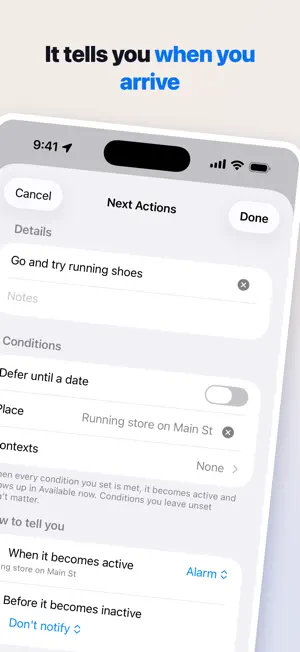
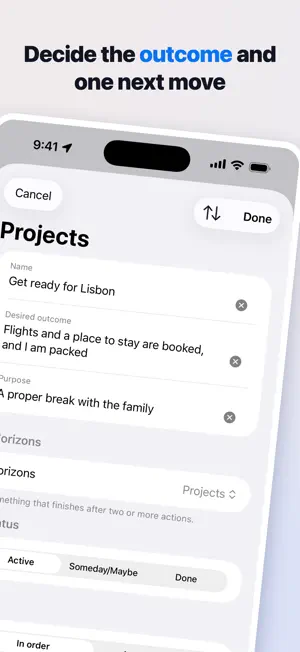
You know GTD. You just couldn't keep it going. This is for you. What stops it is the effort. Sort everything into lists, name it, review every week... and you are back to a plain to-do list. Taska is the GTD loop itself, with the heavy parts made light. ■ Capturing is not deciding Whatever comes to mind goes into the Inbox with no name and no place. The field returns to you, so you can throw the next one in straight after. You can capture without opening the app: - A Home Screen widget (with the count waiting to be clarified) - A button on the Lock Screen or in Control Center - The share sheet in other apps - Siri and Shortcuts, out loud, while walking ■ Clarify one at a time Taska asks one question at a time. What is this? What kind of action? Is it yours to do? Once there is an answer, the questions stop. The name is built from what you wrote, so you are never handed a blank field. When no name comes, ask the AI for a draft (Premium). It moves only when you ask, and marks drafts as drafts. ■ See only what you can do now Next Actions has two views. - Available now — only what passes where you are, the tools and time you have, and the energy you have left - All — the whole list, with what you cannot start yet faded and the reason beside it At @Home, nothing from @Work appears. Away from your desk, switch @Computer off. Place and time are judged by your phone; the rest is yours to say. ■ It tells you when you can act Set a defer date, a place and contexts as conditions. When all are met, the action appears in Available now and can alert you: when the date arrives, when you reach the place (pick a one-off place on the map), or when the action ahead of it is done. Arriving can sound an alarm until you stop it, even with the app closed (iOS 26 and later). ■ A stalled project does not stay stalled Finish an action and Taska asks: what is the next move on this project? When nothing comes to mind, pick from the action ideas you jotted down. ■ Delegate it, then stop remembering it Send a link. If they use Taska, the task lands in their Inbox, and accepted, declined and done come back to your Waiting For list on their own — so you never have to ask "how's that going?" Anything waiting more than seven days gets a flag on Home. ■ Above your projects "I want to live more healthily" becomes a project that never ends, and gets forgotten in Someday/Maybe. Four horizons sit above: Areas of Focus, Goals, Vision, Purpose and Principles. Nothing here holds actions — they are for reading back over. ■ Once a week, trust the system again The Weekly Review looks past the lists. It names the actions untouched for 30 days, shows what you finished this week, then asks: what would you change about how you work? ■ You can always turn back Everything you make can be deleted. Anything that cannot be undone asks first, and shows exactly what happens, in numbers. What you delete waits in the Trash. Export any time, free: readable (Markdown) or a copy with nothing missing (JSON). - - - - - - - - - - - - - - - ■ Pricing The app is free and shows ads. Taska Premium (auto-renewing) gives you: - AI drafts for names (projects, routines, actions) - No ads - Apple Calendar events in Next Actions and the Calendar - The same data on your Mac - Filter by how long things take ("I have ten minutes") - Filter by energy (on a tired day, only the light ones) Premium (monthly) $2.99 / month Premium (yearly) $29.99 / year First month free (new subscribers) The subscription renews at the end of the period unless you cancel at least 24 hours before it ends, and your Apple Account is charged. Cancel any time in Settings > your name > Subscriptions. Terms of Use: https://www.apple.com/legal/internet-services/itunes/dev/stdeula/ Privacy Policy: https://taska-5.web.app/privacy_policy_en.html - Your data lives on the device and on the server. Sign in with Apple and it comes with you to a new phone. - Available in 11 languages.
What’s new
Version 3.2.1 · Updated October 24, 2026
- When you sign in and switch to the account you use on another device, your last Weekly Review date and anything you delegated now come with you. Before, a "done" from the person you delegated to could fail to reach you
App privacy
The developer, Kenichirou Shiki, reported these privacy practices to Apple.
Data Used to Track You
The following data may be used to track you across apps and websites owned by other companies:
- Identifiers: Device ID
Data Linked to You
The following data, which may be collected and linked to your identity, may be used for the following purposes:
- Location: Precise Location
- Contact Info: Email Address, Name
- User Content: Other User Content
Used for: App Functionality
Data Not Linked to You
The following data, which may be collected but is not linked to your identity, may be used for the following purposes:
- Identifiers: Device ID
- Diagnostics: Crash Data
Used for: Third-Party Advertising, App Functionality