

Note1: Lock Screen Note
Hosung Hwang Productivity iPhoneiPadiPod touch
Note1: Lock Screen Note is a free Productivity app for iPhone and iPad by Hosung Hwang. Requires iOS 17.0. Updated October 20, 2026.
- Price
- Free
- on the App Store
- Size
- 20 MB
- Age 4+
- Updated
- Oct 20
- 2026 · v1.2.0
Screenshots

About Note1: Lock Screen Note
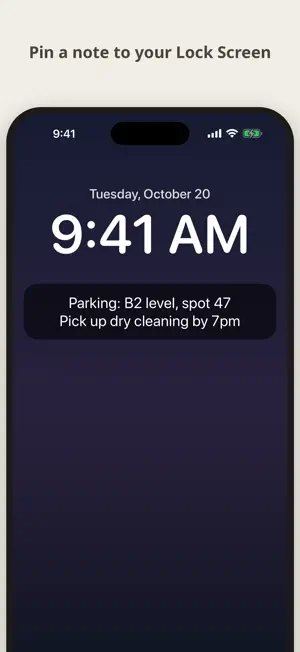
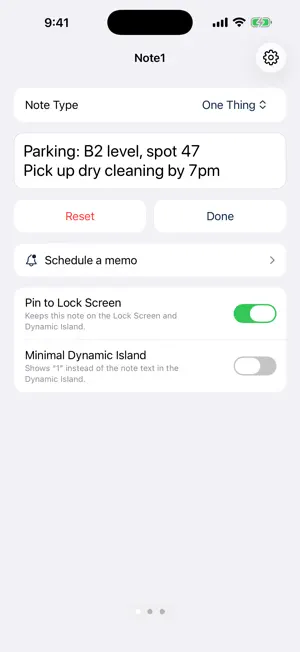
Note1 keeps one note in front of you. No folders. No lists. No endless scrolling. You open the app and your note is already there, ready to edit. PIN IT WHERE YOU LOOK Pin a note to your Lock Screen and the Dynamic Island. A phone number you just heard, a parking spot, a shopping list, the thing you must not forget today. Glance at your phone and it is there. THREE NOTES, ONE SWIPE APART Swipe left and right to move between your notes. Each one can be pinned on its own, so you can keep today's errand on the Lock Screen while the other notes wait. HOME SCREEN WIDGET Put your note on the Home Screen. Choose which note each widget shows, place several, and tap one to jump straight to that note. SCHEDULE A MEMO Write a memo now and pick a time. When the time comes you get a notification, and one tap adds it to your note or deletes it. Plan tonight's shopping list or tomorrow morning's reminders ahead. MADE TO STAY OUT OF THE WAY - Opens straight into your note - Adjustable text size and alignment - Minimal display option for the Dynamic Island so a glance does not reveal everything - Works offline. No account, no sign-up YOUR NOTES STAY YOURS Notes are stored on your device. We have no servers and cannot read what you write. FREE AND PRO The first note is free, forever. Note1 Pro unlocks all three notes for a monthly subscription. Pro also removes the limit on memo schedules (the free plan allows one). Subscription renews automatically unless cancelled at least 24 hours before the end of the period. Manage or cancel anytime in your App Store account settings. Terms of Use (EULA): https://www.apple.com/legal/internet-services/itunes/dev/stdeula/ Privacy Policy: https://cofounder.co.kr/note1/privacy
What’s new
Version 1.2.0 · Updated October 20, 2026
New: Schedule a memo - Pick a time and write a memo. You get a notification at that time. - Open it to add the memo to your note or delete it right away. - Tap a scheduled memo in the list to edit it. Fixes - Reordering checklist items no longer adds stray characters to an item.
App privacy
The developer, Hosung Hwang, reported these privacy practices to Apple.
Data Not Linked to You
The following data, which may be collected but is not linked to your identity, may be used for the following purposes:
- Purchases: Purchase History
- Usage Data: Product Interaction
Used for: Analytics
Alternatives to Note1: Lock Screen Note
Looking for apps like Note1: Lock Screen Note? Here are 6 similar apps on the App Store. The highest rated is LockScreenNotes & Widget (5.0/5), and 5 of the 6 are free to download.
-
 Lock Screen Notes - PinNote
-
 PinNote – Lock Screen Notes
-
 LockScreenNotes & Widget
5.0
LockScreenNotes & Widget
5.0
-
 Harvey Reminders
-
 isnote - Island Notes
-
 わすれん − ロック画面にメモ・あと何日
| App | Rating | Price | Last updated | Compare |
|---|---|---|---|---|
| Note1: Lock Screen Note | – | Free | October 20, 2026 | |
| Lock Screen Notes - PinNote | – | Free | Aug 21, 2026 | Compare |
| PinNote – Lock Screen Notes | – | Free | Oct 1, 2026 | Compare |
| LockScreenNotes & Widget | 5.0 / 5 (4) | Free | Aug 6, 2026 | Compare |
| Harvey Reminders | – | Free | Oct 28, 2025 | Compare |
| isnote - Island Notes | – | 0.99 USD | Aug 4, 2026 | Compare |
| わすれん − ロック画面にメモ・あと何日 | – | Free | Aug 17, 2026 | Compare |