

GradeMe!
Russell Metzger Education iPhoneiPadiPod touch
GradeMe! is a free Education app for iPhone and iPad by Russell Metzger. Requires iOS 26.2. Updated September 2, 2026.
- Price
- Free
- on the App Store
- Size
- 25 MB
- Age 4+
- Updated
- Sep 2
- 2026 · v1.1
Screenshots


About GradeMe!
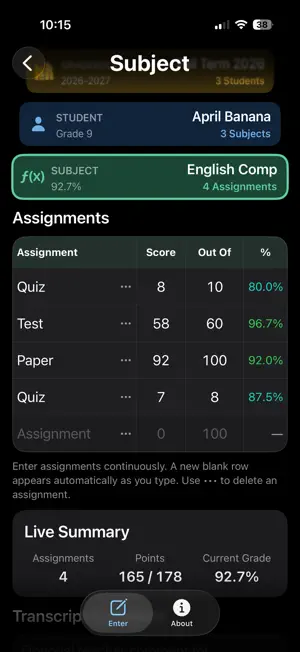
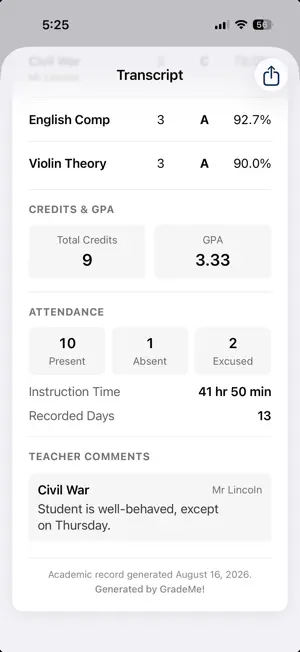
Spend less time recording grades. Spend more time teaching. GradeMe! is a simple, powerful gradebook designed for teachers who want to keep accurate academic records without turning recordkeeping into a second job. Whether you’re managing one student or an entire classroom, GradeMe! makes it easy to organize your school year, record grades, track attendance, and create polished academic records—all in one place. SIMPLE FROM THE START GradeMe! was designed to be quick to set up and easy to use. Create a Gradebook, add your Students and Subjects, and you’re ready to start recording grades. No complicated setup. No sprawling menus. No learning curve just to enter an assignment. EVERYTHING ORGANIZED Create multiple Gradebooks and organize each one with its own Students, Subjects, and Assignments. GradeMe! automatically keeps the numbers up to date as you work, so you can see how each student is doing without maintaining separate spreadsheets or calculating grades by hand. FAST ATTENDANCE Recording attendance shouldn’t interrupt your day. GradeMe! lets you record attendance in just a couple of taps, making it easy to keep accurate records while staying focused on teaching. GRADES THAT CALCULATE THEMSELVES Enter points earned and points possible, and GradeMe! does the rest. Subject averages and letter grades stay current automatically as assignments are added or changed. CREDITS & GPA WHEN YOU NEED THEM For high school, college, or other situations where credits and GPA matter, simply enable Credits & GPA for the Gradebook. When you don’t need them, they stay out of the way. PRINTABLE ACADEMIC TRANSCRIPTS Turn the records you’ve already entered into a clean academic transcript. GradeMe! brings together student information, courses, final grades, attendance, credits, GPA, and teacher comments into a professional document that can be saved, printed, or shared. YOUR RECORDS, PRESERVED IN THE CLOUD Your GradeMe! data is stored in the cloud, helping preserve important academic records and making them available when you need them. BUILT AROUND TEACHING GradeMe! isn’t trying to become another complicated school management system. It’s designed around a much simpler idea: Recording the work should take less time than teaching it. From everyday assignments to the final transcript, GradeMe! helps you maintain the records you need with less effort—so you can spend more of your time where it belongs: teaching. PRIVACY POLICY & TERMS Privacy Policy: https://ramaccts.wixsite.com/exaq-services-llc#grademe Terms of Use (Apple Standard EULA): https://www.apple.com/legal/internet-services/itunes/dev/stdeula/
What’s new
Version 1.1 · Updated September 2, 2026
Minor improvements - reversed display order of assignments to avoid lengthy scrolling.
App privacy
The developer, Russell Metzger, reported these privacy practices to Apple.
Data Linked to You
The following data, which may be collected and linked to your identity, may be used for the following purposes:
- Contact Info: Email Address, Name
- User Content: Other User Content
- Identifiers: User ID
Used for: App Functionality
Alternatives to GradeMe!
Looking for apps like GradeMe!? Here are 6 similar apps on the App Store. The highest rated is Homeschool Wizard (5.0/5), and all 6 are free to download.
-
 Homeschool Wizard
5.0
Homeschool Wizard
5.0
-
 Math Duel Kids: Learn & Play
-
 CO-OP Link
5.0
CO-OP Link
5.0
-
 RIS School (Teacher)
-
 Eduviyo
-
 Hearth: Homeschool Planner
| App | Rating | Price | Last updated | Compare |
|---|---|---|---|---|
| GradeMe! | – | Free | September 2, 2026 | |
| Homeschool Wizard | 5.0 / 5 (2) | Free | Sep 24, 2026 | Compare |
| Math Duel Kids: Learn & Play | – | Free | Sep 18, 2026 | Compare |
| CO-OP Link | 5.0 / 5 (1) | Free | Oct 8, 2026 | Compare |
| RIS School (Teacher) | – | Free | Sep 19, 2026 | Compare |
| Eduviyo | – | Free | Apr 15, 2026 | Compare |
| Hearth: Homeschool Planner | – | Free | Jul 30, 2026 | Compare |
Compare GradeMe! with the top alternatives: ratings, updates, ASO score and keyword gaps →