

PoofCal
Ravneet Nagpal Productivity iPhoneiPadiPod touch
PoofCal is a free Productivity app for iPhone and iPad by Ravneet Nagpal. Requires iOS 17.0. Updated September 11, 2026.
- Price
- Free
- on the App Store
- Size
- 2 MB
- Age 4+
- Updated
- Sep 11
- 2026 · v1.0.3
Screenshots


About PoofCal
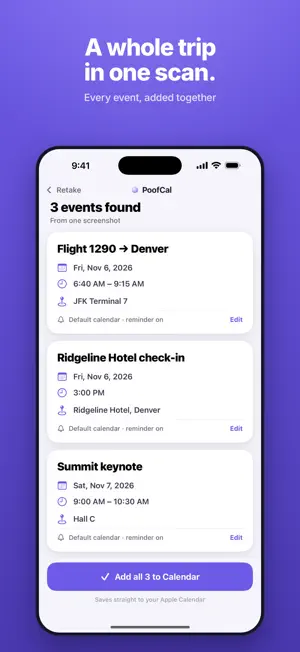
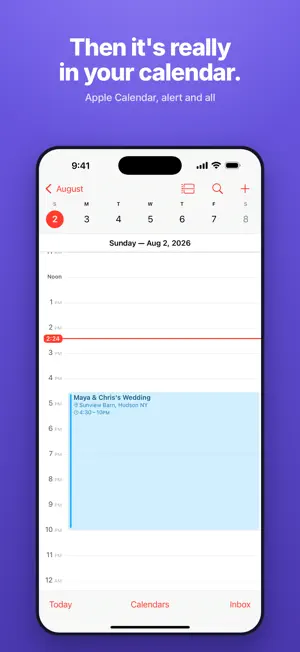
Snap a screenshot. Get a calendar event. PoofCal reads the date, time and place out of any picture — a flight confirmation, a party invite, a school flyer, a concert ticket, a text from a friend — and drops it straight into your Apple Calendar. No retyping. WHAT IT HANDLES • Screenshots of emails, texts, DMs and websites • Photos of physical flyers, invitations and posters — even handwriting • Several events in one picture, added together • Confirmation numbers, seats and party details kept in the notes BUILT TO GET THE DATE RIGHT The hard part usually isn't reading the words — it's knowing that "this Friday at 7" means the 12th, or that a flyer with no year means next March. PoofCal works out the year, the time zone and the end time, and flags anything it had to guess so you can fix it in one tap before it saves. PRIVATE BY DEFAULT Your photo is read on your device using Apple's built-in text recognition. Only the text goes out to be turned into an event, and nothing is stored — no account, no sign-in, no history sitting on a server. TRY IT FIRST Your first few scans are free, so you can watch it work before you pay for anything. PoofCal Pro — unlimited scans • $14.99 per year • $2.99 per month Payment is charged to your Apple Account at confirmation of purchase. The subscription renews automatically unless it is cancelled at least 24 hours before the end of the current period; your account is charged for renewal within 24 hours of the end of the period. You can manage or cancel your subscription in your Apple Account settings after purchase. Terms of Use (EULA): https://www.apple.com/legal/internet-services/itunes/dev/stdeula/ Privacy Policy: https://poofcal.app/privacy
What’s new
Version 1.0.3 · Updated September 11, 2026
Pick how you pay: yearly, monthly, or a one-time lifetime purchase. Clearer pricing before you tap. A little ring on the home screen shows your free scans left. Faster first run, and stronger protection for your scans.
App privacy
The developer, Ravneet Nagpal, reported these privacy practices to Apple.
Data Not Linked to You
The following data, which may be collected but is not linked to your identity, may be used for the following purposes:
- User Content: Photos or Videos, Other User Content
- Identifiers: Device ID
Used for: App Functionality
Alternatives to PoofCal
Looking for apps like PoofCal? Here are 6 similar apps on the App Store. The highest rated is Cash Flow Planner (4.6/5), and all 6 are free to download.
-
 Questly: Gamified To-Do List
-
 Pebble AI: To-Do & Focus
4.2
Pebble AI: To-Do & Focus
4.2
-
 Cash Flow Planner
4.6
Cash Flow Planner
4.6
-
 Momentum: Energising Habits
3.6
Momentum: Energising Habits
3.6
-
 Easlo Experiments
4.6
Easlo Experiments
4.6
-
 Joi: Daily Planner & Organizer
4.4
Joi: Daily Planner & Organizer
4.4
| App | Rating | Price | Last updated | Compare |
|---|---|---|---|---|
| PoofCal | – | Free | September 11, 2026 | |
| Questly: Gamified To-Do List | – | Free | Oct 13, 2026 | Compare |
| Pebble AI: To-Do & Focus | 4.2 / 5 (74) | Free | Apr 29, 2026 | Compare |
| Cash Flow Planner | 4.6 / 5 (305) | Free | Sep 24, 2026 | Compare |
| Momentum: Energising Habits | 3.7 / 5 (20) | Free | Feb 3, 2026 | Compare |
| Easlo Experiments | 4.6 / 5 (24) | Free | Aug 27, 2026 | Compare |
| Joi: Daily Planner & Organizer | 4.4 / 5 (190) | Free | Jan 6, 2026 | Compare |
Compare PoofCal with the top alternatives: ratings, updates, ASO score and keyword gaps →