

ThirdLife: Digital Wellbeing
ThirdLife Labs Pty Ltd Health & Fitness iPhoneiPadiPod touch
ThirdLife: Digital Wellbeing is a free Health & Fitness app for iPhone and iPad by ThirdLife Labs Pty Ltd. Rated 5.0/5 from 1 ratings. Requires iOS 17.4.
- Rating
- 5.0
- 1 ratings
- Price
- Free
- on the App Store
- Size
- 5 MB
- Age 4+
- Updated
- Oct 12
- 2026 · v2.6.1
Screenshots



About ThirdLife: Digital Wellbeing
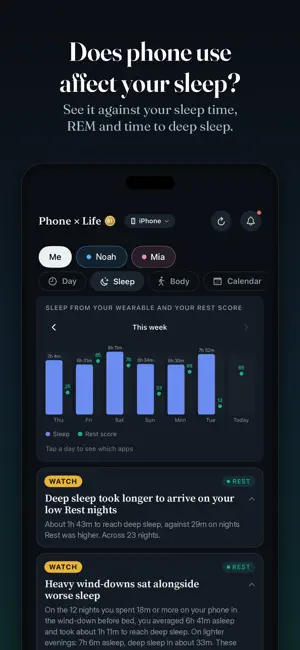
Screen time tools count hours. ThirdLife turns raw screen-time signals into intelligent findings across the four dimensions of your digital life that matter most: Connect, Balance, Focus and Rest. So you can tell a healthy day from one that needs care, and do something about it. Connect, real conversation against passive scrolling Balance, active use against consumption Focus, sustained attention against fragmentation Rest, how quiet your phone stayed around sleep Each is scored out of 100, and the four roll into one daily score, with a plain-language read on what shaped the day. No jargon, no dashboards to decode. PHONE × LIFE Every other tool looks at your phone on its own. ThirdLife reads it beside the rest of your life and finds what moved together. Your day: hour by hour, what the phone was used for. Tap an hour for the apps. Your sleep: on the nights the phone stayed up late, did you sleep less? Read against your actual sleep from Apple Health, not a guessed bedtime. Your body: how much of each workout the phone was in, and whether it came on your walks and outside. Music and workout apps are left out. Your calendar: what share of your committed time the phone quietly took. Every chart shows a week at a time; tap a day for the apps behind it. Patterns that moved together, not proof of cause. Where the data is thin, ThirdLife says nothing rather than guessing. INSIGHTS Every score comes with the why behind it. Findings in plain language, graded Great, Good, Watch or Action, naming the exact apps, minutes and days behind each one. A short read daily, a deeper one monthly. MILESTONES Change is hard to see day to day, so ThirdLife marks it in small, honest milestones. Encouragement when things go well, never a game you have to win. WEEKLY REPORT Once a week, the week just gone in one place: what lifted, what slipped, and how each ring moved. LIMITS Limit an app, several, or a whole category like social media, with daily totals and before-sleep limits that stop you at the line or nudge you gently. FOR FAMILIES See your children's day on your own phone. If they're in your Family Sharing group with Screen Time on, they appear in ThirdLife automatically, with nothing to install on their phone: their four scores, insights, an hour-by-hour view of their day, and the apps they used. Set their bedtime and school hours, and ThirdLife reads their nights and school days against their real routine. Scoring is fairer for children too: Connect counts real messaging and calls, and a short burst of watching barely touches Focus. You see their scores, not their messages, browsing or location. Want them to have their own view? Install ThirdLife on their phone too. You set the limits, sleep and school hours behind a passcode; they see the rest, and the app tells them plainly that you can see their scores. One subscription covers your whole family through Family Sharing. PRIVACY IS THE ARCHITECTURE Your screen time, health data, calendar and scores are read and scored on your phone, and ThirdLife never sends them anywhere: no account, no analytics, no servers. A child's Screen Time reaches a parent's phone through Apple's Family Sharing, never through us. We only ask for an optional name and email, for a short monthly note on what's new. Works offline. FREE AND PREMIUM Seeing is free: your overall score, the four rings, your reads for today and the month, and your milestones. Premium adds Phone × Life, the weekly report, Limits, and your children's scores on your phone. Try it free for 14 days. ThirdLife Labs Pty Ltd, Melbourne, Australia.
What’s new
Version 2.6.1 · Updated October 12, 2026
ThirdLife for families See your children's day on your own phone. If your children are in your Family Sharing group with Screen Time turned on, they now appear in ThirdLife automatically. Switch between yourself and each child with the pills at the top of Overview and Phone × Life to see their four rings, insights, sleep and school days, and the apps they used. Nothing to install on their phone. Part of Premium, free for 14 days. Set each child's bedtime and school hours in You, so their nights and school days are read against their real routine. Scoring is fairer for children too: Connect counts real messaging and calls, and a short burst of watching barely touches Focus. Phone × Life, rebuilt - Day: your day hour by hour, what the phone was used for, against your sleep window. Tap an hour to see the apps. - Charts a week at a time. Tap any day to see the apps behind it: before bed, during sleep, in meetings, during workouts. - Steps and daylight are now compared with your phone time, including whether the phone came with you on walks and outside. Also - Your sleep window now lives in You, one tap away. - Fixes and refinements throughout, youincluding weekly trends and insights, especially for children (2.6.1)
App privacy
The developer, ThirdLife Labs Pty Ltd, reported these privacy practices to Apple.
Data Linked to You
The following data, which may be collected and linked to your identity, may be used for the following purposes:
- Contact Info: Email Address, Name
Used for: Developer’s Advertising or Marketing
Alternatives to ThirdLife: Digital Wellbeing
Looking for apps like ThirdLife: Digital Wellbeing? Here are 6 similar apps on the App Store.


| App | Rating | Price | Last updated | Compare |
|---|---|---|---|---|
| ThirdLife: Digital Wellbeing | 5.0 / 5 (1 rating) | Free | October 12, 2026 | |
| The Well Hub | – | Free | Sep 8, 2026 | Compare |
| The MVMT Studio | – | Free | Oct 30, 2025 | Compare |
| Zero Point Yoga | – | Free | Sep 25, 2026 | Compare |
| Health Passport Eveda | – | Free | Mar 6, 2026 | Compare |
| HLAB | – | Free | Aug 18, 2026 | Compare |
| Anglesea Pilates | – | Free | Dec 10, 2025 | Compare |