

PodGuard - Podcast Filter
Colin OBrien Entertainment iPhoneiPadiPod touch
PodGuard - Podcast Filter is a free Entertainment app for iPhone and iPad by Colin OBrien. Requires iOS 17.0. Updated October 15, 2026.
- Price
- Free
- on the App Store
- Size
- 9 MB
- Age 12+
- Updated
- Oct 15
- 2026 · v1.0.1
Screenshots


About PodGuard - Podcast Filter
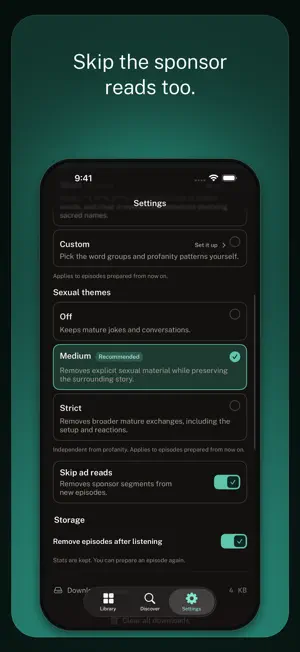
PodGuard filters any podcast by removing profanity, mature themes, and ads. PodGuard prepares cleaned copies of podcast episodes by cutting profanity, selected mature-topic passages, and sponsor segments according to your settings. Have you ever wanted to listen to a podcast, but hesitated because of the host’s language or the topics that might come up? PodGuard helps you enjoy comedy, news, true crime, interviews, and more with fewer interruptions and more confidence about what you will hear. PodGuard cuts unwanted words and passages instead of covering them with a tone. The episode becomes slightly shorter, while the surrounding conversation stays as natural as possible. It fills the void of the profanity so your mind does not autofill profanity. FILTER PROFANITY Select Light, Moderate, or Strict. Custom lets you start with Strict and allow selected word groups back in. Strict can also remove clear irreverent exclamations involving sacred names while preserving prayer and genuine religious discussion. FILTER EXPLICIT TOPICS Off keeps mature conversations. Moderate removes explicit sexual material while preserving the surrounding story. Strict removes broader mature exchanges, including more of the setup and reactions. SKIP AD READS Turn on Skip ad reads to remove detected sponsor segments. LISTEN YOUR WAY Follow shows, download episodes for offline listening, build a queue, and resume where you left off. Playback can begin after PodGuard has checked the opening portion while the rest continues preparing. PodGuard removes what it finds at the level you choose. No automated filter can promise that every episode will be free of everything you may object to, but PodGuard never plays beyond the portion it has checked. Spend less time reaching for Skip. Listen with PodGuard. Terms of Use: https://podguard.app/terms Privacy Policy: https://podguard.app/privacy
What’s new
Version 1.0.1 · Updated October 15, 2026
You can now keep your listening in step between your iPhone and the website. Turn on Listen across devices in Settings to share your followed shows, listening positions, queue, playback speed and filter choices. Signing in is quicker. Sign in with Apple can fill in your name for you, and you can skip the name step. You can choose whether to share listening and support details with us. This helps us find and fix problems faster, and you can change it at any time in Settings under Legal.
App privacy
The developer, Colin OBrien, reported these privacy practices to Apple.
Data Linked to You
The following data, which may be collected and linked to your identity, may be used for the following purposes:
- Usage Data: Product Interaction
- Diagnostics: Crash Data, Other Diagnostic Data
- Purchases: Purchase History
- Contact Info: Email Address
- User Content: Audio Data, Other User Content
- Identifiers: User ID, Device ID
Used for: Analytics, App Functionality
Alternatives to PodGuard - Podcast Filter
Looking for apps like PodGuard - Podcast Filter? Here are 6 similar apps on the App Store. The highest rated is Lou: Skip Podcast Ads (5.0/5), and all 6 are free to download.
-
 Lou: Skip Podcast Ads
5.0
Lou: Skip Podcast Ads
5.0
-
 PodHaven
5.0
PodHaven
5.0
-
 QuellCast: Clean Podcasts
5.0
QuellCast: Clean Podcasts
5.0
-
 Skingomz
5.0
Skingomz
5.0
-
 Earmuffs
5.0
Earmuffs
5.0
-
 Podcast It: AI Podcast
3.5
Podcast It: AI Podcast
3.5
| App | Rating | Price | Last updated | Compare |
|---|---|---|---|---|
| PodGuard - Podcast Filter | – | Free | October 15, 2026 | |
| Lou: Skip Podcast Ads | 5.0 / 5 (5) | Free | Oct 15, 2026 | Compare |
| PodHaven | 5.0 / 5 (1) | Free | Sep 25, 2026 | Compare |
| QuellCast: Clean Podcasts | 5.0 / 5 (1) | Free | Oct 14, 2026 | Compare |
| Skingomz | 5.0 / 5 (1) | Free | Oct 18, 2026 | Compare |
| Earmuffs | 5.0 / 5 (3) | Free | Jun 18, 2026 | Compare |
| Podcast It: AI Podcast | 3.5 / 5 (2) | Free | Sep 19, 2026 | Compare |