

Dimora: AI Interior Designer
JASPER GROUP FZCO (Company/Organization) Lifestyle iPhoneiPadiPod touch
Dimora: AI Interior Designer is a free Lifestyle app for iPhone and iPad by JASPER GROUP FZCO (Company/Organization). Rated 5.0/5 from 2 ratings.
- Rating
- 5.0
- 2 ratings
- Price
- Free
- on the App Store
- Size
- 66 MB
- Age 4+
- Updated
- Sep 16
- 2026 · v1.6.6
Screenshots



About Dimora: AI Interior Designer
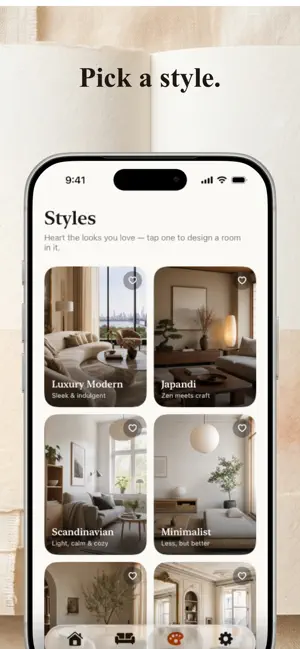
Dimora is your personal AI interior designer. Photograph any room and it comes back redesigned — with a written note explaining every choice, and a complete plan of what it takes to build it. Then Dimora does the thing other AI room apps don't: it furnishes your design with real products from real furniture stores in your own country, and rebuilds the photo around those exact pieces. Real product names. Real prices in your currency. Real links to the shop. The room you are looking at is a room you can actually order. HOW IT WORKS 1. Photograph your room, or pick a photo from your library. 2. Choose from 14 styles — Japandi, Luxury Modern, Scandinavian, Parisian, Art Deco, Mid-Century, Coastal, Industrial and more. 3. Set your budget on the slider, and tap what stays — your couch, your flooring, your TV. Your designer works around what you already own. 4. Your designed room arrives in moments, with a designer's note and a full build plan. 5. Tap "Source the pieces" and Dimora finds the real products, in real stores near you, and re-renders your room using them. REAL PRODUCTS, REAL STORES, YOUR COUNTRY Dimora shops where you shop. In 30 markets it searches the stores that actually operate there, in the language those stores publish in, and prices everything in your currency: IKEA, Home Centre, Danube Home, Amazon.ae and Marina Home in the Gulf. John Lewis, Dunelm and Habitat in the UK. Wayfair, West Elm, Crate & Barrel and Article in the US. OTTO, home24 and Westwing in Germany. Maisons du Monde and La Redoute in France. Pepperfry and Urban Ladder in India. Castlery and HipVan in Singapore. Mio, JYSK, Bolia and Nordic Nest across the Nordics — and many more. Every piece is a real listing with a photo, a real price, and a link straight to the store page. A DESIGN YOU CAN ACTUALLY BUILD • A build plan, not a picture — every piece grouped like a designer's spec sheet, with prices and a running total against your budget. • Tap anything in the photo — the sofa, the rug, the lamp — and see what it is, what it costs, why your designer chose it, and where to buy it. • Swap any piece for a budget, standard or premium alternative. The total recalculates instantly. • Replace a single object visually. Don't like the sofa? Pick another and only the sofa changes — same walls, same light, same everything else. • Check pieces off as you buy them. Every room shows how far along it is and exactly what's left to spend. • Pieces you already own are marked "You own this — $0", so your budget only counts what you actually need to buy. TALK TO YOUR DESIGNER Every room has a conversation. Say "make it brighter", "warmer colours", "replace only the rug", "I have cats", "make it rental friendly" — and the room and the plan both change in response. Unlimited on every membership. KEEP EVERY ROOM ORGANISED Name and save every design, and group rooms by place — your apartment, your parents' house, a villa, the office — each with its own rooms, total invested and remaining spend. Compare before and after with a drag-to-reveal slider, play a cinematic reveal, and share or save the result. MEMBERSHIP Your first design is free, sourcing included. • Designer — $29.99/month, 20 designs a month • Designer Annual — $269.99/year, 20 designs a month (save 25%) • Studio — $79.99/month, 60 designs a month, for professionals • Or a one-time pack of 5 designs Chat, swaps, object replacements, palette changes and your build checklists are unlimited on every membership. A design is one new room render plus its full sourcing pass; refining a design never costs another. Memberships renew automatically until cancelled. Cancel anytime in your Apple Account settings. Terms of Use: https://getdimora.app/terms Privacy Policy: https://getdimora.app/privacy Dimora designs are AI-generated concepts. Prices shown before sourcing are estimates; sourced prices come from the retailer's own page. As an Amazon Associate, Dimora earns from qualifying purchases.
What’s new
Version 1.6.6 · Updated September 16, 2026
Bug fixes and improvements
App privacy
The developer, JASPER GROUP FZCO (Company/Organization), reported these privacy practices to Apple.
Data Linked to You
The following data, which may be collected and linked to your identity, may be used for the following purposes:
- Purchases: Purchase History
- Contact Info: Email Address
- User Content: Other User Content
- Identifiers: Device ID
- Diagnostics: Other Diagnostic Data
Used for: App Functionality
Data Not Linked to You
The following data, which may be collected but is not linked to your identity, may be used for the following purposes:
- Usage Data: Advertising Data, Product Interaction
- User Content: Photos or Videos
Used for: Third-Party Advertising, Analytics, App Functionality
Alternatives to Dimora: AI Interior Designer
Looking for apps like Dimora: AI Interior Designer? Here are 6 similar apps on the App Store. The highest rated is Gallup Hill Baptist Church (5.0/5), and 5 of the 6 are free to download.
-
 ShopTheRoom.ai
-
 Puzzle - Meet Me
-
 Spiro Sense
-
 Gallup Hill Baptist Church
5.0
Gallup Hill Baptist Church
5.0
-
 Parent Trap
5.0
Parent Trap
5.0
-
 Your Guardian Angel
| App | Rating | Price | Last updated | Compare |
|---|---|---|---|---|
| Dimora: AI Interior Designer | 5.0 / 5 (2 ratings) | Free | September 16, 2026 | |
| ShopTheRoom.ai | – | Free | May 2, 2026 | Compare |
| Puzzle - Meet Me | – | Free | Jul 27, 2026 | Compare |
| Spiro Sense | – | 0.99 USD | Sep 17, 2026 | Compare |
| Gallup Hill Baptist Church | 5.0 / 5 (2) | Free | Sep 26, 2026 | Compare |
| Parent Trap | 5.0 / 5 (2) | Free | Jan 3, 2026 | Compare |
| Your Guardian Angel | – | Free | Jul 27, 2026 | Compare |