

Means: Safe to Spend
Beyond BnB Ventures LLC Finance iPhoneiPadiPod touch
Means: Safe to Spend is a free Finance app for iPhone and iPad by Beyond BnB Ventures LLC. Rated 5.0/5 from 1 ratings. Requires iOS 15.1.
- Rating
- 5.0
- 1 ratings
- Price
- Free
- on the App Store
- Size
- 45 MB
- Age 4+
- Updated
- Aug 23
- 2026 · v1.0.1
Screenshots

About Means: Safe to Spend
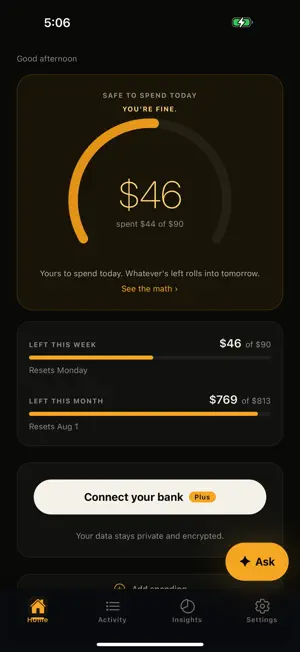
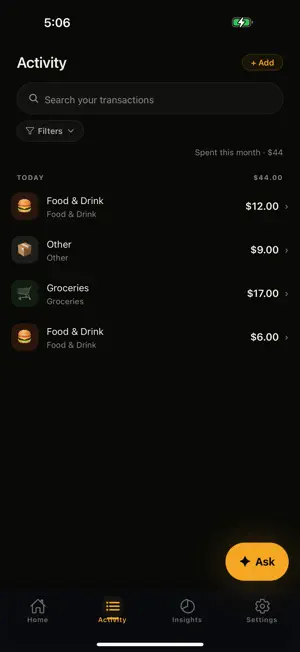
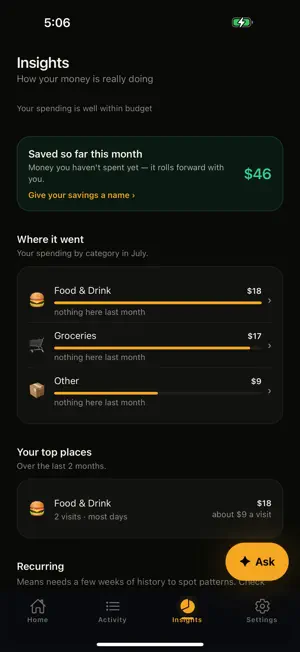
Means answers the only money question that matters day to day: what's actually safe to spend right now? Connect your bank in seconds and Means does the rest. It reads your income, sets aside what's owed for bills and the goals you care about, and shows you one honest number — your safe-to-spend — on a calm home screen that updates on its own. No spreadsheets, no envelopes, no guilt. WHY MEANS • One honest number. Not a dozen charts — the amount that's genuinely yours to spend today. • It works on its own. Link your accounts once and spending shows up automatically. • Bills, handled. Means learns your recurring bills and quietly protects that money. • Goals that stick. Set money aside for what matters and watch safe-to-spend adjust. • Every number opens. Tap any figure to see the exact transactions behind it. • Calm by design. A quiet, warm interface that respects your attention. MEMBERSHIP The budgeting is free, and always will be. • Free — the full budgeting toolkit: your daily safe-to-spend, rollover, set-asides and a savings goal. You add spending by hand. 10 AI questions a month. • Plus — connect up to 10 banks so your spending appears on its own, plus 200 AI questions a month. • Pro — up to 20 banks and 1,000 AI questions a month. SUBSCRIPTION DETAILS Means Plus — $7.99 per month, or $59.99 per year (billed once a year). Means Pro — $14.99 per month, or $99.99 per year (billed once a year). Both include a 7-day free trial for new subscribers. Connecting a bank, so your spending appears automatically, is part of Means Plus and Means Pro. Without a subscription you can add spending by hand and ask 10 AI questions a month, free forever. Payment is charged to your Apple Account at confirmation of purchase. Your subscription renews automatically for the same period at the same price unless you turn off auto-renew at least 24 hours before the end of the current period. Your Apple Account is charged for renewal within 24 hours before the end of the current period. Manage your subscription or turn off auto-renew in your Apple Account settings after purchase. Any unused portion of a free trial is forfeited when you purchase a subscription. Prices are in USD; prices in other regions may vary. Terms of Use (EULA): https://www.apple.com/legal/internet-services/itunes/dev/stdeula/ Means Terms of Service: https://api.means.finance/terms Privacy Policy: https://api.means.finance/privacy PRIVATE BY DESIGN Your bank connection is handled by Plaid, a trusted bank-grade provider, and is read-only — Means can see transactions and balances, and can never move money. Your data is encrypted, never sold and never used for advertising. Means is paid for by memberships, not by you. Support: https://api.means.finance/support
What’s new
Version 1.0.1 · Updated August 23, 2026
Small repairs, mostly to the moments where Means wasn't clear enough. Notifications now open the screen they're about. If an update from your bank doesn't go through, Means says so instead of going quiet. Connecting a bank explains what actually happened, rather than asking you to try again when that can't help. And the assistant and Insights now describe the same month. Plus a round of layout and accessibility fixes throughout.
App privacy
The developer, Beyond BnB Ventures LLC, reported these privacy practices to Apple.
Data Linked to You
The following data, which may be collected and linked to your identity, may be used for the following purposes:
- Purchases: Purchase History
- Financial Info: Other Financial Info
- Contact Info: Email Address
- User Content: Other User Content
- Identifiers: User ID, Device ID
Used for: App Functionality
Data Not Linked to You
The following data, which may be collected but is not linked to your identity, may be used for the following purposes:
- Diagnostics: Crash Data
Used for: App Functionality
Alternatives to Means: Safe to Spend
Looking for apps like Means: Safe to Spend? Here are 6 similar apps on the App Store. The highest rated is Waypoint Budget Planner App (5.0/5), and all 6 are free to download.
-
 Spendable: Safe to Spend
-
 SpendMunk - Budget Planner
-
 Weekly Safe to Spend
-
 UseKYN:Money Tracker & Planner
4.8
UseKYN:Money Tracker & Planner
4.8
-
 PayCheck Budget
4.4
PayCheck Budget
4.4
-
 Waypoint Budget Planner App
5.0
Waypoint Budget Planner App
5.0
| App | Rating | Price | Last updated | Compare |
|---|---|---|---|---|
| Means: Safe to Spend | 5.0 / 5 (1 rating) | Free | August 23, 2026 | |
| Spendable: Safe to Spend | – | Free | Aug 17, 2026 | Compare |
| SpendMunk - Budget Planner | – | Free | Apr 29, 2026 | Compare |
| Weekly Safe to Spend | – | Free | Aug 28, 2026 | Compare |
| UseKYN:Money Tracker & Planner | 4.8 / 5 (21) | Free | Aug 2, 2026 | Compare |
| PayCheck Budget | 4.4 / 5 (11) | Free | Sep 17, 2026 | Compare |
| Waypoint Budget Planner App | 5.0 / 5 (3) | Free | Sep 25, 2026 | Compare |