

Auto Image Scroll
Seiya.k Photo & Video iPhoneiPadiPod touch
Auto Image Scroll is a free Photo & Video app for iPhone and iPad by Seiya.k. Requires iOS 15.0. Updated October 14, 2026.
- Price
- Free
- on the App Store
- Size
- 36 MB
- Age 4+
- Updated
- Oct 14
- 2026 · v1.2.8
Screenshots

About Auto Image Scroll
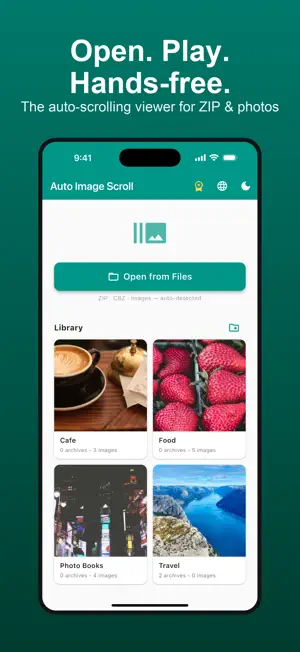
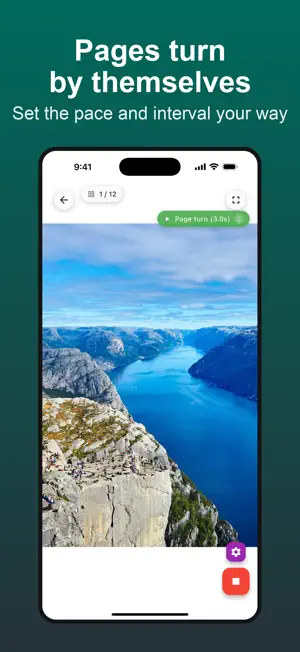
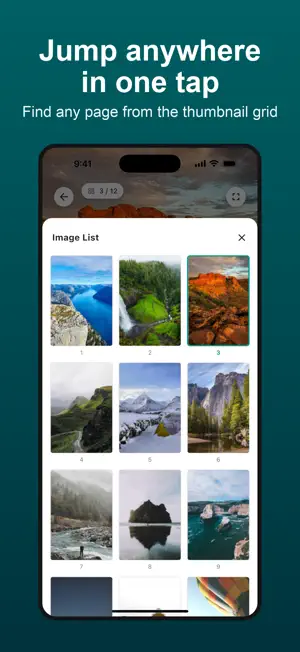
Open it, press play, and it scrolls. A hands-free image viewer that keeps moving at a steady speed without you touching the screen. Comic and doujinshi ZIP, CBZ and CBR files, photo books, illustration sets, long screenshots, reference images. When you want to read but your hands are busy, Auto Image Scroll turns the pages for you — while eating, while exercising, between tasks. WHO IT IS FOR - Anyone reading comic or doujinshi ZIP, CBZ and CBR files on a phone - Anyone who wants photo books and illustration sets to play by themselves - Anyone whose hands are busy — cooking, training, commuting - Anyone checking long screenshots or reference images at a steady pace MAIN FEATURES - Read ZIP, CBZ and CBR without unzipping, sorted in natural file order - JPEG, PNG, WebP, HEIC, GIF and BMP supported (animated GIFs play) - Three view modes: vertical scroll, horizontal scroll and page turn - Right-to-left reading for manga - Trim margins automatically, so blank borders do not eat the screen - Speed control from slow to fast, plus a custom speed - Loop playback and automatic position saving - Continue to the next volume in the same folder when one finishes - A library with folders and cover images - Jump to any page from the thumbnail grid - The screen stays awake while auto-scrolling - Everything runs on your device. No image is ever uploaded PLANS Free: browsing, auto-scroll, speed control and automatic margin trimming (up to 100 images at a time, up to 3 stored ZIP, CBZ or CBR files). Pro (monthly, yearly or one-time): unlimited images, unlimited stored archives, loop playback, resume from your last position, custom speed, dark mode and continuing to the next volume. The yearly plan includes a 7-day free trial. ABOUT THE SUBSCRIPTION - Payment is charged to your Apple Account at confirmation of purchase. - A subscription renews automatically unless cancelled at least 24 hours before the end of the current period, and is charged within 24 hours of renewal. - You can manage or cancel it in your account settings after purchase. - Any unused portion of a free trial is forfeited when you buy a subscription. Privacy Policy: https://fillapps.com/privacy/ Terms of Use (EULA): https://www.apple.com/legal/internet-services/itunes/dev/stdeula/
What’s new
Version 1.2.8 · Updated October 14, 2026
• CBR support: comic files in RAR format now open directly, without extracting — just like ZIP and CBZ • Minor improvements
App privacy
The developer, Seiya.k, reported these privacy practices to Apple.
Data Not Linked to You
The following data, which may be collected but is not linked to your identity, may be used for the following purposes:
- Identifiers: Device ID
- Usage Data: Product Interaction
- Purchases: Purchase History
Used for: Analytics, App Functionality
Alternatives to Auto Image Scroll
Looking for apps like Auto Image Scroll? Here are 6 similar apps on the App Store. The highest rated is 趣相册 - 沉浸式照片视频管理 (5.0/5), and all 6 are free to download.
-
 シンプルスライドショー
-
 趣相册 - 沉浸式照片视频管理
5.0
趣相册 - 沉浸式照片视频管理
5.0
-
 QuickSlideshow
-
 ScrollCap Screen Collage Maker
-
 DiashowDL
-
 Simple-Photo-Frame
| App | Rating | Price | Last updated | Compare |
|---|---|---|---|---|
| Auto Image Scroll | – | Free | October 14, 2026 | |
| シンプルスライドショー | – | Free | May 30, 2026 | Compare |
| 趣相册 - 沉浸式照片视频管理 | 5.0 / 5 (1) | Free | Dec 19, 2025 | Compare |
| QuickSlideshow | – | Free | Jul 11, 2026 | Compare |
| ScrollCap Screen Collage Maker | – | Free | Jul 4, 2026 | Compare |
| DiashowDL | – | Free | Jun 24, 2026 | Compare |
| Simple-Photo-Frame | – | Free | Oct 8, 2026 | Compare |
Compare Auto Image Scroll with the top alternatives: ratings, updates, ASO score and keyword gaps →