

MapFrame: Travel Map Cards
LightShift Co., Ltd. Photo & Video iPhoneiPadiPod touch
MapFrame: Travel Map Cards is a free Photo & Video app for iPhone and iPad by LightShift Co., Ltd. Requires iOS 26.0. Updated August 4, 2026.
- Price
- Free
- on the App Store
- Size
- 10 MB
- Age 4+
- Updated
- Aug 4
- 2026 · v1.0
Screenshots


About MapFrame: Travel Map Cards
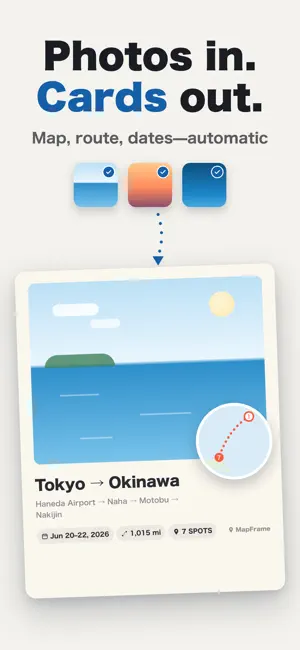
Your trip photos, ready to post. Map, dates, and distance—added automatically. Trip photos tend to pile up in your camera roll. Where you took them, how you got around—the story of the trip doesn't come through in photos alone. With MapFrame, you just pick the photos. It reads where and when they were taken and turns them into a share-ready travel card with a map and route lines. ■ Pick photos, get a travel card Choose up to 12 trip photos. MapFrame reads the capture location and time, then builds a 4:5 card with a mini map, route lines, city names, dates, and total distance. ■ A 15-second reel from the same photos Export a vertical 9:16 reel, too. Your photos and the map move gracefully, following the template. ■ Routes are inferred automatically Walking, driving, trains, flights, and ferries are detected from distance and speed. Flight and ferry legs curve gently across the map. ■ Fix anything afterwards Rename places, reorder stops, change transport modes, pick from 6 route-line colors, toggle dates and distance, and zoom or reposition the main photo. ■ 15 templates to match the mood Journal, Glass, and Ticket are among the 5 free basics. Pro unlocks Film, Magazine, Minimal, Midnight, Sakura, Summer, Wrapped, and more. ■ Processed entirely on your device MapFrame never asks for photo library read permission—it only receives the photos you pick and builds your card on the device. Your photos are never sent to our servers. No ads, no tracking. — Made for — • People who post trip, outing, and event photos to social media • Anyone who wants "where it was taken" to be part of the story • Keeping travel memories in a form you'll want to revisit • Anyone careful about how their photos and location data are handled — Pricing — Free to download, with 3 free exports every month (5 basic templates). MapFrame Pro unlocks unlimited exports, no watermark, and all 15 templates. $3.99/month, $29.99/year ($2.49 per month), or a $69.99 one-time lifetime purchase. The yearly plan starts with a 7-day free trial. Travel memories belong with a map. Make posts that show where you've been, with MapFrame. — Terms & Privacy — Privacy Policy: https://light-shift.net/apps/mapframe/privacy-en Terms of Use (EULA): https://www.apple.com/legal/internet-services/itunes/dev/stdeula/ Pro (monthly/yearly) is an auto-renewing subscription. Payment is charged to your Apple ID at purchase confirmation, and the subscription renews automatically unless auto-renew is turned off at least 24 hours before the end of the current period. You can manage or cancel anytime in your App Store account settings.
App privacy
The developer, LightShift Co., Ltd., reported these privacy practices to Apple.
Data Not Linked to You
The following data, which may be collected but is not linked to your identity, may be used for the following purposes:
- Purchases: Purchase History
- Identifiers: Device ID
- Usage Data: Product Interaction
Used for: Analytics, App Functionality
Alternatives to MapFrame: Travel Map Cards
Looking for apps like MapFrame: Travel Map Cards? Here are 6 similar apps on the App Store. The highest rated is LocationAlpha (5.0/5), and all 6 are free to download.
-
 soloc
-
 PinSnap: GPS for Alpha Cams
-
 mado frame
-
 LocationAlpha
5.0
-
 Alpha GPS: Camera Geotagging
5.0
-
 Unleashed - Camera Remote
4.4
| App | Rating | Price | Last updated | Compare |
|---|---|---|---|---|
| MapFrame: Travel Map Cards | – | Free | August 4, 2026 | |
| soloc | – | Free | Mar 4, 2026 | Compare |
| PinSnap: GPS for Alpha Cams | – | Free | Oct 22, 2026 | Compare |
| mado frame | – | Free | Jul 17, 2026 | Compare |
| LocationAlpha | 5.0 / 5 (1) | Free | Sep 8, 2026 | Compare |
| Alpha GPS: Camera Geotagging | 5.0 / 5 (6) | Free | Oct 19, 2026 | Compare |
| Unleashed - Camera Remote | 4.4 / 5 (52) | Free | May 27, 2024 | Compare |