

Planple — Simple Daily Planner
DAEHAE SHIN Productivity iPhoneiPadiPod touch
Planple — Simple Daily Planner is a free Productivity app for iPhone and iPad by DAEHAE SHIN. Requires iOS 15.0. Updated October 5, 2026.
- Price
- Free
- on the App Store
- Size
- 29 MB
- Age 4+
- Updated
- Oct 5
- 2026 · v1.4.9
Screenshots
About Planple — Simple Daily Planner
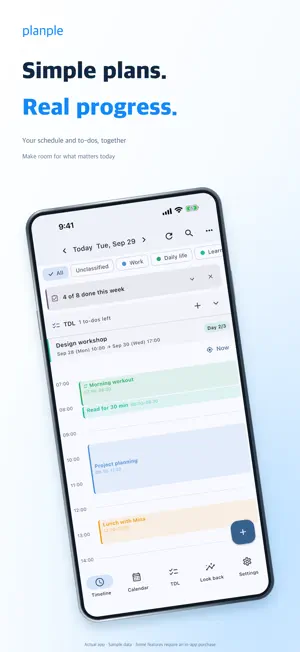
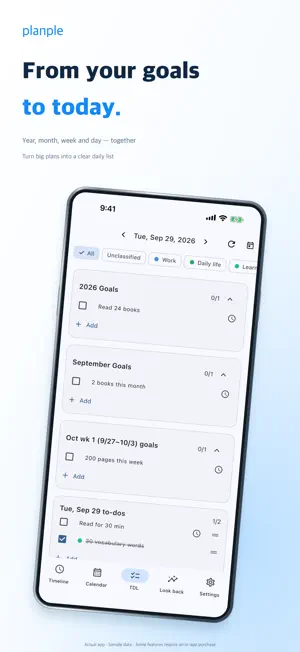
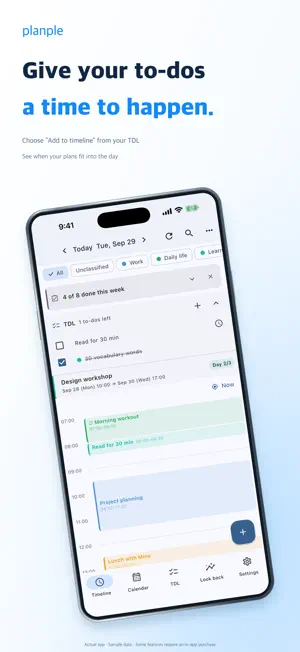
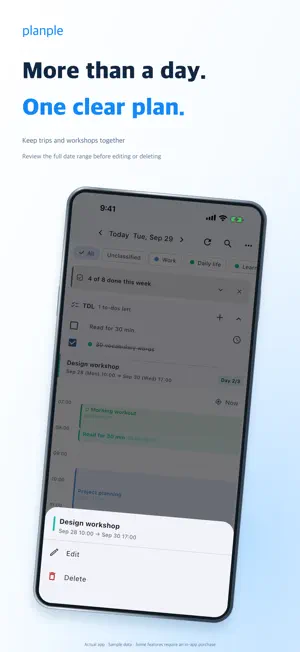
Simple plans. Real progress. Planple helps you turn big goals into daily to-dos and give them a place on your schedule. Start with what matters today, then decide when to do it. FROM BIG GOALS TO TODAY Plan from year to month to week to day with TDL. Break “24 books this year” into “2 this month,” “200 pages this week” and “read for 30 minutes today.” Add a to-do to your timeline when you are ready to give it a time. SEE YOUR DAY CLEARLY Move between the 24-hour timeline and year, month, week and day calendar views. Keep trips and other multi-day events together, review their full date range, and edit or delete them. Choose a project directly in the event form and filter your plans by project. REMINDERS WHEN THEY MATTER Set several reminders for one event: an hour before, ten minutes before or at the start. Scheduled notifications can arrive without keeping the app open. Delivery depends on your device's notification permissions and system settings. MAKE ROOM WHEN PLANS CHANGE Move upcoming events and their reminders together, with undo if you change your mind. Repeating events, overnight schedules and a daily wrap-up help you keep planning as life happens. EVERYDAY PLANNING IS FREE Use schedules, TDL, multiple reminders, this week's to-do completion summary, daily wrap-up and Home Screen widgets for free. Export your schedules, to-dos and projects to a file and restore them later, also free. PLANPLE PRO: LOOK BACK AND PLAN TOGETHER A one-time in-app purchase adds: - Look-back insights: review the past 12 weeks of existing to-dos and your weekday history. Completion-time and postponement patterns appear after at least 30 completion records within the last 180 days. - Create shared projects: invite people by link and approve who joins. Events and to-dos show their authors, and each person edits or deletes their own items. Pro is needed to start sharing; joining an invitation is free. - Automatic iCloud backup: enable it in settings to back up while using the app when at least 24 hours have passed since the last backup. Keeps the latest seven backups. Requires available iCloud storage and a network connection. A LAYOUT THAT FITS Use Planple on iPhone and iPad. With enough content width, view your timeline beside today's to-dos, or the month beside the selected day. Home and Lock Screen widgets keep your plans within reach. Switch between Korean and English and use light or dark mode. START WITHOUT AN APP ACCOUNT Personal schedules and to-dos are stored on your device by default. When you enable sharing, items in the selected project sync through the server. Reminders remain separate on each device. Purchase verification and the sharing or backup features you choose may use the network. Make a clear plan for today. Then take it one step at a time.
What’s new
Version 1.4.9 · Updated October 5, 2026
• A clearer daily timeline and TDL ordered from year to month to week to day. • Choose a project directly when creating or editing an event. • Improved editing, deletion and display of multi-day events. • Fixed duplicate reminder notifications on iOS. • Improved Pro product lookup, pending-payment guidance and purchase state persistence. Open the app once after updating to refresh scheduled reminders.
App privacy
The developer, DAEHAE SHIN, reported these privacy practices to Apple.
Data Linked to You
The following data, which may be collected and linked to your identity, may be used for the following purposes:
- Contact Info: Name
- User Content: Other User Content
- Identifiers: User ID
Used for: App Functionality
Alternatives to Planple — Simple Daily Planner
Looking for apps like Planple — Simple Daily Planner? Here are 6 similar apps on the App Store.





| App | Rating | Price | Last updated | Compare |
|---|---|---|---|---|
| Planple — Simple Daily Planner | – | Free | October 5, 2026 | |
| 나를(naleul) | – | Free | Sep 17, 2026 | Compare |
| Weekvu - Weekly Planner | – | Free | Aug 24, 2026 | Compare |
| Orbit-정체성 기반 습관 관리 | – | Free | Oct 9, 2026 | Compare |
| 오늘치 | – | Free | Aug 6, 2026 | Compare |
| 미뤘다 | – | Free | Oct 8, 2026 | Compare |
| Todolog: To-dos to Records | – | Free | Jun 29, 2026 | Compare |