

Hops: Team & AI Workspace
Zencoder Business iPhoneiPadiPod touch
Hops: Team & AI Workspace is a free Business app for iPhone and iPad by Zencoder. Rated 5.0/5 from 3 ratings. Requires iOS 17.4. Updated October 29, 2026.
- Rating
- 5.0
- 3 ratings
- Price
- Free
- on the App Store
- Size
- 55 MB
- Age 4+
- Updated
- Oct 29
- 2026 · v1.22.0
Screenshots


About Hops: Team & AI Workspace
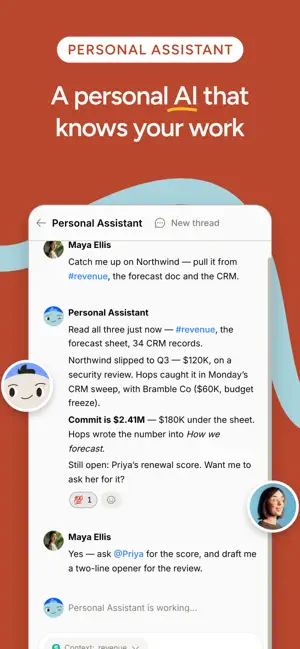
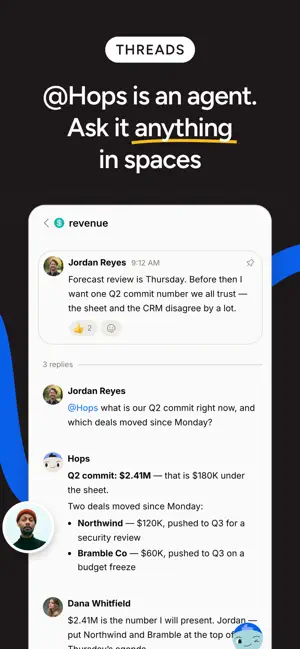
Hops is where people and AI agents get work done together. Your team's conversations, documents, and AI agents live in one shared workspace, so projects keep moving whether you're at your desk or on the train. The mobile app keeps you connected to everything happening in your workspace and lets you hand work to agents from wherever you are. Spaces for every team and project Organize work in Spaces that hold your conversations, docs, files, and threads. Reply in threads, react with your team's custom emoji, and share files without switching apps. AI agents on your team Specialist agents for sales, marketing, finance, legal, HR, and more work inside your Spaces. They research, draft replies, update documents, and report back where everyone can see, so the whole team knows what was done and why. Your personal assistant Every member gets a personal AI assistant for quick tasks: summarize a thread, draft an email, dig up a document. Ask from your phone and have the result before you're back at your laptop. Automations Schedule agents to run recurring work: a Monday pipeline report, daily inbox triage, a weekly competitor digest. Review results and adjust schedules right from the Automations tab. One Activity feed Mentions, replies, and agent results land in a single Activity feed, and push notifications open straight into the right conversation. Catching up takes a minute, not an evening. Docs, tables, and files Open the documents and tables your team and its agents are writing, follow the history of changes, and jump into the discussion around them. Connected to your tools Agents work across Gmail, Outlook, Slack, Notion, Salesforce, GitHub, and 2000+ other integrations, with permissions scoped per Space so people and agents only see what they should. Built for work Hops is SOC 2 Type II, ISO 27001, and ISO 42001 certified. Hops works with your team's workspace. Sign in with your existing account, or create a workspace at hops.ai.
What’s new
Version 1.22.0 · Updated October 29, 2026
New - Talk to Hops in CarPlay. Tap Talk to Hops on the car screen or say "Hey Siri, talk to Hops". Your iPhone can stay locked, and the conversation is saved in Chats with Hops. Requires iOS 26.4 or later. - Laser pointer and auto-play when you present slides. - After setup, Hops greets you with a welcome message. Improved - Voice conversations start listening sooner, and saying goodbye ends the call. - Crowded table cells show whole values and a "+N" you can tap to see the rest. - Single-choice and person fields in tables open a searchable list. - Nested numbered lists are numbered 1, a, i by level. - Files preview the same way wherever you open them, including PDFs attached to a message you haven't sent yet. - Imported PowerPoint slides keep their original fonts. - Tables open faster. Fixed - Opening a chat no longer marks unread messages as read before you see them. - Links and chips in a forwarded message open when you tap them. - A space you were just added to appears right away. - A small image in a document no longer makes its line taller than the image. - Table column headers update when a teammate changes a column as you open the table. - A new table entry no longer appears twice when you add it while the table is loading.
App privacy
The developer, Zencoder, reported these privacy practices to Apple.
Data Linked to You
The following data, which may be collected and linked to your identity, may be used for the following purposes:
- Contact Info: Email Address, Name
- Identifiers: User ID, Device ID
- Usage Data: Product Interaction
- User Content: Emails or Text Messages, Photos or Videos, Audio Data
- Search History: Search History
Used for: Developer’s Advertising or Marketing, Analytics, Product Personalization, App Functionality
Data Not Linked to You
The following data, which may be collected but is not linked to your identity, may be used for the following purposes:
- Diagnostics: Crash Data, Performance Data, Other Diagnostic Data
Used for: Analytics
Alternatives to Hops: Team & AI Workspace
Looking for apps like Hops: Team & AI Workspace? Here are 6 similar apps on the App Store. The highest rated is Eiko: Nimble Accounter (5.0/5), and all 6 are free to download.
-
 Sidekick Pro
-
 BeforeWord: AI LinkedIn Posts
-
 Eiko: Nimble Accounter
5.0
Eiko: Nimble Accounter
5.0
-
 FaithPlanner
-
 EUPay Business
-
 ShutTimer: Alarm & Routine
| App | Rating | Price | Last updated | Compare |
|---|---|---|---|---|
| Hops: Team & AI Workspace | 5.0 / 5 (3 ratings) | Free | October 29, 2026 | |
| Sidekick Pro | – | Free | Oct 17, 2026 | Compare |
| BeforeWord: AI LinkedIn Posts | – | Free | Jul 25, 2026 | Compare |
| Eiko: Nimble Accounter | 5.0 / 5 (1) | Free | Aug 26, 2026 | Compare |
| FaithPlanner | – | Free | Feb 20, 2026 | Compare |
| EUPay Business | – | Free | Oct 9, 2026 | Compare |
| ShutTimer: Alarm & Routine | – | Free | Jul 6, 2026 | Compare |