

ClipBoard Manager & Sync
AppieTap Utilities iPhoneiPadiPod touchMac
ClipBoard Manager & Sync is a free Utilities app for iPhone and iPad by AppieTap. Requires iOS 18.0. Updated October 17, 2026.
- Price
- Free
- on the App Store
- Size
- 8 MB
- Age 4+
- Updated
- Oct 17
- 2026 · v1.0.2
Screenshots

About ClipBoard Manager & Sync
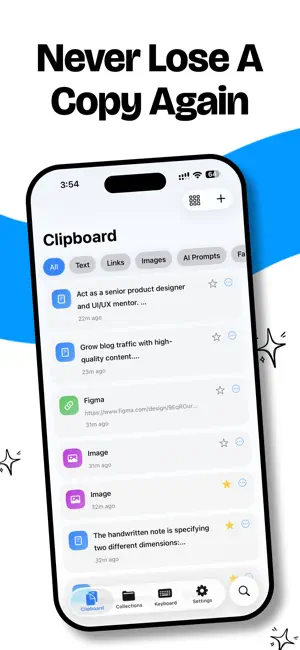
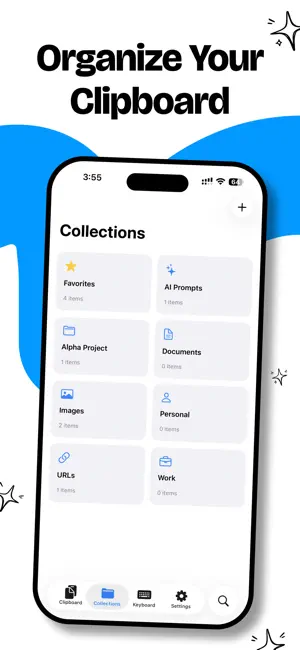
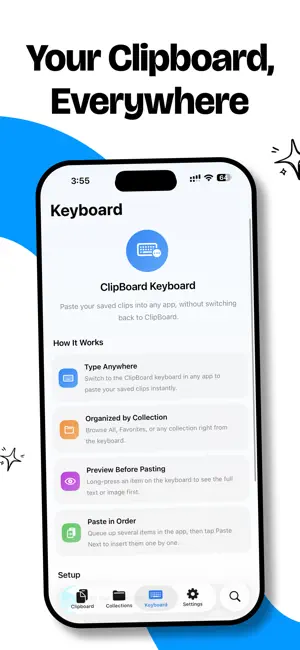
ClipBoard keeps everything you copy in one place and lets you paste it anywhere with its custom keyboard. Copy a piece of text, a link, or an image, then open ClipBoard or its keyboard and the clip is saved to your history. Search it, organize clips into collections, and pin favorites. When you need something back, tap a clip to copy it, drag it into another app, or paste it straight from the ClipBoard keyboard without switching apps. KEY FEATURES • Clipboard history: every clip you save, in one searchable list • ClipBoard keyboard: paste any saved clip into any app • Snippets: save phrases you type often and insert them from the keyboard with one tap • Instant search across everything you've saved • Collections: organize clips into groups that fit how you work • Favorites: keep the important clips a tap away • Drag and drop: drag a clip into any app on iPhone and iPad • Share extension: save text, links, and images from any app's share sheet • Scan Text: capture printed text with your camera, recognized on your device • Link titles (optional): saved links keep their page titles • iCloud sync (optional): your clips and snippets on every device you own HOW CAPTURE WORKS iOS does not let apps read the clipboard in the background. ClipBoard saves the current clipboard each time you open the app or its keyboard, and you can save anything else through the share sheet. Nothing is captured while ClipBoard is closed. PRIVATE BY DESIGN Your clips stay on your device. No account, no tracking, and nothing you copy is sent to us. The keyboard reads only the clips you have saved. It never logs what you type. If you turn on sync, it goes through your personal iCloud. CLIPBOARD PRO Your first 10 clips are free, with search, the keyboard, snippets, and iCloud sync included. ClipBoard Pro unlocks all of your history after that. Choose a monthly or yearly subscription, or a one-time lifetime purchase. Privacy Policy: https://appietap.tech/clipboard/privacy-policy Terms of Use: https://appietap.tech/clipboard/terms
What’s new
Version 1.0.2 · Updated October 17, 2026
• Snippets: save the phrases you type often and insert them from the ClipBoard keyboard with one tap • Tap a clip to copy it; the (i) button opens its details • Drag clips into other apps on iPhone and iPad • Locked clips can now be deleted • A simpler ClipBoard Pro screen, with all plans on one page • Fixed the keyboard crashing when opened with Full Access on, and when showing image thumbnails • Fetch Link Titles can be turned off in Settings • Fixes for the share extension, iPad, and onboarding
App privacy
The developer, AppieTap, reported these privacy practices to Apple.
Data Not Collected
The developer does not collect any data from this app.
Alternatives to ClipBoard Manager & Sync
Looking for apps like ClipBoard Manager & Sync? Here are 6 similar apps on the App Store. The highest rated is ClipKit - Clipboard Manager (1.0/5), and all 6 are free to download.
-
 PasteKit: Clipboard Keyboard
-
 ClipboardNoti
-
 Clipboard Keyboard - TapPaste
-
 Clippa - Clipboard History
-
 ClipKit - Clipboard Manager
1.0
-
 Recopy - Copy & Paste
| App | Rating | Price | Last updated | Compare |
|---|---|---|---|---|
| ClipBoard Manager & Sync | – | Free | October 17, 2026 | |
| PasteKit: Clipboard Keyboard | – | Free | Oct 18, 2026 | Compare |
| ClipboardNoti | – | Free | Jul 30, 2026 | Compare |
| Clipboard Keyboard - TapPaste | – | Free | Oct 19, 2026 | Compare |
| Clippa - Clipboard History | – | Free | Jan 19, 2026 | Compare |
| ClipKit - Clipboard Manager | 1.0 / 5 (1) | Free | Oct 23, 2026 | Compare |
| Recopy - Copy & Paste | – | Free | Jul 17, 2026 | Compare |