

PhotoFit: Photo Resizer
GWANG YONG YU Utilities iPhoneiPadiPod touch
PhotoFit: Photo Resizer is a free Utilities app for iPhone and iPad by GWANG YONG YU. Requires iOS 16.0. Updated October 19, 2026.
- Price
- Free
- on the App Store
- Size
- 14 MB
- Age 4+
- Updated
- Oct 19
- 2026 · v1.0.34
Screenshots



About PhotoFit: Photo Resizer
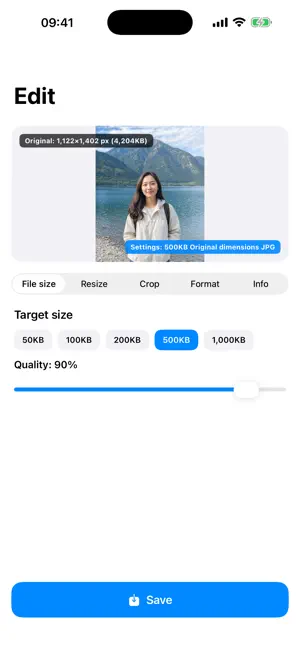
PhotoFit helps you match a photo to the file size (KB), pixel dimensions, aspect ratio and format you need. For applications, ID photos or social uploads with strict requirements, preview the expected result before saving and compare it with the original. KEY FEATURES • Compress toward a preset from 50 KB to 2 MB, or enter your own target • Set width and height, resize by long edge or percentage, and preserve aspect ratio • Crop to 1:1, 3:4, 4:3, 9:16, 16:9 and more, with 90-degree rotation • Save as JPG, PNG, HEIC, WebP, AVIF, TIFF, GIF or BMP • See why a format is unavailable on your device • Remove location, camera and capture-date metadata selectively • Preview estimated size and resolution, then compare before and after • Reuse presets for social media, profiles, ID photos and document uploads RAW AND ANIMATED IMAGES • Develop supported camera RAW files with controls for exposure, white balance, tone, sharpness, noise reduction, lens correction and more • View frame count, play time and loop count for GIF and WebP • Preview and choose which animation frame to convert PDF, MACROS AND BATCH • Create and share a PDF from the photo you are editing • Save editing steps as a macro and import or export them as JSON • Apply a macro to up to 100 photos sequentially, then retry only failed items • Recover progress after an interrupted batch EDITING ASSISTANT On supported devices, the on-device AI assistant turns natural-language requests into editing settings. You see and confirm every setting before it is applied. Other devices use offline rule-based interpretation. PRIVACY AND ACCESS Photo processing runs on your device. PhotoFit does not upload originals or results to an operator server, and never overwrites your original. No account or login is required. Some advanced features can be unlocked with rewarded ads, including a 30-minute Pro Pass. There are no in-app purchases or subscriptions. Advertising, update checks, app-usage measurement and AI model downloads may use the network. Target-size results, available formats and RAW controls can vary with the image and device.
What’s new
Version 1.0.34 · Updated October 19, 2026
· A fresh look across the app with cream paper tones and soft mochi buttons · The keyboard no longer pops up on its own, and tapping an empty area dismisses it · Keyboard focus no longer lingers in the editor options when you switch screens
App privacy
The developer, GWANG YONG YU, reported these privacy practices to Apple.
Data Used to Track You
The following data may be used to track you across apps and websites owned by other companies:
- Identifiers: Device ID
Data Linked to You
The following data, which may be collected and linked to your identity, may be used for the following purposes:
- Location: Coarse Location
- Identifiers: Device ID
- Usage Data: Product Interaction, Advertising Data
Used for: Third-Party Advertising, Developer’s Advertising or Marketing, Analytics, App Functionality
Data Not Linked to You
The following data, which may be collected but is not linked to your identity, may be used for the following purposes:
- Diagnostics: Performance Data, Other Diagnostic Data, Crash Data
Used for: Third-Party Advertising, Developer’s Advertising or Marketing, Analytics, App Functionality