

Vylor: AI Expense Tracker
Alaa Farhat Finance iPhoneiPadiPod touch
Vylor: AI Expense Tracker is a free Finance app for iPhone and iPad by Alaa Farhat. Requires iOS 15.0. Updated October 18, 2026.
- Price
- Free
- on the App Store
- Size
- 31 MB
- Age 4+
- Updated
- Oct 18
- 2026 · v1.7.4
Screenshots


About Vylor: AI Expense Tracker
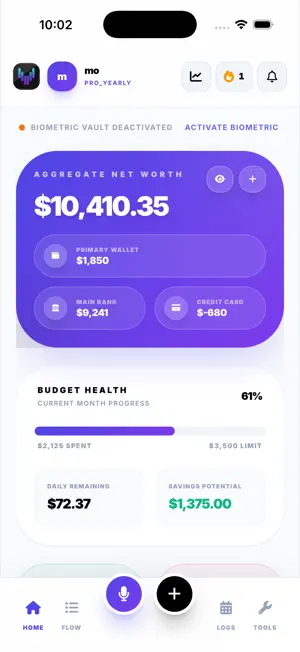
VOICE EXPENSE TRACKING — POWERED BY GEMINI AI Track every expense by talking. Vylor is the AI expense tracker and personal finance app for iPhone. No typing. No spreadsheets. Just talk. ——— AI VOICE EXPENSE TRACKER Log every transaction instantly. Just say "I spent $45 on dinner with my credit card" and Vylor automatically categorizes and records it. Gemini Live AI understands natural language — amounts, merchants, dates, and payment methods. Your finance tracker updates in real time as you talk. ——— VYLOR SENTINEL — YOUR MONEY, WATCHED Vylor doesn't wait for you to open the app. Sentinel proactively briefs you on your balance, weekly spending, upcoming bills, and a clear Safe / Caution / Danger read — daily (PRO) or weekly (Free). It warns you BEFORE you overspend or run low, and its subscription radar flags price hikes, new subscriptions, and free trials that started charging. ——— AI FINANCIAL ADVISOR — ASK, ANALYZE & FORECAST Talk to Vylor's AI about your real money: • "How much did I spend on food last week?" • "Where did my money go this month?" • "Can I afford a $1,200 laptop?" • "What's my projected balance in 3 months?" Vylor answers from your actual transactions — totals and breakdowns by category, time, or account — and forecasts your balance from your real spending pace. Edit or delete entries by voice too — Vylor confirms first. ——— AI RECEIPT SCANNER — VYLOR VISION (PRO) Snap a photo of any receipt. Vylor Vision's AI instantly extracts the merchant, total, tax, and line items — no manual entry needed. Turn paper receipts into a clean, searchable digital record in seconds — built for tax season. ——— DASHBOARD, NET WORTH & SPENDING HISTORY Your whole financial picture at a glance: net worth, spending breakdown by category, and a real-time transaction feed. Track cash, bank, cards, and crypto in one place. Review history by day, week, or month with color-coded categories, set daily allowances, and let AI coaching keep you on track. ——— HOME SCREEN WIDGETS Your finances, always visible — no app opening required. Vylor's Home Screen widgets update automatically with every transaction — quick voice logging, recent activity, budget tracking, upcoming bills, and your net balance. ——— PRIVACY & SECURITY Your financial data stays on your device. No account sign-up required — Vylor works from first launch. Biometric Lock (PRO) adds Face ID or Touch ID. We do not sell your data. Ever. ——— FREE vs PRO Free — no credit card needed: 30 AI voice logs per month, up to 5 accounts, weekly Sentinel briefing, and the full dashboard and history. PRO — $3.99/month (or annual, save 21%): unlimited voice logs, daily Sentinel briefings + spending alerts, AI receipt scanning (Vylor Vision), 50 accounts, biometric lock, CSV export, and no ads. ——— Download Vylor free and manage your money by talking — one conversation at a time. ——— Vylor PRO is an auto-renewable subscription: $3.99/month or $37.99/year. Payment is charged to your Apple ID at purchase confirmation, and renews automatically unless auto-renew is turned off at least 24 hours before the end of the current period. Manage or cancel anytime in your App Store account settings. Terms of Use (EULA): https://vylor.money/terms Privacy Policy: https://vylor.money/privacy
What’s new
Version 1.7.4 · Updated October 18, 2026
Ask Vylor how your net worth moved this week. • Voice now answers for the last 7 days, and can walk you through the last two weeks day by day.
App privacy
The developer, Alaa Farhat, reported these privacy practices to Apple.
Data Linked to You
The following data, which may be collected and linked to your identity, may be used for the following purposes:
- Location: Coarse Location
- Usage Data: Advertising Data, Product Interaction
- Identifiers: User ID, Device ID
- Purchases: Purchase History
- Financial Info: Other Financial Info
- Contact Info: Email Address
- User Content: Photos or Videos, Audio Data
Used for: Third-Party Advertising, Analytics, App Functionality
Alternatives to Vylor: AI Expense Tracker
Looking for apps like Vylor: AI Expense Tracker? Here are 6 similar apps on the App Store. The highest rated is RizKharj – Expense Tracker (5.0/5), and all 6 are free to download.
-
 Budget G.P.A.: Student Budget
-
 Centsly
-
 Centsly: Money Expense Tracker
-
 RizKharj – Expense Tracker
5.0
-
 Spring Hill State Bank Mobile
4.8
-
 Kubyo
4.8
| App | Rating | Price | Last updated | Compare |
|---|---|---|---|---|
| Vylor: AI Expense Tracker | – | Free | October 18, 2026 | |
| Budget G.P.A.: Student Budget | – | Free | Oct 10, 2026 | Compare |
| Centsly | – | Free | May 12, 2026 | Compare |
| Centsly: Money Expense Tracker | – | Free | Aug 8, 2026 | Compare |
| RizKharj – Expense Tracker | 5.0 / 5 (6) | Free | Oct 17, 2026 | Compare |
| Spring Hill State Bank Mobile | 4.8 / 5 (372) | Free | Sep 29, 2025 | Compare |
| Kubyo | 4.8 / 5 (50) | Free | Nov 20, 2024 | Compare |