

SaifGauge: Kakeibo Budget
Masato Oda Finance iPhoneiPadiPod touch
SaifGauge: Kakeibo Budget is a free Finance app for iPhone and iPad by Masato Oda. Requires iOS 17.0. Updated October 6, 2026.
- Price
- Free
- on the App Store
- Size
- 3 MB
- Age 4+
- Updated
- Oct 6
- 2026 · v1.2.0
Screenshots
About SaifGauge: Kakeibo Budget
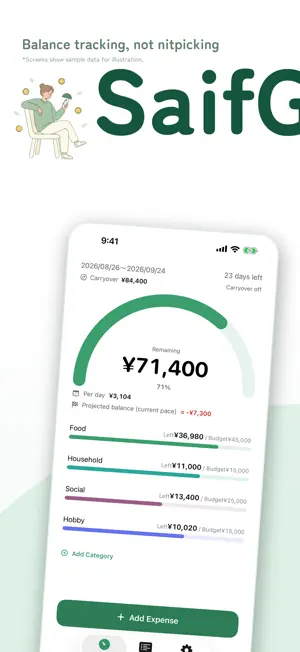
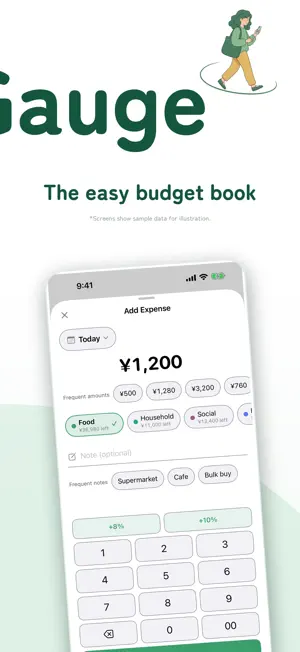
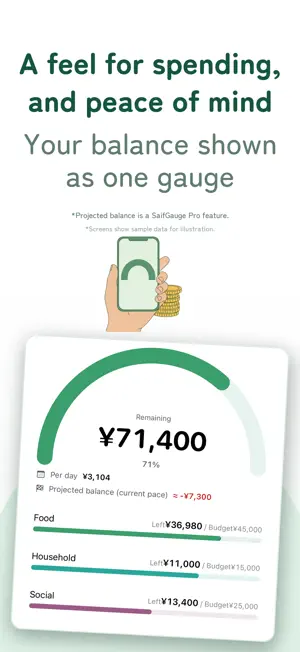
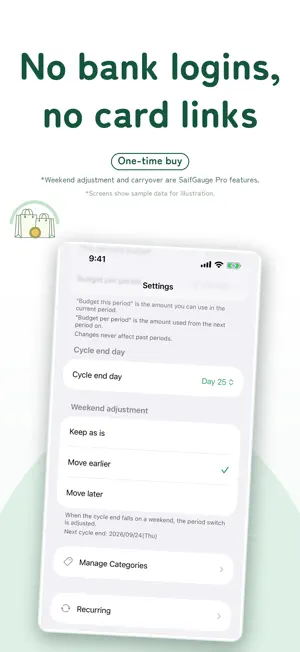
"How much can I still spend?" SaifGauge answers the moment you open it, with one balance gauge. Made for budgeting from payday to payday. No bank linking, no account sign-up, no external connections, no ads. Your data stays on your iPhone. Extra features are a one-time purchase, with no subscription. ONE GAUGE The main screen is one big "Remaining" gauge, plus a mini gauge per category and a simple pie chart. "Per day" shows what's left divided by the days remaining, today included. The gauge changes color as money runs low and shows "Over budget" if you go over. Projected balance (Pro) estimates what's left on your cycle end day at your current pace. BUILT FOR PAYDAY CYCLES • Paid on the 25th? Set the cycle end day to the 24th. End of month works too • Payday on a weekend? Start the period the Friday before or the Monday after (Pro), or keep it • Prefer weekly? Set "Period length" to 1 week or 2 weeks (Pro) and pick the start weekday. The current period keeps its start date; your budgets are prefilled, scaled by days, and you can edit them • Budgets are saved per period; past periods never change. Edits to "Budget per period" start next period, or tap "Apply to This Period" • Roll leftovers into the next period as a lump sum or add them to your daily budget (Pro). With rollover on, overspending carries over too • Recurring costs like rent and subscriptions post automatically (monthly, every 2, 3 or 6 months, or yearly) in the period with their payment day. Pause any with a switch CATEGORIES & ENTRY • Give each category (envelope) its own budget and gauge color, or choose "Start without categories" • Reorder and rename freely. Settings warns you if category budgets exceed your total • A budgeting keypad with a 00 key and "+8%" / "+10%" tax buttons • Chips for frequent amounts and notes; category chips show what's left • Missed a day? Pick the date and log it later BREAKDOWN & CALENDAR • This period's expenses by date and a pie chart by category. Tap to edit, swipe to delete • Calendar: each day's spending in red if over the period budget's daily share, green if within • Browse previous periods with ◀ (Pro) WIDGETS • Small: your balance gauge. Tap it to log an expense • Medium (Pro): overall remaining plus up to 3 categories, the rest as a count. Tap a row to log in that category EXPORT TO CSV FOR EXCEL • Export expenses as a CSV file for Excel, Numbers or Google Sheets • UTF-8 with BOM. Where a comma is the decimal separator, columns use semicolons • Date, category, amount, note and period columns. Amounts are plain numbers, ready to total • Save to Files or send by AirDrop or email. You choose where it goes; the app sends nothing • Find "Export" in Settings or Breakdown. Current period free; past periods and all periods (Pro) BACKUP • Save all data to one file and restore anytime: "Add to current data" or "Replace current data" • New iPhone? Import the file, then tap "Restore Purchases" in Settings with the same Apple Account LOOK AND FEEL • Auto, Light or Dark appearance • 18 theme colors (1 free, 17 with Pro). Preview any color, Pro colors included, on the gauge before applying it • Follows your text size; VoiceOver reads out your balance and days left PRIVACY No bank linking, no account, no external connections, no ads, no tracking. Our App Store privacy label reads "Data Not Collected." WHAT'S FREE / SAIFGAUGE PRO Free: balance gauge, expense entry, amount chips, 3 categories, automatic recurring costs, the current period's list and pie chart, CSV export of the current period, backup and the small widget. SaifGauge Pro, a one-time in-app purchase, unlocks: • Unlimited categories • Weekend adjustment for cycle end (earlier/later) • Balance rollover • View full history of past periods • Medium widget (remaining per category) • 18 theme colors • Projected balance at closing day • Export all periods as CSV • Track by 1-week or 2-week periods SUPPORT Bugs or requests? Send them from Settings > Support.
What’s new
Version 1.2.0 · Updated October 6, 2026
The theme screen now shows a preview of your Home screen, and choosing a color no longer takes you away from it, so you can keep trying colors. You can now export your expenses as a CSV file from Settings or from the Export button on the Breakdown screen. You can now budget by 1-week or 2-week periods instead of a month. Choose "Period length" in Settings. Your current period keeps its start date, and periods are counted in weeks from that day. When you switch, your budget and category budgets are prefilled, scaled by the number of days, and you can adjust them. You can also pick the weekday each period starts on. Past periods keep their budgets, and the gauge, Per day, projected balance, Breakdown, Calendar and CSV export all work with 1-week and 2-week periods too. Exporting the current period is free, and 1-month periods stay free as before. Exporting all periods and using 1-week or 2-week periods are part of SaifGauge Pro.
App privacy
The developer, Masato Oda, reported these privacy practices to Apple.
Data Not Collected
The developer does not collect any data from this app.
Alternatives to SaifGauge: Kakeibo Budget
Looking for apps like SaifGauge: Kakeibo Budget? Here are 6 similar apps on the App Store. The highest rated is Spendable Today: Daily Budget (5.0/5), and all 6 are free to download.
-
 のこりと。- 給料日までの残金管理
-
 ノコリ - 引き算おこづかい帳
-
 Spendable Today: Daily Budget
5.0
Spendable Today: Daily Budget
5.0
-
 Stop Overspending: Toriwake
-
 残高くん - ミニマルでシンプルなお金の管理
-
 nokori シンプルおこづかい管理
| App | Rating | Price | Last updated | Compare |
|---|---|---|---|---|
| SaifGauge: Kakeibo Budget | – | Free | October 6, 2026 | |
| のこりと。- 給料日までの残金管理 | – | Free | Jun 24, 2026 | Compare |
| ノコリ - 引き算おこづかい帳 | – | Free | Sep 6, 2026 | Compare |
| Spendable Today: Daily Budget | 5.0 / 5 (1) | Free | Oct 1, 2026 | Compare |
| Stop Overspending: Toriwake | – | Free | Oct 5, 2026 | Compare |
| 残高くん - ミニマルでシンプルなお金の管理 | – | Free | Sep 22, 2026 | Compare |
| nokori シンプルおこづかい管理 | – | Free | Sep 5, 2026 | Compare |