

Sprig Money: Paycheck Split
Atlas Learning Group LLC Finance iPhoneiPadiPod touch
Sprig Money: Paycheck Split is a free Finance app for iPhone and iPad by Atlas Learning Group LLC. Requires iOS 17.0. Updated August 13, 2026.
- Price
- Free
- on the App Store
- Size
- 6 MB
- Age 4+
- Updated
- Aug 13
- 2026 · v1.0
Screenshots


About Sprig Money: Paycheck Split
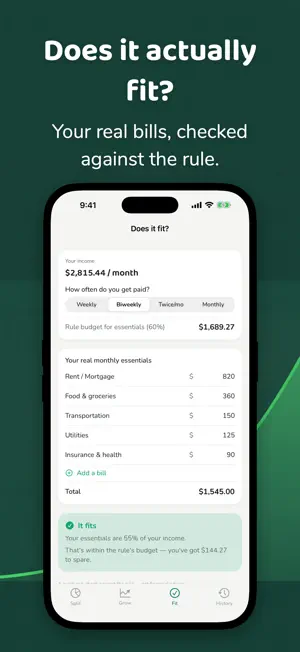
Get paid. Enter the number. Sprig splits it before you have time to talk yourself out of saving any of it. No budgeting app to maintain. No transactions to categorize. No bank account to link. Sprig does one thing: the moment your paycheck lands, it divides that amount into four buckets using a simple percentage rule, so the decision is already made before you open your other apps. HOW IT WORKS Pick a rule. Default is 20/10/60/10 — Growth, Stability, Essentials, Enjoyment. Prefer 50/30/20 or 70/20/10? They're built in. Or set your own percentages and make it yours. Enter your paycheck. Type the number. See four amounts instantly. Save it. Done in seconds, not sessions. Working two jobs? Add another check and Sprig splits the combined total the same way. FOUR SCREENS, FOUR JOBS Split — Enter what you were paid. See exactly what goes to Growth, Stability, Essentials, and Enjoyment. Save the paycheck and move on with your day. Grow — Watch what your Growth bucket becomes over time. Scrub out to any horizon and see money put in versus interest earned, side by side. It's a projection, not a promise. Fit — Tell Sprig your real monthly bills. It checks them against what your rule allots for essentials and gives you a plain answer: it fits, or it's tight. No spreadsheet required. History — Every payday you've saved, stacked in one place. Watch the total climb, check by check. WHO THIS IS FOR You get paid weekly or biweekly. You don't want to learn a budgeting system, track every purchase, or link your bank account to an app. You want the decision made in the time it takes to read a text message, then you want to get on with your life. That's what Sprig does — nothing more, nothing less. PRIVATE BY DESIGN Everything lives on your device. No account. No sign-up. No bank linking. No transaction import. Your paycheck numbers never leave your phone. Sprig is free to use, with ads. A one-time purchase removes them for good — no subscription. A NOTE ON THE NUMBERS Grow shows estimates based on the rate and contributions you enter. Real returns vary and aren't guaranteed. Nothing in this app is financial advice — it's a rough picture of what steady saving can look like over time, so you can decide what to do next. Get paid. Open Sprig. Split it. Get back to your life.
App privacy
The developer, Atlas Learning Group LLC, reported these privacy practices to Apple.
Data Used to Track You
The following data may be used to track you across apps and websites owned by other companies:
- Identifiers: Device ID
- Usage Data: Advertising Data
Data Not Linked to You
The following data, which may be collected but is not linked to your identity, may be used for the following purposes:
- Identifiers: Device ID
- Usage Data: Advertising Data
Used for: Third-Party Advertising, Analytics
Alternatives to Sprig Money: Paycheck Split
Looking for apps like Sprig Money: Paycheck Split? Here are 6 similar apps on the App Store. The highest rated is CashEnvelope (1.0/5), and all 6 are free to download.
-
 Cascade: Income Planner
-
 Finl
Finl
-
 Mibud - Money & Budget Tracker
-
 Clink - Budget & Finance
-
 tallydrop
-
 CashEnvelope
1.0
CashEnvelope
1.0
| App | Rating | Price | Last updated | Compare |
|---|---|---|---|---|
| Sprig Money: Paycheck Split | – | Free | August 13, 2026 | |
| Cascade: Income Planner | – | Free | Sep 1, 2026 | Compare |
| Finl | – | Free | Nov 19, 2025 | Compare |
| Mibud - Money & Budget Tracker | – | Free | Feb 27, 2026 | Compare |
| Clink - Budget & Finance | – | Free | Sep 21, 2026 | Compare |
| tallydrop | – | Free | Jul 14, 2026 | Compare |
| CashEnvelope | 1.0 / 5 (1) | Free | Sep 15, 2026 | Compare |