

Speak List: Reads & Reminds
Plainstone Productivity iPhoneiPadiPod touch
Speak List: Reads & Reminds is a free Productivity app for iPhone and iPad by Plainstone. Rated 5.0/5 from 1 ratings. Requires iOS 15.0.
- Rating
- 5.0
- 1 ratings
- Price
- Free
- on the App Store
- Size
- 28 MB
- Age 4+
- Updated
- Oct 20
- 2026 · v1.0.2
Screenshots



About Speak List: Reads & Reminds
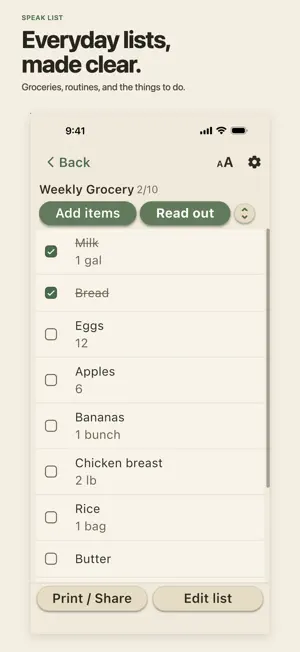
Use Speak List like a straightforward list app — type, check off, remind, share, and print. When voice helps, speak a whole list or hear it read to you one step at a time. Everything Speak List offers today is free to use. There is no subscription, advertising, tracking, or account. Your lists stay on your device. MAKE LISTS YOUR WAY • Type, paste, or speak a whole list. • Share selected text or a .txt file into Speak List from another app — it becomes a list. • Edit, reorder, find, and check off items with large, clearly labeled controls. • Deleted something by mistake? Undo brings the item — or the whole list — right back, reminders included. • Start quickly with ready-made lists for groceries, cooking, routines, exercise, medication checklists, school, everyday tasks, and examples to listen to at your own pace. READ ALOUD — AT YOUR PACE • Read any list aloud in Continuous or Step by step mode. • Listen at the pace that suits you — Slow, Normal, or Fast, plus a Pause time switch that adds a quiet gap after every item. • Bring your own words — lists, instructions, articles, teachings, study material, or prayers. • Repeat loops a list. Sleep lets you listen as you drift off — it keeps looping, then stops quietly soon after your chosen time, without a chime and without cutting off the words being spoken. • Stop and come back later. Speak List remembers your place in each list — even after you close the app — and offers Continue or Start over. • Control reading from the Lock Screen or earphones, or mute the voice. Siri can open, add to, read, pause or stop a named list on supported iPhones. • During an active read, ask Siri for the next item—while locked if Siri is allowed. Step by step still waits after untimed items. • For timed recipe or workout steps, read Step by step and leave Count down on — write “Boil 7 minutes” or “Plank 20 sec” in a step, and the time counts down before reading continues. THREE TIMING TOOLS — EACH DOES ONE JOB • Count down follows timed steps while you are reading. • Remind me creates a named walk-away alert from a timed step — it can ring after you leave the app. Set one per item; several can run at once. When your iPhone allows it, the alert can ring as a stronger alarm even on silent; otherwise Speak List sets a reminder and tells you which it set. • The bell sets a one-time or repeating clock-time reminder for an item, such as an appointment or a morning routine — repeat daily, weekly, monthly, or at a custom interval. • See every active alert together on the Reminders screen, where you can snooze, stop, change, or cancel each one. PRIVATE BY DEFAULT • Speak List has no account and no automatic cloud sync. • Share a clean plain-text list. The other person does not need Speak List or an account. • Print one or several lists with a large preview. • Lists, read-aloud, and reminders keep working without an internet connection. • Back up all your lists as plain text, then choose iCloud Drive or another Files location. Restore that file whenever you need it. ACCESSIBLE IN THE REGULAR APP • Choose from four text sizes, or follow your iPhone’s text size. Big buttons, light and dark appearances, and VoiceOver throughout — no separate accessibility mode. • Works on iPad too, in an enlarged iPhone view. • App interface and User Guide available in English, Spanish, French, German, Japanese, Simplified Chinese, and Traditional Chinese. Detailed Help topics and some ready-made lists are currently in English. Ready-made templates — including the medication, exercise, and wellness examples — are organizational aids only and do not provide medical or wellness advice. Your list data is not stored on a Speak List server. Speech recognition prefers on-device processing and may use Apple's speech service on older iPhones or when on-device recognition is unavailable. Optional one-time contributions support development but do not unlock features.
What’s new
Version 1.0.2 · Updated October 20, 2026
• Safer whole-list text editing: a warning appears before renaming or removing items would discard saved notes, dates or reminders. Keep editing returns to your draft. • Fixed reminders that could remain scheduled after their items were removed or renamed in the text editor. • Type/Paste and whole-list text editing now accept note, date and reminder fields written on an item's line. Existing details are still not automatically shown in the text editor; use Details to view them or rename an item without losing them.
App privacy
The developer, Plainstone, reported these privacy practices to Apple.
Data Not Collected
The developer does not collect any data from this app.
Alternatives to Speak List: Reads & Reminds
Looking for apps like Speak List: Reads & Reminds? Here are 6 similar apps on the App Store. The highest rated is QuickList: Smart Grocery List (5.0/5), and all 6 are free to download.
-
 ListBox
4.0
ListBox
4.0
-
 QuickList: Smart Grocery List
5.0
QuickList: Smart Grocery List
5.0
-
 WonderPen
4.0
WonderPen
4.0
-
 Playbacks: AI Note Taker
4.8
Playbacks: AI Note Taker
4.8
-
 SCIENCE & PLAY BUILD
3.9
SCIENCE & PLAY BUILD
3.9
-
 Checklist – Simple Task Lists
4.7
Checklist – Simple Task Lists
4.7
| App | Rating | Price | Last updated | Compare |
|---|---|---|---|---|
| Speak List: Reads & Reminds | 5.0 / 5 (1 rating) | Free | October 20, 2026 | |
| ListBox | 4.0 / 5 (1) | Free | May 12, 2026 | Compare |
| QuickList: Smart Grocery List | 5.0 / 5 (2) | Free | Jan 8, 2026 | Compare |
| WonderPen | 4.0 / 5 (9) | Free | Oct 23, 2026 | Compare |
| Playbacks: AI Note Taker | 4.8 / 5 (1,315) | Free | Oct 26, 2026 | Compare |
| SCIENCE & PLAY BUILD | 3.9 / 5 (9) | Free | Oct 22, 2024 | Compare |
| Checklist – Simple Task Lists | 4.7 / 5 (2,927) | Free | Oct 28, 2026 | Compare |