

QuizBook - Practice & AI
容升 柴 Utilities iPhoneiPadiPod touch
QuizBook - Practice & AI is a free Utilities app for iPhone and iPad by 容升 柴. Requires iOS 17.0. Updated October 12, 2026.
- Price
- Free
- on the App Store
- Size
- 8 MB
- Age 4+
- Updated
- Oct 12
- 2026 · v3.2
Screenshots


About QuizBook - Practice & AI
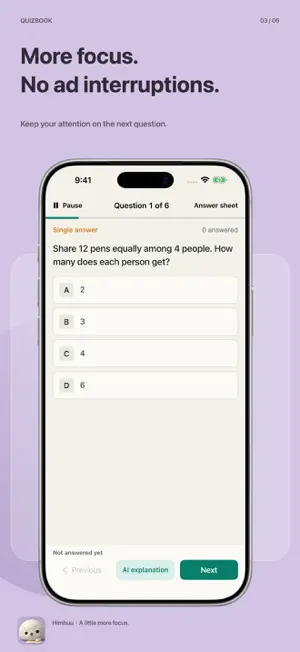
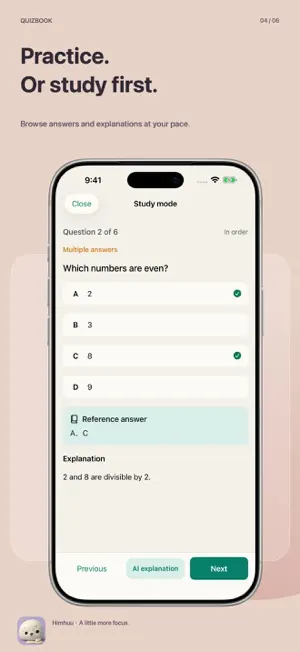
Turn your own questions into focused study. No ads to interrupt your practice. IMPORT AND PRACTICE Import Word (DOCX) or Excel (XLSX) question banks and choose question types and session length. Practice single-choice, multiple-choice, true-or-false, fill-in-the-blank, and short-answer questions. Written answers are self-assessed against a reference, not automatically graded. PRACTICE OR STUDY Test your knowledge in practice mode, or open Study to browse reference answers and existing explanations. Review mistakes, resume unfinished practice, and revisit past sessions. AI EXPLANATIONS Sign in to online mode and request a teaching explanation for an individual question. A first-use dialog explains the service and asks for consent. Only tapping Generate sends the current question, options, reference answers, existing explanation, and your answer; your full local library and learning history are not sent. Disable future consent or revoke submitted explanations in Settings. AI can be wrong, so check reliable study material. LOCAL STUDY WITHOUT SIGN-IN Import, practice, study answers, review mistakes, and create backups without an account. Signing in does not automatically upload existing banks or sync learning records. Online banks support one-question-at-a-time practice, not full-bank downloads. Leaving online practice ends that session. Available banks and coverage are shown in the catalog. ENGLISH AND SIMPLIFIED CHINESE Choose a fully localized interface. Imported questions retain their original language; question content is not automatically translated. No ads. Online features require an internet connection and sign-in. Each account can submit up to 10 AI requests per day, resetting at midnight Beijing time. A shared daily allowance also applies, so the full individual limit is not guaranteed. Requests pass through a backend outside mainland China and are processed by Alibaba Cloud Qwen in mainland China. Explanations remain viewable for up to 7 days; necessary consent and usage records are retained for up to 30 days. See the privacy policy for recipients, retention, and deletion limitations. Privacy: https://himhuu.com/apps/quizbook/privacy Terms: https://himhuu.com/apps/quizbook/terms We would love to hear your feedback and suggestions: [email protected]
What’s new
Version 3.2 · Updated October 12, 2026
• A clear Study entry on the home screen lets you browse reference answers and explanations. • Import and practice fill-in-the-blank and short-answer questions, then assess your answers against the reference. • A first-use consent dialog makes AI explanations easier to access. • Less repeated text and clearer layouts on the home and practice setup screens. • Complete English interface translations and improved bilingual layouts.
App privacy
The developer, 容升 柴, reported these privacy practices to Apple.
Data Linked to You
The following data, which may be collected and linked to your identity, may be used for the following purposes:
- User Content: Other User Content
- Identifiers: User ID
- Usage Data: Product Interaction
Used for: App Functionality
Alternatives to QuizBook - Practice & AI
Looking for apps like QuizBook - Practice & AI? Here are 6 similar apps on the App Store. The highest rated is 笨笨译站 (5.0/5), and 5 of the 6 are free to download.





| App | Rating | Price | Last updated | Compare |
|---|---|---|---|---|
| QuizBook - Practice & AI | – | Free | October 12, 2026 | |
| FlyerExam | – | Free | Oct 21, 2026 | Compare |
| 笨笨译站 | 5.0 / 5 (1) | Free | Jan 13, 2025 | Compare |
| 博弈模拟器 | – | Free | Feb 11, 2026 | Compare |
| Needless Clock | 5.0 / 5 (1) | Free | Oct 10, 2026 | Compare |
| 专注花伴-番茄钟学习计时器 | – | Free | Sep 29, 2026 | Compare |
| My Data Usage Widget Pro | 2.0 / 5 (6) | 3.99 USD | Sep 18, 2026 | Compare |