

Sprig: Private Meeting Notes
Aryan Aladar Productivity iPhoneiPadiPod touch
Sprig: Private Meeting Notes is a free Productivity app for iPhone and iPad by Aryan Aladar. Requires iOS 26.0. Updated August 6, 2026.
- Price
- Free
- on the App Store
- Size
- 16 MB
- Age 4+
- Updated
- Aug 6
- 2026 · v1.0.2
Screenshots


About Sprig: Private Meeting Notes
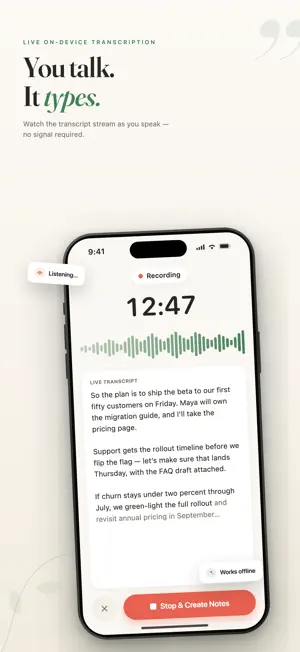
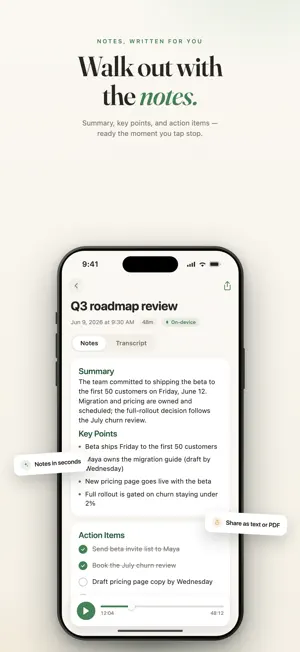
Stay present in the conversation. Sprig records and transcribes live, then turns what was said into a clear summary, key points, and action items—all privately on your iPhone. Start with one tap, or launch Sprig from the Action Button on supported iPhones. Your first note is included. PRIVATE AI MEETING NOTES • Live transcription — See your transcript appear while you speak • Notes, written for you — Get a concise summary, key points, and checkable action items when you finish recording • Private by design — Your recordings, transcripts, summaries, and notes are processed and stored on your iPhone • Works offline — Transcribe and create notes even in Airplane Mode • No account required — Open Sprig and start recording without creating an account BUILT FOR IPHONE • Press. Record. Done. — Launch Sprig from the Action Button on supported iPhones • Live recording status — Follow your recording with a live timer in the Dynamic Island on supported devices • Keep talking — Recording continues while your iPhone is locked • Return to the source — Review time-stamped transcripts connected to the original audio • Share anywhere — Export your notes as text or a clean PDF to Messages, Mail, and other apps FOR WORK, SCHOOL, AND LIFE Use Sprig for standups, 1:1s, investor calls, lectures, interviews, appointments, contractor quotes, brainstorms, and any conversation worth remembering. TRY SPRIG Create your first note at no charge. Sprig Pro unlocks unlimited notes with monthly and yearly subscription options. Eligible new subscribers can try the yearly plan free for seven days. The monthly plan begins immediately and does not include a free trial. Your current localized price and renewal terms are displayed before purchase. Payment is charged to your Apple Account when the purchase is confirmed. Subscriptions renew automatically unless canceled at least 24 hours before the end of the current subscription period. A yearly free trial automatically converts to a paid yearly subscription unless canceled before the trial ends. You can manage or cancel your subscription in your Apple Account settings. On-device note generation works best on iPhones that support Apple Intelligence. Privacy Policy: https://www.sprignotes.app/privacy Terms of Use: https://www.sprignotes.app/terms Apple Standard EULA: https://www.apple.com/legal/internet-services/itunes/dev/stdeula/
What’s new
Version 1.0.2 · Updated August 6, 2026
Meet the new Sprig onboarding. • Critical Bug Fixes • See live transcription and structured notes in action • Personalize Sprig around the conversations you want to capture • Discover how much time Sprig could save you • Get a clearer, faster path to your first note We’ve also polished recording, subscriptions, and overall reliability.
App privacy
The developer, Aryan Aladar, reported these privacy practices to Apple.
Data Not Collected
The developer does not collect any data from this app.
Alternatives to Sprig: Private Meeting Notes
Looking for apps like Sprig: Private Meeting Notes? Here are 6 similar apps on the App Store. The highest rated is Attentionly: ADHD Time Audit (4.3/5), and all 6 are free to download.
-
 Wyn: Habit Tracker & Reminders
-
 Attentionly: ADHD Time Audit
4.3
Attentionly: ADHD Time Audit
4.3
-
 Wise Note
-
 Karl: Voice Meeting Notes Pro
-
 SquareNotes
4.0
SquareNotes
4.0
-
 StudyNotes - Note Taking AI
| App | Rating | Price | Last updated | Compare |
|---|---|---|---|---|
| Sprig: Private Meeting Notes | – | Free | August 6, 2026 | |
| Wyn: Habit Tracker & Reminders | – | Free | Oct 10, 2026 | Compare |
| Attentionly: ADHD Time Audit | 4.3 / 5 (3) | Free | Oct 2, 2026 | Compare |
| Wise Note | – | Free | May 6, 2025 | Compare |
| Karl: Voice Meeting Notes Pro | – | Free | Oct 15, 2026 | Compare |
| SquareNotes | 4.0 / 5 (1) | Free | Mar 31, 2026 | Compare |
| StudyNotes - Note Taking AI | – | Free | Oct 1, 2026 | Compare |