

UnJumble
JACK EDWARD VOLLER Productivity iPhoneiPadiPod touchApple Watch
UnJumble is a free Productivity app for iPhone and iPad by JACK EDWARD VOLLER. Requires iOS 26.0. Updated October 16, 2026.
- Price
- Free
- on the App Store
- Size
- 12 MB
- Age 4+
- Updated
- Oct 16
- 2026 · v2.2.1
Screenshots


About UnJumble
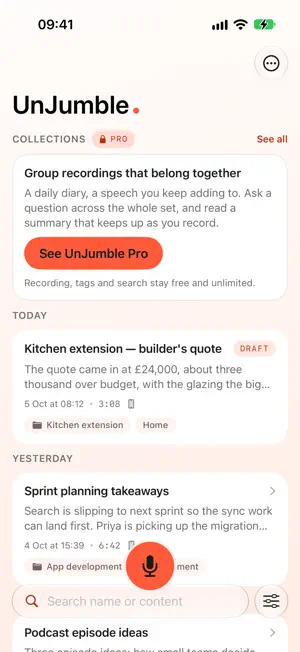
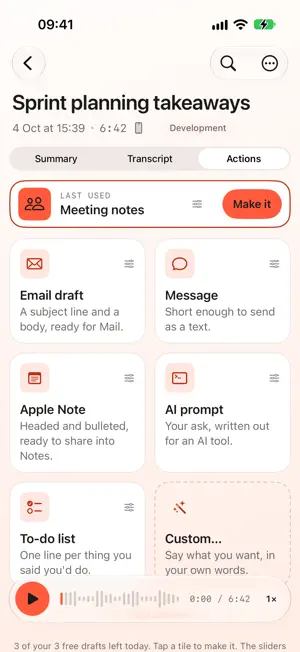
You think faster than you type. UnJumble is for people who think better out loud than at a keyboard. Talk for as long as you want — ten seconds, or forty minutes on a difficult email. It records on your phone, names it, summarises it and files it. One tap turns it into an email, a message, a note, a to-do list or a prompt for an AI tool. Think out loud. Send it sorted. Record a voice note, then let UnJumble transcribe it on your device, give it a sensible title, and write a concise summary. It also writes a tidied-up version of the transcript — headings, bullets and short sections, in whatever shape fits what you said — so it is already there by the time you go looking for it. Your original words are always kept alongside it. Know what a recording is for before you make it. Hold the record button to choose what it will become, or long-press UnJumble on your Home Screen and start recording straight away. The draft is waiting the moment the recording finishes. Turn a recording into what you need next: • Email draft • Message, ready to share in the app you choose • Apple Note • Meeting notes • AI prompt for your preferred development tool • To-do listYour recordings stay organised in one searchable library, on every device you use. Play the original audio at up to 2x speed and drag to any moment in it, edit a title, copy or share the result, and return to the full transcript whenever you need it. Tap a tag to filter the library down to what you are looking for, or sort it whichever way suits you. Tag your recordings your way. Create the tags you use and put them on anything, as often as you like. Not finished talking? With UnJumble Pro you can pause a recording and put it down as a draft. It is transcribed, titled and summarised straight away and marked as a draft in your library, so you can come back later, carry on recording, and let the title and summary catch up with everything you have added. Pro also records on your Apple Watch, files recordings into Collections and lets you ask them questions and get suggestions, tags new recordings for you — only from your own list, only when it is confident, and never inventing a tag of its own — and lets you save your own "Turn into…" actions with custom instructions, say what each tag means, and correct a name the recogniser got wrong. UnJumble is built for the moments when typing would interrupt your flow: a thought on a walk, a follow-up after a meeting, or a quick brief before you forget it. UnJumble Pro The free app includes unlimited recording, transcription, titles and summaries, structured transcripts, your own tags, search, and saved default styles for every kind of draft, plus three "Turn into…" drafts a day. UnJumble Pro removes the daily limit on drafts and adds Collections, Apple Watch recording, saved custom actions, automatic tagging, your own tag rules, saved drafts, and correcting a name the recogniser got wrong. £2.99 per month or £24.99 per year, renewing automatically unless cancelled in your Apple Account settings. Terms of Use (EULA): https://www.apple.com/legal/internet-services/itunes/dev/stdeula/
What’s new
Version 2.2.1 · Updated October 16, 2026
New to UnJumble? A short welcome and a 'How it works' tour now show you around the first time you open the app. • Try Pro free for 7 days on Monthly or Annual plans. • New Reminders action: turn the to-dos in a recording into Apple Reminders, one per task, with dates where you mentioned them. • The Mail button now opens your default mail app. • Tags are now one tap away in the recording toolbar. • A quick tip the first time you share shows you where your result can go. • Transcripts now share as clean, formatted paragraphs.
App privacy
The developer, JACK EDWARD VOLLER, reported these privacy practices to Apple.
Data Linked to You
The following data, which may be collected and linked to your identity, may be used for the following purposes:
- Contact Info: Email Address
- User Content: Photos or Videos, Customer Support, Other User Content
- Identifiers: Device ID
Used for: App Functionality
Data Not Linked to You
The following data, which may be collected but is not linked to your identity, may be used for the following purposes:
- Identifiers: User ID
- Usage Data: Other Usage Data
- Diagnostics: Other Diagnostic Data
Used for: App Functionality
Alternatives to UnJumble
Looking for apps like UnJumble? Here are 6 similar apps on the App Store. The highest rated is Lightwave Link Plus (4.5/5), and all 6 are free to download.
-
 Remote Valuation
-
 Survey Valuation
-
 Lightwave Link Plus
4.5
Lightwave Link Plus
4.5
-
 ZDialer by Zoho Voice
4.3
ZDialer by Zoho Voice
4.3
-
 Printt
3.9
Printt
3.9
-
 Calligrapher: Handwriting Font
3.8
Calligrapher: Handwriting Font
3.8
| App | Rating | Price | Last updated | Compare |
|---|---|---|---|---|
| UnJumble | – | Free | October 16, 2026 | |
| Remote Valuation | – | Free | Oct 1, 2024 | Compare |
| Survey Valuation | – | Free | Sep 29, 2026 | Compare |
| Lightwave Link Plus | 4.5 / 5 (37) | Free | Sep 21, 2026 | Compare |
| ZDialer by Zoho Voice | 4.3 / 5 (399) | Free | Sep 18, 2026 | Compare |
| Printt | 3.9 / 5 (49) | Free | Nov 13, 2025 | Compare |
| Calligrapher: Handwriting Font | 3.8 / 5 (115) | Free | Sep 28, 2026 | Compare |
Compare UnJumble with the top alternatives: ratings, updates, ASO score and keyword gaps →